Just a few notes for everyone this week.
I wanted to put this out there for all members, if you're looking for a way to make any additional revenue for next year, please contact me. I'm looking for a few good people to see if they would be interested in selling banner ads for the P4P Hotel. It's a good way to pick up some extra cash and you may have some contacts that I don't have. We can give a nice commission rate also and just think it would be a renewable income!
Take the time to set your goals for the new year, make a few that are short term and a couple of long term. What I did last year was to super impose a picture of the number one rep in our office in a bullseye. Had it hanging up all year! I'll have all the numbers in a few days, point of the matter is that we all need to have something to drive us. For me after 32 years even I need to do this, and I'm making a point of setting my goals again for this year!
P4P Hotel's Production Print Certification Testing! That's right now posted on P4P U Certifications & Testing are the first five tests in a total of ten tests. There will be a new test posted each month for the next five months!
Please take advantage of the sales documents, quotes, proposals, rfp's, rfq's, uploads, p4p library, downloads and all of the additional forum features that are enabled with a Premium Membership!
Please support our Advertisers by clicking their links and giving them a call! LCA Leasing Corp, Stethos USA, Jetmobile, Polek & Polek, UDOCX, Print Audit, & Cybercon Dealer Services, sfSCAN
Recent Blogs of NoteWhy is single clicking an 11×17 on a “copier” legal?
Selling Copiers & MFP's "Add Value to You Web Site"
Selling Copiers & MFP's "3 Short Follow Up Stories"
Top Ten Copier & MFP Industry Predictions for 2012
Selling Copiers & MFPs "1 Awesome Way to Increase Profit through Knowledge"
Uploaded Pricing Proposals & QuotesX700XV Xerox
X700i Digital Color Press"Pricing on the Street"
Canon 3245i"Pricing on the Street"
KonicaMinolta bizhub423"Pricing on the Street"
Xerox WorkCentre 5150PTQ.pdf
Interesting & Most Viewed P4P Forum ThreadsCompetitive Info Xerox Workcentre 7500 Series
End of 2011 Sales Quota Poll, End of Month, End of Quarter
Both HP and Lexmark increase prices Jan 01 2012
kyocera taskalfa 3050ci - What can you tell me about it?
Big Shake Up at XEROX!!!
Awesome FREE Widget for laser printer TCO
Ricoh MP2550B Shortage from Thai Floods
Got A Situation! What would ou do? (10 responses)
Press ReleasesCanon to build new MFP/Copier factory in Thailand
ACS, A Xerox Company, Helps Iowa Modernize the Way Physicians Share Patient Information
Mergers and Acquisitions: 7 MSPs Acquired Since New Year 2012
Minuteman Press Printing of Lansing, Ill., Grows Business With Help of Ricoh Pro C651
NEW! Uploaded MFP Docs in P4P Document Library
Ricoh Full Line Sell Brochures
New Ricoh SP 5210SR A4 MFP Brochure "New 15 additional threads!"
New Ricoh MP 2352_2852_3352_Brochure
research-managed-print-service-for-government-agencies
P4P Poll QuestionsNew Color Cost Per Page Poll for 60 ppm plus
New Color Cost Per Page Poll for 30-44 ppm COLOR
New Color Cost Per Page Poll for 45 - 59 ppm COLOR
New Leads, RFP's & RFQ's Uploaded!Health Strm / Lease Color Copier
Printers/Projectors/Shredders/Plotters/Copiers
Countywide Multifunction Device Copiers/DUE DATE CHANGED TO 1/26/12/ADDENDUM
Lease of 389 copiers for.......
716 Copiers needed for.........
The Staff at the Print4Pay Hotel
With over 3,500 worldwide followers that support copiers, multifunctional devices and printers, the information that comes across our message boards is enormous. The latest selling techniques, strategies, future products from the manufacturers and rumors are daily posts on the message boards. www.p4photel.com
Sunday, January 8, 2012
Selling Copiers & MFP's "Add Value to You Web SIte"
More often your potential customers and current customers are using the web to do research long before you get a phone call. They'll do much of the leg work on what they need or what they would like by searching google, reading blogs or going to web sites such as yours. What's the problem with most web sites in the office equipment industry? There's no interaction for the for the potential new customer or the existing customer. Let's face it, your customer or potential customer will call you when they have questions that can't be answered by your web site, however if another site answers that question you may be losing opportunities.
Web sites need to have current information and something that they can interact with on a daily basis. There are some very nice office equipment web sites out there, and they incorporate a current blog, current press releases via feedzilla and there are those that have interactive polls along with widgets that can help a customer decide on what product would be best for them. Office equipment dealers that have web sites with these attributes will stand the best chance of having the customer call them and they are either ready to order or have some additional questions for the rep to answer.
I found a neat widget from the folks at Pahoda Imaging that will enhance your web site. Best all of the widget is free. You can get three different widgets that you can put on your blog and web site, these widgets will allow your customers to compare features and TCO for different manufacturers and models.
1. Compare HP, Lexmark, and Xerox Printers
2.Compare HP, Lexmark, and Ricoh Printers
3.Compare HP, Lexmark, and Kyocera Printers
Keep in mind that these text link say printers however they also have MFP's in the links also. What I like best is the ability have something that is quick, reliable and something that will help my customers understand that we are leaders in our market place and have the resources to educate them on the total cost of operation. I'm sure these widgets can be customized also, so you if you support Ricoh, Lexmark and Kyocera you'll be able to have a widget for that also (this may not be free).
-=Good Selling=-
Wednesday, January 4, 2012
Selling Copiers & MFP's "3 Short Follow Up Stories"
1) Just a short story for everyone today. Back in December of last year I was asked to quote on a copier for a local company. Not a big unit or sale, but a 25ppm monochrome device.
The company new and credit was extremely hard to get approved, after six weeks of trying off and on, we finally got it done. I called the customer and they didn't have the time to wait and had negotiated with another company (sort of like a sub lease).
I had stayed in touch with them and called every four months as a follow up. Just the right thing to do, even if you lose the sale right?
Almost two years had passed and I got a call from the same company that they had kicked out the old vendor and needed another system. Just goes to show you that you need to persevere and still make the calls because anything can happen.
Numbers two and three are posted in the Print4Pay Hotel forums, take a trip here P4P Hotel, get registered (it's free) to read the rest and collaborate with your peers.
The 3 D's represent Desire, Dedication and Determination. Desire to succeed, Dedication to your profession by being a professional sales person and not someone who slings mud at either the competition or the other sales people, Determination to be the best at your craft and to always have the zeal to learn as much as possible!!
-=Good Selling=-
Monday, January 2, 2012
Ricoh Innovates with Scan2iPhone & Scan2iPod App
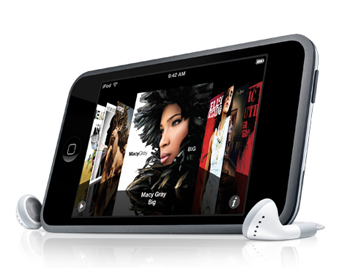
I've had an iPod touch for awhile, but never had the chance to play around with
it. Over the last week or so, I've been having some fun with all of the
different apps and games. I'll have to admit I love some of the games but hate
the fact that they give you the opportunity to pay for additional features.
Whatever, the game cost .99 cents and I think I dumped $20 bucks or so on
upgrades, kinda wish I had that opportunity with PACMAN when I use to sit at the
bar for hours dumping quarters into the machine.
Anyway, I downloaded the app for Ricoh Innovations for scanning documents on my iPod touch and this will also work with the iphone, not sure about the new droid phones.
So, under some not so good light at my desk I used the app to scan some pages. It's easy!!! You open the Ricoh app, take the picture and you'll then have the opportunity to deskew the document, clean the document or keep as is. When you're done you can them export to all these Google docs, email, Evernote, Dropbox, or export to your picture gallery. When exporting to everything but your picture gallery you send as a .pdf or .jpeg.
Within a minute or less I had the document in my Google docs and then sent to my email account. One of the nice features that I noticed is that once the document is sent it's not deleted, this enables you to send the document to another if needed. It kinda almost felt James Bondish, being able to take a picture of the document and have it captured and secured with one of my accounts.
The image quality is good. Keep in mind that you can tap the screen of the iPod or iPhone and you'll be able to focus and then see the AE lock on the screen. I did not have the chance to export as a jpeg to see that quality. Keep in mind it's more for documents, sketches and stuff like that. Once I opened the doc, of course it was readable, but the quality kinda reminded me of a poor quality fax (but, I then realized that the document I captured was printed via inkjet printer and it was taken from an image from the web, thus 72dpi). I printed the document to my printer and it printed exactly what I scanned.
I'm thinking a better quality document will produce much better results and I really didn't have the time to run out to the car to get some good originals nor did I want to print from the inkjet. When I'm back in the office I'll give this a shot with some clean documents.
So, I'm thinking this is an awesome app, especially for those of us in the field. Instead of using scan2email or faxing the documents to the office. I can take a picture of them and email them or upload to my Google docs (this way I always have a copy of the documents).
It's the sizzle that sells the steak right? I'll going to incorporate this app into my presentations, and I was just thinking a neat demonstration would be to have email2print setup at the office and then just email the scanned page to the MFP's email address. That would be the sizzle!
Dam, I couldn't wait till I got to the office so I went to the car and pulled a clean original and processed through the Ricoh app. You know it did a very good job, not A1 perfect, but good enough for FREE and good enough to read and process documents!!!
-=Good Selling=-
Selling Copiers & MFPs "1 Awesome Way to Increase Profit through Knowledge"
What happens when you have no one to turn to about a specific solution on a piece of hardware? You know what I'm talking about, there always seems to a question or two that you know the exact spec or the workflow involved.
I'll give you a scenario, you were at the customers office and had a great meeting, however some additional questions came out of left field about an "xyz" solution. You could tell the client was hot on this and if your system had the capability you would have a better chance to demo the solution, propose the solution and close the sale. To add fuel the fire the client wants the answer asap since they are making the decision within the next 24-48 hours. Typically you'll call your manager, or someone within your organization first, and it's not uncommon that they won't be available (seems to happen all to often) or do not have the answer. You'll then try the manufacturers dealer or direct channel rep, most times it can be a hot and miss here also especially with the recent reductions in staffing. Plus what happens when you need the answer the next day coming off a late afternoon appointment?
My golden rule is the more knowledge you have the better you chance to close additional sales and increase profit from your knowledge with hardware and solutions.
Let's face it, there are not that many guru's (docusultants) in the copier and MFP business. These are the guys and gals that eat, sleep and breath the industry. You could also refer to them as the "geeks" of imaging.
Back in 2003 I created a loose knit group of copier people within MSN communities, probably eight or nine of us to start, and we grew and grew. Today sees the Print4Pay Hotel forums as the only forum of it's kind that allows copier & mfp people to share information, discuss hardware, software solutions, comp plans, new products, price quotes, leads, new trends, new solutions along with daily threads on new products in a secure closed forum. There's a "core" of copier and MFP guru's that help each other, with no strings attached. There's also a handful of solution manufacturers that monitor the site and provide support through the forums. The best part about the forums is that they are FREE. The Print4Pay Hotel has over 3,000 followers in the industry.
So, the one awesome tip is to click this link Register for the Print4Pay Hotel forums and get timely information on products and solutions that will help you add value, add profit and close sales. Here's another link for our testimonial page. Enjoy and have an awesome New Year!
-=gOOD sELLING=-
Thursday, December 29, 2011
Top Ten Copier & MFP Industry Predictions for 2012
Whoa! What a year for the industry with the earthquake/tsunami in Japan, the floods in Thailand, the continued devaluation of the dollar vs the yen, Xerox dumps wide format, Global Imaging Systems has taken over all of the SMB business from Xerox, and major copier manufacturers finally produce their own A4 MFP systems.
Speaking of Xerox, word on the street is that Xerox may be bought (this coming from a Print4Pay Hotel Member on the forums), a recent blog stated that the dancing partners maybe HP, Dell and IBM. You just never know in this business. I just though about this scenario today, Dell buys Xerox and keeps ACS and then spins off the imaging division! You never know.
Last year saw these predictions Top Ten MFP Copier Industry Predictions for 2011. I'm not claiming to be a soothsayer, not when you get 6 out of 10 wrong, however we were right with Kodak on the verge of Bankruptcy (stock is at .65 cents), Samsung did introduce the A3 MFP in the US, it was announced in 2011 that the IKON brand will disappear in March of 2012, and Copier Manufacturers did make the move and purchased MPS related companies.
What can happen in 2012?
1. I'll go out on a limb, Xerox will be bought by....well someone
2. Kodak files for Bankruptcy or is bought "A picture is forever, Kodak is not"
3. Ricoh USA finally comes clean and announces that Ricoh Americas Corp has moved to Malvern, PA
4. Sharp bows out of the commercial MFP business similar to what Panasonic did three years ago, however they will still continue to market A4 devices through distributors and the web, no more dealer and direct channel.
5. Chinese Manufacturer Siene Technology introduces first MFP and looks to establish USA dealer network.
6. Toshiba Business Systems withdraws from the copier/print hardware business, instead they focus on giving the hardware away for free to capture the clicks.
7. One of the Big four Xerox, Ricoh, Canon or KonicaMinolta will buy Auxilio, who ever does takes a major leap of faith in MPS.
8. Managed Print Services......the hype continues
9. Xerox announces additional layoffs in the US
10. USA MFP Copier manufacturer sees the introduction of the first segment 5 A4 MFP.
Some of these are meant to be light hearted and have no chance of coming true, so please take some of this as entertainment and figure out what could happen and what's not going to happen. Above all I hope you enjoyed this!
-=Good Selling=-
Labels:
auxilio,
Canon,
Konica Minolta,
managed print services,
ricoh,
Seine,
Sharp,
Toshiba,
Xerox
Daily Managed Print Service Industry Notes from Around the World!
Fifteen Trends at Managed Services Conferences: This blog offered insights from the Kaseya Connect User Conference, HTG Dallas and the Managed Print Services Conference. 7. Cloud Computing is Big Business for Small Business: This guest blog, ...go here for more
And our managed print services are helping them keep those costs under control. The other thing we're hearing about is process improvement. With Perceptive, and now Pallas Athena, we help them understand better what their processes are. ...go here for more
I’ve spoken with industry analysts, listened to co-workers and read plenty of IT prophecies form an opinion about what the New Year will bring. In my opinion, the two hottest managed services sectors entering 2012 are managed document services (MDS) and go here for more
Dec 27, 2011 Scottsdale, AZ. – MWA Intelligence, Inc. (MWAi), a leader in enterprise-class M2M (machine to machine) and M2P (machine to people) solutions and services, has been named as one of the Top Managed Print Services Organizations of 2012 by Greg Walter’s The Death of The Copier blog...read more here
-=Good Selling=-
Labels:
managed print services,
MPS,
MPS Mentor
Tuesday, December 27, 2011
10 Tips for "More Light With Less Current"
The information below was derived from a pamphlet that I found while cleaning out the attic. The pamphlet was printed in 1941 and was titled "800 Ways to Save and Serve", which was designed to help Americans with the World War II effort.
Times have changed this is for your enjoyment and nothing else.
You can reduce those electric bills by-
1. Eliminating colored bulbs. The greatly lessen the actual light you get.
2. Replacing dark shades and shade linings with light ones.
3. Using one high wattage bulb in place of several smaller ones. A 100 watt bulb gives 50% more light than four 25 watt bulbs, yet uses the same amount of current.
4. Dust the bulbs and the linings of the lamp shades. Wipe off parchment shades, inside and out, with a damp cloth (Turn off electric before dusting).
5. Wash light bulbs occasionally, but be careful not to get the metal section wet. Dry thoroughly before replacing. Be sure electric is OFF while replacing.
6. If after washing the bulbs still look very dark, get new ones.
7. When you leave a room for more than 5 minutes, switch the light off.
8. If your rooms are due for a repainting, consider the lower electric bills you will enjoy by painting walls white or some pastel shade, thereby requiring less artificial lighting.
9. "Bargain" light bulbs are usually and extravagance. They dim quickly, but consume as much electric as good ones. Play safe by using the standard brands.
10. If you spend much time working in the basement, spare your eyes by whitewashing the walls so they reflect more light. If the joists overhead are exposed, you can increase the amount of illumination from the ceiling fixture without changing to a larger bulb. Simply nail several white painted boards or cardboards to the joists around the base of the fixture.
-=Good Selling=-
Monday, December 26, 2011
Selling Copiers & MFP's "9 Tips to Start the Year Right"
Who says you can't teach an old dog new tricks?
Even me with 32 years in the "down the street" sales can still learn a few things. Over the last few years I've made the effort to schedule vacation time a few days before Christmas and then the week after Christmas. I don't go anywhere, will do a few things around the house that need attending, take some longer naps (I need em), get some of the odds and ends done that I've put off like re-registering the car.
More importantly, I'll take this time to recharge. Things that I like to do during my time off that will help me with next years sales.
1. Re-read a few chapters of my favorite sales books. (you've got to stay on top of your game, there's nothing new in sales, so it's always good to review and make sure you're doing all of the right things)
2. Make a list of my goals for next year. (I'll make one or two major and then 5 or 6 minor ones).
3. Update my data base in our CRM software. Out with the crap and in with the new. (In my case, just like the old index cards, some accounts will get lost in the shuffle. I'll take this time to make sure every account gets a call)
4. Make a list of 20 "Net New" Companies that I'd like to get as accounts. (Kinda my wish list for accounts that I'd like to get into for the new year)
5. Educate myself about what my competitors have to offer for hardware & software. (Sometimes we get so caught up with prospecting, researching, quoting and closing that we find ourselves not knowing about new products and software from the competition, I'll take a trip to their web site to review)
6. Make some follow up calls to make sure I have some January business. (There's always some loose ends that need to be taken care of)
7. Review pipeline for first quarter. (What can I say, you always need to know what you need to do to make things happen and have the business that will pay you the big bucks)
8. Relax (My most favorite, this will also include power naps, mindless entertainment, and a few good flicks)
9. Family Time (Other than relaxing I'll make sure I help the wife or the kids with something special, if it were not for them I might not have the desire, determination or dedication to be the best at what I do)
The industry has been good to me and I'm pretty sure it's because I've always worked hard. With out hard work and passion I probably would have wilted many years ago. But, after 32 years there's always something new and something new to learn.
-=Good Selling=-
Thursday, December 22, 2011
Ricoh's New SP5200SR Copier MFP Review
Whoa! It's been four days since I posted a blog, just goes to show you what the end of the month, the end of the quarter and the end of the year can do to you when you're still selling!I'd like to put my thoughts down about the new Ricoh S5200SR series, pretty much what I like, what I don't like and some of the unknowns that I see about the new product.
Over the last 3 or 4 years I've been a big fan of A4 Copier/MFP devices. For years I couldn't fathom why major manufacturers like Xerox, Ricoh, Canon and KonicaMinolta (The Big 4) were not developing their own A4 strategy. I'm thinking the proliferation of MPS (Managed Print Service) in recent years changed the mind set of the Big 4 to enter the A4 MFP marketplace with their own home grown devices.
Ricoh SP5200 series
One of the most confusing aspects of this series is the model number, there is a laser printer version and an MFP version. The model numbers for the laser printers are SP5200DN and SP5210DN. The SP5200DN prints at up to 47 pages per minute and the SP5210DN prints at up to 52 pages per minute. D represents Duplex, white the N represent Network .
Here's where it gets confusing, in the MFP series we have an SP5200S, SP5210SF, and the SP5210SR. The SP5200S prints and copies at up to 47 pages per minute and out of the box offers print/copy/color scan/store. While the SP5210SF offers out of the box configurations with print/copy/color scan/store/fax and an inner one bin tray (for fax receptions), and has a print speed of up to 52 pages per minute.
The flagship of the series is the SP5210SR offers the same out of box configuration as the SP5210SF except that the fax is an option and the 1 bin tray is replaced with an internal 50 sheet stapler (50 pages for letter and 30 pages for legal). What ever happened to keeping it simple. When talking about the systems it's crucial to make sure that you know the difference between the DN, S, SF & SR versions of the device.
For time being I'm gonna put the laser printers on the back burner and from here on I'll be writing about the MFP version in general.
Labels:
A4,
MFP,
MFP Reviews,
ricoh,
Spec Review
Sunday, December 18, 2011
Ricoh USA Website in Countdown Mode to......
For the last ten days if you paid a visit to the Ricoh USA web site the main banner was replaced with a banner of a "cloaked" product and a picture of a color GUI (Graphical User Interface) that is placed on their copiers. As of Friday or it might have been Thursday the countdown was down to 1 day left. I'm thinking it was Thursday when the one day was left. I didn't have the time to visit the site on Friday, nor Saturday, but had the chance today to pay a visit and see what the hype was.
I'm thinking I knew what the hype was, the delayed launch of the SP5200 A4 series multifunctional products. The SP5200 multifunctional series is much needed to compete with the Canon 1700 series. We were suppose to see it here in the US in November.
However, I bit at the banner ad and was expecting to see something on Friday, Saturday or Sunday. Well, the countdown banner is gone, the old banners are back up and there is no press release. Heck, maybe they'll post it on the overnight or first thing in the AM. It's not surprising since.....
Labels:
A Week in the Life of Copier Sales,
A4,
Canon,
ricoh
Saturday, December 17, 2011
12 Gas Saving Tips "800 Ways to Save & Serve"
Your Gas, Electric and Phone Bills
The information below was derived from a pamphlet that I found while cleaning out the attic. The pamphlet was printed in 1941 and was titled "800 Ways to Save and Serve", which was designed to help Americans with the World War II effort. Times have changed this is for your enjoyment and nothing else.
Ideas on keeping them "down to earth"
Conserve Cooking Fuel
1) Fuel is a victory essential. Conserve your bit by lowering the hear once the watter is boiling. It will remain at this tempature. Buy an oven thermometer so that the roasting and baking can be done at the most economical, recommended temparture.
2) Don't heat a whole tea kettle of water when all you need is two cups.
3) Remove sediment in your tea kettle.
4) Cook most vegetables in the smallest possible quantity of water - this saves vitamins and minerals too!
Labels:
800 Ways to Save and Serve,
WWII
Wednesday, December 14, 2011
Digital A3 Envelope Press from Ricoh? I Think....
I've been around this business long enough to know a good thing when I see it. My roots are in the Print4Pay market of the office equipment business. My first introduction to the Print4Pay business was when I began selling the Minolta 450Z analog copier to print shops, advertising agencies, newspaper and basically any company that needed to reduce or enlarge a document by 1/10th of 1%. Gosh darn those where the good ole days right?
In the past few years dedicated "digital" envelope presses have emerged from the likes of Xante, Oki and a few other third party suppliers. If you're not familiar with these devices I'll make it short and sweet, it's a tweaked OKI Color LED (Laser Emitting Diode) print engine with A3 (up to 11x17 print) print capability. These LED (technically not laser, but is laser quality or better, depends on who you ask) are then married with an envelope feeder attachment and then an exit conveyor attachment. The feeder feeds envelopes into the by-pass area of the paper feed system. There you have it, a digital press that can produce 4 color envelopes with for consumables of about 2 cents each.
Price...., the systems are pricey, with most models that will range from $16k-$22k per system. You have to see a whole lotta envelopes to make up that kinda cash. If the price was right for these systems, I'd bet dollars to doughnuts that every print shop and CRD would have one. The fact is the price is not right and not every print shop has one or can afford to have one.
Labels:
digital presses,
envelope printers,
Okidata
Monday, December 12, 2011
120 Ways to Save on Food "8 Tips on Vegetables & Fruit"
The information below was derived from a pamphlet that I found while cleaning out the attic. The pamphlet was printed in 1941 and was titled "800 Ways to Save and Serve", which was designed to help Americans with the World War II effort. Times have changed this is for your enjoyment and nothing else.
VITAMINS ARE EXPENSIVE
Save those Vitamins! They're most precious part of your food and the more of them that you get inside you, the fitter you'll be for those stressful times. Here are eight common-sense rules for conserving vitamins, as recommended by the Metropolitan Life Insurance Company:
1. In cooking vegetables, raise the temperature to the boiling point as rapidly as possible. Heat may then be lowered.
2. Foods shout not be put through a sieve while still hot.
3. When cooking, use as little water as possible.
4. The water used in cooking is valuable for soups sauces, and gravies.
5. Chopped fruits and vegetables should be prepared just before serving.
6. Start cooking frozen foods while they are still frozen.
7. Frozen foods which are to be served raw should be used immediately after thawing.
8. Stirring air into foods while they are cooking cause vitamin destruction.
P.S.
read more 8 bonus tips
Copier & MFP Color Cost Per Page Poll
Over the years the Print4Pay Hotel has conducted many "secure" polls that are only available to registered members on our forums.
Just yesterday we started our Second Annual Color Cost per page poll. Within the forums we allow our members to click the Color Cost Per Page that they are charging end users. The poll is anonymous so no one knows who clicked what cost per page and what monthly volume. After two days we've already posted 156 page views.
It's essential that we as sales people, Dealer Owners, and the Direct Channel can get a view of what is being charged for the Color Cost Per Page. Here you can see the average cost per page, the low cost per page and the high cost per page, plus you can match them with monthly and quarterly volumes.
In recent days 67% of our members stated that the Color Cost Per Page on a 50 page per minute color MFP doing 5,000 pages per month is below .........yup gonna have to be a member to get that information. Membership is FREE, you just gotta put up with a weekly email of updates on the latest industry threads from our members. Keep in mind that our forums are secure, no end users, no bs registrations. So if you can take a trip here, become a member of the worlds largest group of copier, print and mfp professionals in the work.
Here's a sample of one of our Second Annual "Color Cost Per Page Polls"
Question:
Please check your average color cost per page for 10,000 plus pages per month.
Choices:
.08
.075-.079
.070-.074
.065-.069
.060-.064
.055-.059
.050-.054
.045-.049
.040-.044
.035-.039
under .034
Question:
Please check your average color cost per page for 7,000-10,000 pages per month.
Choices:
.08
.075-.079
.070-.074
.065-.069
.060-.064
.055-.059
.050-.054
.045-.049
.040-.044
.035-.039
under .034
Question:
Please check your average color cost per page for 4,000 - 7,000 plus pages per month.
Choices:
.08
.075-.079
.070-.074
.065-.069
.060-.064
.055-.059
.050-.054
.045-.049
.040-.044
.035-.039
under .034
-=Good Selling=-
Labels:
Color Copiers,
cost per page,
MFP Industry Notes,
MFP Polls
Tuesday, December 6, 2011
Daily Managed Print Service Industry Notes from Around the World!
Mission Viejo's AUXILIO Inc., a managed print services (MPS) provider for the healthcare industry, is holding an informal webinar on Friday, Dec. 8 at 8 am hosted by Modern Healthcare. ...read more here
NEWSBYTE, Dec. 6, 2011 - Lexmark International, Inc. (NYSE: LXK) has enhanced its offerings for the public sector by combining the power of Lexmark multifunction product (MFP) technology with ImageNow from Perceptive Software. To save valuable time when submitting documentation for services, the Lexmark MFP and ....read more here
Despite CEO Meg Whitman saying that 2012 would be a year of balance sheet rebuilding, HP(HPQ) announced another acquisition Monday, purchasing German software company, Hiflex Software GmbH. HP spent more than $11 billion in 2011 making ....read more here
The lawsuit was filed in US District Court for the Northern District of California on behalf of all HP LaserJet owners by David Goldblatt of New York, who recently purchased two of the printers. The lawsuit accuses HP of violating California's consumer ....read more here
Brother strengthens senior sales team with print industry veterans
Printer manufacturer Brother has expanded its sales team with the appointments of two senior managers. Cathy Ellis (pictured) joins from Dell, where she was the UK head of its printer business for three years. She will take up the newly created position of head of sales, online partners, developing Brother’s online partner network, and ....read more here
-=Good Selling=-
-=Good Selling=-
Sunday, December 4, 2011
Document Capture Workstations "Is the Time Right"?
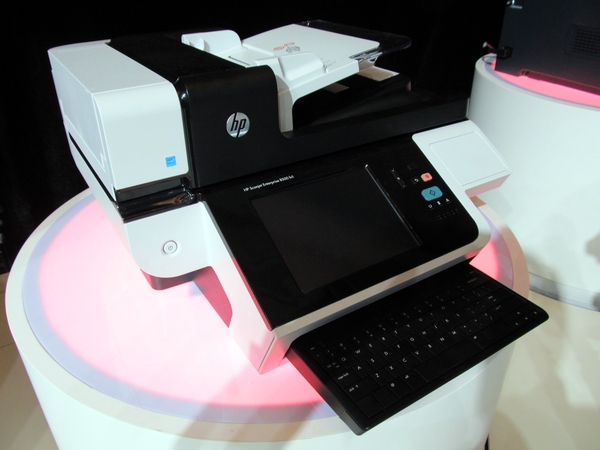
A few days ago I was flipping through the MFP Report and there was an interesting article on an HP device listed as a "Document Capture Workstation". The MFP Report states that the HP Scanjet Enterprise 8500 fn1 was previewed at Innovation Impact in Shanghai a few months ago.
I'm all over this technology! Many years ago I mentioned that Hi Speed Network Scanners Stations are needed in the office, but you'd have to spice them up with some additional features like:
- Scan2email
- Scan2folder
- Scan2ftp
- Scan2sharepoint
- Ability to run third party software such as ecopy, digidoc flow, NSI, etc....
- Network Fax
- Cloud Fax
- Scan2Print
- Scan2fax
Thursday, December 1, 2011
What is Jetmobile?
Recently Jetmobile signed on as an annual supporter of the Print4Pay Hotel. I'll admit I knew little about Jetmobile and what they did until I spoke with Stoney Tuckness Director of Business Development. So without further ado, I've posted the first Print4Pay Hotel Interview with Stoney @ Jetmobile. Please go here for online demo.
Stoney what is Jetmobile?
What type of Jetmobile products are there?
What are the benefits of each product?
Stoney what is Jetmobile?
Jetmobile is an ISO 9001 certified
company with 17 years of experience developing enterprise-class software
solutions for the printing industry. Jean Francois d’Estalenx established
Jetmobile in 1994 in Paris but has since grown into a global company with
strong representation in all 3 major regions; Americas, EMEA, APJ. Jetmobile headquarters are located in Nampa,
ID, Paris, France & Singapore.
Jetmobile is nearing 70 employees, 45 of which make up our research and
development department and quality control. This reach and scope allows
Jetmobile to tailor our already flexible software based on regional needs as
well as offer technical and sales support 24/6 in local languages.
What type of Jetmobile products are there?
Jetmobile offers 3 major products;
SecureJet, MicrDIMM, and BarDIMM. These products are sold as either OEM
products from major printing manufactures or through indirect channels.
Jetmobile’s BarDIMM turns your HP
LaserJet printer into a barcoding expert. BarDIMM supports over 90 barcoding
formats, numerous manufacturing symbols in multiple languages, is fully
scalable, and supports color.
Jetmobile’s MicrDIMM allows for ad
hoc dynamic check printing including signature lines, logos, and addresses, removes
the need for pre printed check stock, and minimizes security risks of pre
printed checks or third party check printing services. Our flagship product is SecureJet. SecureJet
is a security, mobility and traceability solution for print devices. SecureJet is
a next generation, enterprise-class, fully scalable, security, mobility, and
traceability, solution. SecureJet allows customers to minimize printing cost,
increase security, and prove utilizations and efficiencies as well as providing
knowledge for actionable print environment optimization.
Labels:
barcode,
Healthcare,
HP,
jetmobile,
Laser Printers,
ricoh
Tuesday, November 29, 2011
What Happens When You're Numero Uno in Copier & MFP Sales
Every now and then I like to have a little fun with the blog. Today, I had a few chuckles at Ricoh 's expense and a few others.
If you're number one, it always seems you're going to take some heat about something. In 20 or 30 years it would be interesting to see what the likes of Ricoh, Canon, Xerox and KonicaMinolta are doing and how they got there.
I'm thinking the past 4 years and the next 4 years will define how companies like Ricoh, Xerox, KonicaMinolta and Canon will be moved forward or backwards.
I need to get to the chuckles right? I was speaking with an RICOH person today just chomping it up about us being in the business for a long time and that person made a statement that they had to travel to Malvern for a corporate meeting, with that statement I could tell there was some, well...let's just say it was evident with the tone that Malvern is the NEW HQ as GMAN's (Member of Print4Pay Hotel) been stating for sometime! First chuckle!
But, even more unsettling was that I received a "ricoh" document the other day. Nosey me, I clicked on all of the TABS and found out that what I thought was originally a "ricoh" document was actually a document developed by IKON many years ago and then converted to Ricoh. Hey, there was the second chuckle of the day.
Sometimes I wonder....did Ricoh Americas buy IKON or did IKON get paid to take over Ricoh Americas? Ha!! Another chuckle, you really gotta laugh at this stuf.
Here's another, I follow Canon and Oce. Since the Canon take over, the web is flooded with OCE Press Releases, yet I get almost nothing coming from Canon. What gives?
What about this, how the heck can Toshiba, Sharp, or Kyocera Dealers and Direct Branches feel about their manufacturers marketing programs when there are virtually ZERO Press Releases for MFP, MPS or copier related products?
I have alerts set for all four and I see more from Kyocera, less from Toshiba and a minuscule from Toshiba and Sharp. By far the most press releases are in this order Xerox, Oce, Ricoh and KonicaMinolta.
As my father in-law always stated "what do expect from a pig, but a grunt". True, you can take a visit to the Toshiba, Sharp and Kyocera....and where the heck are the mfp's and or copiers?? You really have to get down the page or dig deep to find them.
Thank you to Ricoh for sticking to MFP's and Copier for now, Hoping I'll be around in 30 years to see how all of this shakes out!
-=Good Selling=-
Labels:
Canon,
KonicaMinolta,
Kyocera,
MFP,
MFP Industry Notes,
OCE,
ricoh,
Sharp,
Toshiba,
Xerox
Sunday, November 27, 2011
To Ricoh "What I Want for Christmas" 2011
The tradition of burning a Yule log actually has its roots in ancient Scandinavia. Supposedly the Yule log was a source of good luck and its remnants were saved to inspire good fortune throughout the year. It was such a widely held belief that people even threw the ashes in wells to make the water safer to drink.
It was once believed that any woman who went under a mistletoe and was not kissed would not marry the coming year.
Thanx to Interesting Christmas Facts for these.
I did a wish list for Ricoh last year, Here's what I want for this Christmas from Ricoh Americas for 2011:
-=Good Selling=-
It was once believed that any woman who went under a mistletoe and was not kissed would not marry the coming year.
Thanx to Interesting Christmas Facts for these.
I did a wish list for Ricoh last year, Here's what I want for this Christmas from Ricoh Americas for 2011:
- Dedicated A3 Color Envelope Printer with or without a Fiery
- 60-90 page per minute A4 MFP's
- Increased Mono & Color Scan Speeds for Segment 4 A3 MFP's
- A4 MFP's with an A3 "Cost Per Page Model"
- Embeded Browser Units on all MFP's so I can sell the heck out of UDOCX
- Duplexing A3 (11x17) Digital Duplicator
- 4 PPM Wide Format MFP with Color Scan
- Network Scanning Station: All of the Scan Features of the Ricoh MP5001 with NO print engine!
- Wide Format MFP that will Color Print/Color Scan and Color Copy
- Stop laying off good Ricoh people in favor of IKON people!
-=Good Selling=-
Labels:
A4,
Color Scanners,
Fiery,
MFP,
ricoh,
Wide Format
Subscribe to:
Posts (Atom)