Showing posts with label Printers. Show all posts

Sunday, April 21, 2013

Memjet, Preton Saver Offering New MFP & MPS Solutions

A couple of months ago I wrote a blog about Memjet's new C6010 ink color printer with their waterfall ink head technology.  The Memjet C6010 color printer's claim to fame is an out put speed of 60 pages per minute with full bleed for letter size paper, the ability for the dealer to control the aftermarket for the ink and the excellent margins on that are available for the ink and the hardware.

I had the chance to speak with Kim Beswick with Memjet the other day.  Kim spoke about the dealers ability to control your ink supplies. The dealer(s) would be able to buy new or send used cartridges to Parts Now for a refill @ a 30% discount.  Dealers also would be able to refill their own cartridges @ a 50% discount and Memjet would supply the dealers with a free refill systems. Dealers would be able to buy ink in one liter bags.

Control is good, especially with aftermarket supplies. One of the points I outlined in the previous Memjet blog was the thought that wouldn't it be awesome if the Memjet C6010 had technology to allow dealers to bill the end users for the amount of ink that they used.  This would be similar to Xerox's tiered billing or Kyotier billing. Having this type of billing system would allow dealers to bill for just black, and tiered cost per page billing for the amount of color ink that was used. At the time when I wrote the blog there was no such technology available until......

Preton made an announcement on March 17th

Saturday, January 26, 2013

5 questions to ask BEFORE buying a new printer


5 questions to ask BEFORE buying a new printer was a google alert I received the other day. I took a peek to see what someone else had to say about printers or MFP's. Headlining the article was
Essential home-office equipment for the accounting and finance professional
The article was targeted for Accountants and Finance Professionals

Here's the 5 points that he spoke about, I'll follow with rebuttal:

Here are some key questions to ask yourself:

1)  Is most of your printing producing monochrome (black & white) output? If so, an inexpensive mono laser printer might be the best choice. These are available in the $100 range, and have great looking output as well as fast print speed. Black and white printers.

These $100 printers will cost a small fortune to keep them running, it's estimated
that a $100 laser printer can have a monochrome per page cost as high as 5 cents a page depending upon the make and model of the unit. Plus the fact, that if the system does break the cost to fix will be more than the printer, and off to the municipal landfill goes another printer.

Sunday, January 13, 2013

10 Questions for the Manual MPS Assessment

Recently, I had an appointment with a "net" new account that was interested in our Managed Print Service Program. This was not a large account (about 30 employees).  Of course the first item of business was to close on the assessment. In this particular business there were over 15 assorted printers from Dell, HP & Okidata.

In smaller accounts I'm not a big fan of all the assessment software tools that are available. When doing a manual assessment one of the items of business is to inventory the entire fleet. I'm a big fan of doing a walk through and collecting my data the old fashioned way.

Of course the manual assessments will take time, however I'm introduced to every person in every department that prints. Not only do I get to meet that person, but I also get a few minutes to interview that person about how they use the printer. After I print the configuration sheet from the printer I'll then have a short interview with the main user/users of the printer.

1.  What size of paper do you print onto?

Wednesday, November 14, 2012

Japanese Printer Companies during World War II "Part One"

I've always been fascinated with the history of companies, as to when they first opened, what they manufactured and how they came to prominence in their market place. Okidata has a long history of manufacturing and there is some awesome information on the history of Okidata in the links I provided at the end of this blog. In particular I was interested in what Japanese printer companies manufactured during World War II. Yes, I borrowed some of the information from the history of OKI, but also put together some quick facts about Okidata during the war years. Please enjoy.

Before OKI data was known as OKI data, it was Oki Electric Works and before that Miekosha. Kibataro Oki founded the company in 1881. By 1890 Oki Electric Works had earned an excellent reputation as a communication equipment manufacturer that specialized in telephone receivers.

After December of 1941 civilian communications dropped off and Oki Electric Works devoted most of its efforts to the war effort. Oki Electric Works then relied on orders from the Japanese Imperial Navy and Army to produce field telephones, ammunition, aeronautical radios, and hydrophones. In 1938 Oki Electric Works acquired a site in the Shiba Takahama section of Tokyo, here they were to build their Takahama plant. The plant was finished in 1941 and concentrated manufacturing wireless telegraph equipment, sonar, ammunition, and fuses for the Japanese Imperial Navy. In 1944 Oki was designated by the Munitions Company Act as a “munitions company”, which allowed the Military to take control of the factories and also allowed the government to intervene in personal matters.

March 10, 1945 saw 50 young students and women killed in a bombing raid, they had been held up in an air raid shelter in the Meijiza Theater. When World War II ended in 1945, Oki had 20 plants and nearly 23,000 employees even though its Shibaura, Maebashi and Otsuka Plants had been completed destroyed in American bombing raids.

To read more http://www.oki.com/en/profile/history/120y.html
http://www.oki.com/en/profile/history/pdf/OkiHe3.pdf

-=Good Selling=-

Friday, September 28, 2012

The Transition of the Copier Industry "Part IV"

Part IV


During the 1928 Presidential Campaign the Republican National Committee ran an ad that stated based on the Harding & Coolidge administration that they had "put the chicken in every pot and car in every back yard".  With the introduction of many cloud based document management solutions like Doculex and Intellinetics the  right for Document Management Software for every business both large and small.  Forget about the paper and how about the electronic files, if you don't have a Document Management program how the heck are you finding the documents you created last week, last month or a few years ago?  I get it, they're stored on a drive, and then named under a nested folder which is under another nested folder an then another.

Think about how much time you spend looking for documents whether they are paper based or electronic, if you don't have a managed document service/software you're inefficient.

What can Copier Manufacturers Do:

First they need to forget about all of the cool acronyms and marketing gimmicks.  Today's copier  manufacturers need to start buying companies (software) and focusing on business solutions or developing a new media (that's called R & D) that that will give them a renewable revenue stream (the old renewable revenue stream was putting toner on paper).  I'm of the opinion that manufacturers should start buying companies like dropbox, officedrop, box and document management software companies that have Cloud Document Management Services.  Why let others control the document when you're in the document business?

Manufacturers could bundle their own free service and then offer a pay service. There are many SBM accounts that could benefit from a cloud service document management software. Traditionally what's held the SMB business back is cost, ease of use, and training.  Cloud services billed monthly whether by storage or clicks to create a renewable revenue stream, it's kinda like cloud back up and disaster recovery solutions, the more you store, the more you'll pay.  But cloud document management software can have an immediate ROI impact, which is unlike backup and disaster recovery solutions (who the heck wants to sell insurance, not me).

Sell monthly/annual subscription services that allow SMB accounts to connect there MFPs to share point, ms 365, their CRM, their DMS or their business line of software.  I understand their are some 3rd party companies offering these services, but what do you have to lose beside pages?  Control the document stupid!

Here's a thought, maybe buy some of the most popular CRM's or business lines of software companies and develop those connectors for your MFP's.

Here's another idea,  how about selling print licenses, here you would install 500 printers (all inclusive except for paper), have the customer buy 5 or 10 million pages upfront and then renew the license when the prints have expired.

Do what Ricoh did, come out with your own business tablet and create customized software solutions that will improve a business processes. Printed pages may go away, however the document is here forever.

I don't believe I'll see the end of putting toner or ink on paper in my time, I do believe that one day there will not be a need for paper.  If you've ever watched any StarTrek episodes, you may or may not have noticed that you never see a sheet of paper.  Who knows maybe the likes of Toshiba, Sharp, KonicaMinolta, Ricoh, Canon, Kyocera, Xerox or Samsung will market the first transporter.

Our transition to a services led approach will require us to lead with more diverse services, managed print stream, managed print, document management and storage solutions. Stay tuned for part 5 and "Whats the future for copier dealers".

-=Good Selling=-

Friday, September 7, 2012

Color Printer Deal Equals Buyer is a Liar


It's a late Friday night at home in Highlands, NJ, and I just got finished watching the TV show "Pickers".  These two guys kinda remind me of Laurel & Hardy, and they always seem to offer a fair price to the seller, which got me to thinking about of the potential deals that I was working on today.

One of my accounts is the in the health care business and about 5 years ago the CEO (he had an IT background) had purchased a Ricoh Color CL7200 from me.  Through the years I've tried several times to get him to upgrade the CL7200 into a color MFP system, at ever turn he balked and kept the printer and kept a small SOHO MFP.  The company is not one of my larger accounts, however it is one of my smaller accounts either since they has 70 employees and most of them are on the road on any given day.

The other day the CL7200 threw a service code, we dispatched the tech and our tech got the printer functional again (after more than two hours), but also put in an estimate for parts that needed to be replaced.  All I can tell you is that the parts price was up there, as soon as I saw the estimate I called and suggested a few pre-owned C811's that we had.  We were emailing each other back and forth and finally the CEO stated that he wanted new and to get him some pricing. I know there is no money to be made on these printers since you can find them on the Internet, I gave my best price too move the deal quickly. 

He had a service bill for a good chunk of change, had an

Tuesday, August 14, 2012

So, you all thought copiers were bad right?

So, you all thought copiers were bad right?  Well at least with copiers you have solid, knowledgeable dealers that will support or replace a bad system.  When was the last time you had your copier company offer you unlimited everything?  We'll give you unlimited toner, paper, and go ahead make as many prints, copies and faxes as you like and we'll just never bill you an overage! 

All of the above get me to this, years ago when I got my first blackberry, I'll admit, I was cheap, and I would move from calling plan to calling plan to try and save a few bucks. Finally, it came time for another FREE Verizon upgrade. I opted to stay with the blackberry and finally gave in to the "unlimited" data plan. Woohoo I thought, unlimited emails, Internet, bring on the data!  I was a happy Verizon customer until......I got wind that Verizon was not going to offer the unlimited data plan anymore!

The next day I was on the phone with a Verizon rep and asked does this mean that I don't have unlimited data anymore?  I was told no that's not the case you'll be grandfathered in and as long as you stay with Verizon you'll get to keep your unlimited data package. Woohoo, I'm good to go again right?  It seems that was not the case, my current 2 year plan has lapsed, and I've been receiving emails about upgrading, newer smart phones, so finally I bit. Off I went to the Verizon store, has anyone in Jersey every been to one of these stores?  To put it plain and simple they suck, my worst nightmare is having to go to one of these stores and deal with their "sheep herder" mentality for processing customers.  I picked out the the smart phone that I wanted, and then while they are processing the plan, I see a red alert pop up on the customers service reps screen that needs I need to by additional data.  WTF, I stated that my plan was unlimited, the customer service rep stated well that's not what the computer is stating. With that, a huff and a puff and I was out the door with my old blackberry.

I then called Verizon customer service from outside the store and another customer service rep explained that I can keep my unlimited plan, however I would have to pay full price for the smart phone and still enter into another 2 year agreement.  I thought....typical BS from a company that thinks they he more than enough customers. There is no way I'm going to pay the full price and then commit to owing you $3,200 for the next two years.

If you google "How Verizon Screwed" me, I think the google count was almost two million matches. I know this doesn't have much to do with copiers, printers and solutions but I needed to get this rant out there.  I'll just find a hand me down or an older smart phone and the web and Verizon can Kiss My Ass.

-=Good Selling=-

Tuesday, July 31, 2012

1.2 Trillion Printed Pages Equals Good Times for all!

1,000,000,000,000, do what this number is?  If you guessed a billion, well you're wrong. It's one trillion and in 2015 IDC predicts the US printed page volume will reach 1.2 trillion pages! IDC also stated that growth is small at about 0.1%.

The IDC report also stated that MFP's are winning the print volume race, and total pages on MFP's are predicted to exceed 857 billion pages by 2015. 

Here's an paragraph with link so you can read the entire report:

Overall, printed page volume will remain steady despite a myriad of obstacles, including the introduction of green initiatives within a growing number of enterprise organisations; more widespread managed print services engagements; changing end-user behaviour patterns from young, digitally oriented workers; and a weak economy. The IDC report was published in September of 2011.

I've been one of those naysayers who don't think printed pages is going away anytime soon.  Especially not after I read a recent Press Release from Vista Partners stating that they had initiated coverage (have no clue what that means) Auxilio.  I know of Auxilio they are a public corporation that specializes in losing money with Managed Print Services for the health care industry.  I stated specializing in losing money because I had a short elevator talk with one of the execs of Auxilio.  A few months ago  I asked "When is Auxilio going to start turning a profit"?  He stated "We don't have to turn a profit because...", again it was a short elevator talk and all I can remember is the part "We don't have to turn a profit". WTF!

I'm under the impression that printed pages are moving, less pages may (I'm not so sure of this, due to I'm still a sales guy on the street and I'm in tune with my customers page volumes and I'm just not seeing any significant drops) be printed in the corporate office however more pages may come from print production systems, smaller MFP's in smaller offices and home offices and the recent introduction of some niche printing systems.  10 years ago it was almost impossible to find a copier/mfp or laser printer that could print on 80lb cover, gloss, coated or even textured stock.  Today most higher end MFP's can do this with ease, so you tend to think where did the pages come from.  Most likely they came from the decreasing page volumes of off-set presses. More companies are producing a print a wider variety of media than they ever did before!

What got me onto this kinda rant, is that I read an article today from the MFP report that stated "We’re seeing a new reality emerge in office imaging. There’s no need to agree on the exact downward slope of the curve or to highlight all the component trends beneath the surface. The bottom line is that office print volumes are fall- ing and will continue to do so. What matters now is how the MFP industry responds".

I'm thinking the reality is most people have no clue about page volumes, even the end users, talk to them at a meeting and ask them how many pages they print on their MFP's and laser printers on an annual basis and they'll shrug their shoulders and admit that they have no clue. 

Printed pages are not going away, they may be moving and your job is to find where they are moving and to provide the right solution.  To boot I could think of several cool features on MFP's that would actually increase page volumes (maybe someone needs to call me one time, right).  Seriously, we need to remember that the Apple or the IPAD WILL NOT BE responsible for the extinction of paper.

-=Good Selling=-


Thursday, June 28, 2012

Can Multifunctional Copiers or Printers be Infected with Malware?

Multifunctional Copiers or Printers be Infected with a Malware?

My first thought was….. this is AWESOME! 
Finally all of those tree huggers than complain about the world’s most re-usable resource (paper) may be affected by this new malware infection.  My second thought was, how can I get a hold of this and get this malware to all those rotten people out there that have hung up on me, not called me back (ever), or went with a cheap price!  Can we all remember this one, “the thought of a cheap price is long forgotten after poor service”. 
This also reminds me of the early days of faxing; this is when all plain paper/thermal fax machines were using roll paper.  Guys in the office would send an endless fax to a business that either ticked them off.  The trick was to take and original document, place it in the feeder of the fax machine and then roll the original and the tape the end of the sheet of paper to the front.  The result is that you would have a rolled original document that would be an endless loop.  You would then dial the fax number, press the start key and the document would be set to endless scan.  The result on the receiving machine is that it would continue to print until the roll of paper ran out!  I can remember that some of the paper rolls lengths were 500 feet.  Can you im agine walking in the office in the AM and seeing 500 feet of fax paper all over the floor, or sitting at your desk and just seeing the fax keep printing for hours!
Luckily there was no caller ID then, and one of our guys in the office got caught because he forgot to clear out the sender TTI, this actually told the customer where the document was being transmitted from.  It was not the professional thing to do, however some customers did deserve payback!
With this current malware named Trojan.Milicenso, the infected PC will print out pages of garbled data to the connected printer.  The article I read also indicated that this virus was most prevalent in the US, Europe and India.
The garbled pages of data reminds me of when I first started with installing print drivers, seems when I installed the wrong the print driver and then selected a file to print, we would then get pages and pages of garbled data and the only way to stop it was to turn the printer or multifunctional copier off!
So, can multifunctional copiers become infected with a virus? After doing a Google search and scanning through the first ten pages I came up with nothing. I’m thinking it may have something to do with Operating Systems that multifunctional copiers use that would make them less susceptible to viruses.
If anyone has any additional information on this I’d love to hear about it.

-=Good Selling=-

Thursday, October 20, 2011

Japanese Printer Companies in WWII "Part II"

Brother during World War II was know as Nippon Sewing Machine Manufacturing Company in 1934. Prior to 1934 they were known as Yasui Sewing Machine Co, and was founded by Kaneschi Yasui.

When the started in 1941 Nippon Sewing Machine Manufacturing Company aka Brother Sales Ltd had to switch from manufacturing commercial sewing machines to industrial sewing machines. Not much information was available if Brother produced any additional products for the war effort. However, it was noted that many of their factories received extensive war damage.

Epson started in 1941 as Daiwa Kogyo LTD and was located in Suwa, Nagano, Japan. Not much information was available for Daiwa Kogyo during the war effort, however Daiwa Kogyo was part of the Sieko conglomerate. Sieko like many other Japanese companies were ordered to produce military items such as timing fuses and ammunition.

Now, here's something I never knew in doing some research on timing fuses.

"From late 1944 until early 1945, the Japanese launched over 9,000 of these fire balloons, of which 300 were found or observed in the U.S. Some guesswork gives the total number that made the trip at about 1,000. Despite the high hopes of their designers, the balloons were relatively ineffective as weapons, causing only six deaths and a small amount of damage, and they survive in memory mostly as an ingenious and dangerous curiosity."

Geez, I wonder if this can still happen today, could these balloons go undetected?? Want to read more about the Fire Balloon!

Hitachi started in 1910 by Namihei Odaira, they specialized in manufacturing small 5 horsepower electric motors. In 1920 the name was changed to Hitachi, LTD.

"The rise of the Japanese military government in the 1930s forced some changes at Hitachi. Although Odaira struggled to maintain corporate independence, his company was nonetheless pressured into manufacturing war material, including radar and sonar equipment for the Imperial Navy. Odaira, however, was successful in preventing Hitachi from manufacturing actual weapons.

World War II and its aftermath devastated the company. Many of its factories were destroyed by Allied bombing raids, and after the war, American occupational forces tried to disband Hitachi altogether. Founder Odaira was removed from the company."


-=Good Selling=-

Wednesday, August 24, 2011

Daily Managed Print Industry Notes from Around the World!

Now, customers with HP environments can get a global follow print solution, cutting cost, reducing paper/toner waste and improving security. Of course, Cirrato being what it is, this still means centrally controlled direct printing with minimal impact on network, infrastructure and support. read more

Digital systems include color and black-and-white printing, devices, laser and solid ink network printers, workflow solutions and managed print services. Carr's 360 approach and assessment methodology, specializes in workflow optimization and is ...read more

PrintFleet Inc. provides print management and assessment software along with a host of training, business development, and support programs for dealers, distributors and manufacturers in the imaging and managed print services industry. ...read more

Printers and copiers are an environment that is ripe for greater efficiency and cost savings. Pick any department or any business process and you can bet that printers and copiers are essential tools to get the job done. But despite their importance to company performance, printers and copiers are rarely managed as a corporate asset. Often budgeting and planning is decentralized across various departments. This inevitably results in increased operating costs and lost opportunity for process improvement. read more

Thanks for reading the first of many posts, writings and musings here at the Business Transformation Center. You may or may know of my other blog, “The Death of The Copier,” or DOTC. If so, great. If not, that’s good too. The title sometimes invokes emotion – it always does with copier dealers. Readers of ...read more

Ricoh Americas Corporation recently introduced ChaMPS, a Ricoh Managed Document Services (MDS) Program to help its dealers transform their business model to a services-based model to meet customers’ document management needs. The program is comprised of three components—Proven Methodology, Best-in-Class Resources and Ricoh’s Industry Leading Services—which will be offered cafeteria-style. read more

-=Good Selling=-

Tuesday, August 23, 2011

Daily MFP Industry Notes from around the World

Bidvest company, Konica Minolta South Africa, has once again proven the importance of skills investment, becoming the first local business within its sector to enable customers to integrate its digital multifunctional devices directly into Microsoft SharePoint collaboration software. read more

ROSELLE NJ,, Aug. 22, 2011  -- August 23th , 2011 -- Inc. magazine today ranked Metrofuser () in its annual Inc. 500/5000, an exclusive ranking of the nation's fastest-growing private companies. The list represents the most comprehensive look at the most important segment of the economy--America’s independent-minded entrepreneurs. read morehttp://www.metrofuser.com/
Newton, Massachusetts  August 23, 2011
The color laser printer market has matured over the last several years. Vendors introduced new machines in almost all segments, providing end users with a wider range of device options and allowing companies to purchase devices that are tailored to their needs rather than settling for whatever devices may be available. read more

NEW YORK, August 23, 2011 - A2iA, (@A2iA), the worldwide leading developer of handwritten and machine printed text recognition, information extraction and intelligent document classification software, announced today that A2iA DocumentReader(TM) has been named a “Trend Setting Product” by KMWorld magazine. This is the fourth consecutive year that ...read more

The New South Wales Department of Education and Communities has picked Fuji Xerox Australia to manage its new "Pay As You Print" optimisation program that will see it install printing equipment in schools at no upfront cost, with the schools only paying for what they use. read more

The City regulator alleges that Thomas Ammann, 38, passed inside information on the 2009 takeover by Canon of Oce NV, a Dutch copier maker, that he gleaned while advising Canon as a Mizuho employee. He is accused of passing it to two other defendants ...read more

Ramsey, N.J. - August 23, 2011 - Konica Minolta Business Solutions U.S.A., Inc. (Konica Minolta), a leading provider of advanced imaging and networking technologies for the desktop to the print shop, today announced that Jet Mail Services, Inc. (Jet Mail) has expanded their production print capabilities with the purchase of three bizhub® PRESS C8000 Color Digital Presses. read more

Phoenix, AZ (August 23, 2011) – Mutoh, an industry leader in wide-format printers, proudly hires Nick Gonzalez as Mutoh’s newest customer field service engineer. Gonzalez’s extensive background in technical support and customer service makes him a perfect fit for his new position. read more

Sunday, July 25, 2010

Weekend Print4Pay Hotel MFP Industry Threads!


Hello All!

What's in it for Me?

P4P Value Page get access to all forums, rfp's, rfq's, proposals, quotes, and leads! pssst! We've now linked and uploaded leads, RFP's and RFQ's for more than 1,000 systems!


We're still looking for coverage in areas where there are no Premium Members, remember when you sign up for a Premium Membership you get FREE "core" leads!
Please support our Advertisers Polek & Polek, Lucas Distributing, Print Audit, Cybercon Services (Dealer Consulting Service), Ratio

Recent Blogs of Note
Copiers: A Playful Look at How They Work
Top 3 Challenges of Technology for Office Equipment Dealers
Lead with MFP Solutions to the Table and Hardware will Follow!
haha "You Wanted the Multifunctional Copier When?"
MFP Wars "Samsung Poised for MFP Blitzkrieg

Interesting P4P Forum Threads
KIP to launch new 3ppm wide format?
http://p4photel.com/eve/forums/a/tpc/f/6311092731/m/292109813
KM Promos?
Rumor has it.....
Mark Pollack Joins Konica Minolta!

Most Viewed P4P Forum Threads
Introducing the bizhub C35 "Video"
Konica Minolta Delivers Superior Color and Full Functionality With First A4 Color MFP
Failed Print Jobs on the W3600 with Embedded Print Controller
Single click 11 x 17
New Samsung 11 x 17" Colour MFPs due Oct 01 USA

New Leads, RFP's & RFQ's Uploaded!
RFP for 350 copiers due soon
Lone Star State RFP for 137 copiers
Printers & Toner RFP in Denver
48 Printer RFP in the South Expires 8/9/10
48 month lease for 89 copiers
Large School MFP Bid in the Lone Star


Follow the links for FREE access to the Print4Pay Hotel Forums!

-=Good Selling=-


Enhanced by Zemanta

Tuesday, July 6, 2010

Print4Pay Hotel's Weekend Updates 7/4/10


We've made it halfway through the year, I hope everyone else is doing well with business.  From my last updates quotes and business is much better than this time last year, just hoping we can continue to ride the wave for many more months!


Most Viewed Threads:

Print4Pay Value Membership
Rumor has it.....
Duplo DB280 Perfect binder
What is "Ricoh Infoprint"
Global Image Charge Wording
matt espe quits
How to beat Global Industries aka Xerox

Interesting Threads:

New color copier paper from Canon
Canon expands imageRUNNER ADVANCE-series lineup in Japan with two new color and three
DigiDocFlow is taking forever to OCR documents
Ricoh "Smart Accounting"
Awesome Futuristic Technology: 17 Cool Concept Printers

Posted Price Quotes:

Xerox 7346 Color MFP Proposal
Xerox 7346_lanier 550_kyocera color Proposal
Canon Color imageRUNNER C2550 proposal
Canon Color imageRUNNER C3080i proposal
Canon Color imageRUNNER C3480i proposal
Ricoh C550EX proposal
Leads, RFP's & RFQ's:

2 MFP's Bid RFP for Mid West America
Color Copier Bid in South Africa
Major NJ Bid MFP "College"
Request for Proposals for Document Image Scanning Services
Large School MFP bid in Southwest, USA
50+ MFP RFP in Southeast, USA
Wide Format Bid in Arizona due July 7th, 2010

The Print4Pay Hotel is the world's only business/social site dedicated to people who work in the office equipment industry. Go ahead log on.....become a member of the Print4Pay Hotel!

-=Good Selling=-

Thursday, December 3, 2009

WANTED Federal Printers "Dead or Alive"


Going through my alerts last night I ran across and article from the Washington Post, the Federal Bureau of Engraving and Printing has posted WANTED Posters for desktop printers.

Get this the Bureau of Engraving is offering to Federal employees $75 gift cards for their desktop printers.

From the Washington Post Article:

"For a limited time, to incentivize you to voluntarily give up your active personal printer, BEP will share the savings with you," the flyer said. "You will receive a gift card in the amount of $75 if you turn in an active personal printer."
Get this, our government paid for these printers and now they're giving employees gift cards to relinquish them! I've got a better idea, take them away, no gift cards given, use the network printer for you prints and get up off your butt!


There is an estimated 534 printers, at $75 a pop that represents a total cost of $40,050. Atta boy Feds, way to spend our money when you could easily just take them away and tell everyone to print to the network printer or multifunctional device.

I for one applaud the fact that finally the Bureau has recognized that small convenient lasers printers have an extremely high cost per page, and the work or 10 oer 12 small printers can be done by one network printer or one multifunctional device. However, giving out $75 gift cards to relinquish something the Bureau provided the employees with is downright wrong!

Here's a few facts that most people don't realize about networked multifunctional devices:

Lower cost per page, typically multifunctional devices can have a page cost of .007 or less compared to .03 cents per page for small desktop printers

Less consumable items, most desktop laser printer utilize and AIO (All in One Cartridge), and these are thrown away after a few thousand prints, multifunctional devices use bottles or cartridges of toner which can last as much as 30,000 pages and then the container is sent back to the factory to be refilled.

Longer life span (who the heck is going to repair a $300 laser printer when the cost to have someone on-site to replace a part will cost $200 or more, fact is the printer is thrown in the trash and another is purchased. How wasteful is that?

Virtual mailboxes, users of multifunctional products now have the luxury or printer to a mailbox (space on the hard drive) and then can walk to the printer, enter their pin code and have all of the documents print while they're at the printer!

These are just a few of the features that are available on most multifunctional devices and networked printers.

My God, what's next, we'll offer employees additional gift cards to print on both sides of the paper, or give them gift cards for not printing at all and creating electronic files?

The Bureau needs to get a set of balls and tell it like it is, we're taking your printer, get up off your butt. If you don't like it, show them the door!

-=Good Selling=-

Sunday, August 23, 2009

MFP Wars "Death of the A3 MFP" Part II


So, what's a dealer to do?

Dealers need to become more like VARs (Valued Added Resellers). Recently there was an article I read in CRN magazine about a company that specialized in networks. Over time, the owner noticed that they were getting calls from customers to add additional network drops for printers, mfp's, and telephone systems. Along with that they would also get trouble shooting calls for the printers and scanners that were on the network. He thought, why not have be the sole source for all of the hardware in the office, the benefit to the customer is that they did not have to have multiple vendors for hardware, so a company could reduce their workload with having one vendor to support all of their products.

So, this company decided to revamp their whole business model, he stated it took about a year, however they became and authorized dealer for printers, mfp's, telephone equipment and mailing equipment. Sales, are up along with new profit centers for consumables.

Here's my point, it's so hard and costly to get new customers. This guy found a way to increase his business by offering more products and services to his existing account base, plus the fact that some new additional business was accumulated by acquiring the new hardware lines. We all have the tech departments for on-site service, we are experts in technology.

Of course this type of business model may not work for everyone, there has to be a well laid out business and marketing plan along with acquiring the right people to staff those departments.

If you're not one for adding new hardware vendors then you need to get the solution thing figured out NOW! Figure out where you want to play in solutions market, do you want to capture more clicks with forms solutions, how about transpromo, or can you make the leap into document management. You could also just specialize in moving clicks from existing customer laser printers to your devices with a print management solution. Whatever it maybe, you need to focus on a few core items and become an expert in those solutions.

-=Good Selling=-

Saturday, July 11, 2009

Japanese Printer Companies in WWII "Part 1"


Before OKI data was known as OKI data, it was Oki Electric Works and before that Miekosha. Kibataro Oki founded the company in 1881. By 1890 Oki Electric Works had earned an excellent reputation as a communication equipment manufacturer that specialized in telephone receivers.

After December of 1941 civilian communications dropped off and Oki Electric Works devoted most of its efforts to the war effort. Oki Electric Works then relied on orders from the Japanese Imperial Navy and Army to produce field telephones, aeronautical radios, and hydrophones. In 1938 Oki Electric Works acquired a site in the Shiba Takahama section of Tokyo, here they were to build their Takahama plant. The plant was finished in 1941 and concentrated manufacturing wireless telegraph equipment, sonar, ammunition, and fuses for the Japanese Imperial Navy. In 1944 Oki was designated by the Munitions Company Act as a “munitions company”, which allowed the Military to take control of the factories and also allowed the government to intervene in personal matters.

March 10, 1945 saw 50 young students and women killed in a bombing raid, they had been held up in an air raid shelter in the Meijiza Theater. When World War II ended in 1945, Oki had 20 plants and nearly 23,000 employees even though its Shibaura, Maebashi and Otsuka Plants had been completed destroyed in an American bombing raids.

To read more http://www.oki.com/en/profile/history/120y.html

-=Good Selling=-

Sunday, February 22, 2009

Managed Print Service for Printer Fleets


The hype around Managed Print Services is deafening! Everyday I'm coming across information about how good it is to have a Managed Print Service Program, well..... it's great for the provider of the program and may or may not be right for every client.

I have no idea how many laser printers or inkjet printers are sold every year to commercial businesses. What I do see, is a multitude of printers in the commercial work place, in some businesses there is one for each employee!


1. Do I need a Managed Print Services Program for my Fleet of Printers? False.... What you need to do is eliminate most of these printers and strategically replace them with work group Multifunctional Systems or Multifunctional Devices (Same thing, a digital copier that will print scan, fax and copy). You will lower your cost per page, produce less paper, and increase productivity! The Office Equipment Dealers can then monitor page usage, supply levels, and service from a remote location. In essence they will manage your fleet of MFP's while reducing your cost per page and increasing your IT productivity. This will ease your pain!

2. Can I increase my IT departments productivity and save money? True (somewhat)... but you won't save as much if you eliminated the fleet of printers and went with MFP's. You could also stand to save a bundle buy reducing the energy needed for all those laser printers.

3. Can they really provide excellent service, provide parts and support for all my fleet of printers? True and False
False; especially if your fleet has multiple models from multiply manufacturers. In my 29 years in the field, I've only seen a handful of accounts that had printers from one manufacturer. Nine times out of ten, it's a hodgepodge of different models and different manufacturers. HP, Epson, Lexmark and the rest will not give tech support nor parts support to non-authorized resellers.
True; If all of your printers are from one manufacturer and the company that is offering the Print Managed Program is an authorized service provide, then they will be able to support these systems. The goal for the provider is to get their systems in place, and most likely when a printer fails they may replace it or sell you one that they can provide support for.

Basically, if you don't have the time to manage your printers and you can't replace them with MFP's, then you may be the right candidate for a MPS program. However, if you do your homework, you will have a greater return on your investment by eliminating printers. For some this may be a hard pill to swallow. But there are really some incredible print features that will take the printing pain away, such as secure print, locked print, print2mailbox, hold print, store and hold print.

Take the time to investigate what options are out there and don't jump at the first option that is proposed. Have an analysis done of who prints what, when they print, how much they print, and what types of media that is required. If you do that you'll be able to make the right choice.


-=Good Selling=-

Friday, January 9, 2009

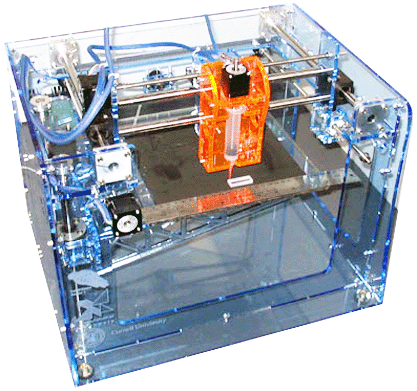
3D Printers "Believe It or Not"


Here's a product that I heard about from an Architect a few months ago, he said "Art, you should be selling something a 3-D printer, it will be the next great thing in the AEC market place". Thought I would search it on the web, but never really had the time, then I picked up this article today by Kenneth Wong

Sen-Yung Lee, a professor of mechanical engineering and director of the Mechanical Technology Research and Development Center at the National Cheng Kung University (NCKU) in Taiwan, may have found a new revenue stream for his country. He and his colleagues recently developed a prototype of a rapid prototyping (RP) machine, or a 3D printer.

In the announcement, the university wrote, "This RP technique has also been transferred to a domestic company, MicroJet Ltd. … The annual revenue garnered from this technique is expected to reach 3-5 hundred million NTD [New Taiwan Dollar), approximately US$10-16 million, in five years."

Terry Wohlers, founder of Wohlers Associates and the author of Wohlers Report 2008 (an in-depth global study of the advances in additive fabrication, including 3D printing and rapid manufacturing), observed, "It's possible to ramp up to $10-16 million in five years, but they'd have to invest aggressively, put together a strong R&D team, create a good method of distribution and support, and make few mistakes along the way."

Wei-Hsiang Lai, a participant in the RP machine development, pointed out this could lead to "the first commercial RP machine developed domestically," with "many commercial potentials. … All of its parts and assemblies are nowadays supplied and manufactured domestically, instead of imported from other countries [as] in the past."

Wohler noted that the project's success also depends on the price and reliability of the system and the quality of the parts it produces.

Explaining the technology, the university wrote, "The RP technique 'prints out' the stereo object by assembling components stack by stack, layer by layer, to the final stereo work. It integrated CAD and CAM systems, similar to computed tomography technique, to slice a 3D solid object to many 2D cross-sectional pictures. This RP device simply prints out these 2D tomographic pictures one by one, eventually to assemble the original 3D object." The machine is expected to print color models in addition to black-and-white ones.

The technique described resembles the technology employed by Z Corp.'s 3D printers, which use a derivative form of ink-jet printing (for more, read Jan/Feb 2009 feature article in Cadalyst).

Wohler added, "The Dimension product family from Stratasys, followed by the machines from Z Corp., have been the most successful in Asia." If the NCKU prototype results in a series of commercial models, Stratasys and Z Corp. will compete with MicroJet, the recipient of NCKU's technology, for the Taiwan market


I remember a line from Independace Day (Movie) with Will Smith saying "I gotta get me one of these"!!!

Wednesday, December 3, 2008

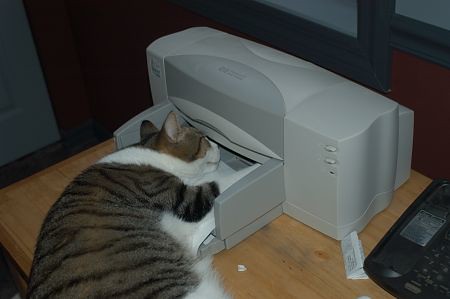
Laser Printers & Cats "Something Has To Go"!

I'll be the first to admit, I am NOT a cat lover. While these creatures are nice to look at they play havoc in my home office.

See, it all started a few years ago when my wife thought she would do someone a favor and take their cat because they were moving. My wife didn't do much research to think that this cat would ever come out of the room (my office) when we have a 170lb RotMastiff roaming the house.

She came home with the cat and the sucker ran right into my office and has not come out of the office in two years!!! That's right, I share my office with a beast that hurls furballs, bites, yaks food and craps in a box (lovely).

So last summer, my son comes homes from Pro Baseball and decides that him and his finance wanted a kitten. Against my arguments, they got this cute little furball, now this furball stayed with them in our house but in their apartment (thank goodness). Well, low and behold Summer became fall and my son and his finance are back in college for one last semester. My wife in the meantime had another lapse in judgement and could not bear to have the little furball alone. So, the cycle starts again, they bring this beast in the house, open the box and where does the little crap kicker go? Yup, into my office, so now I have two crapkickers (litter box mates) fighting wars in my office.

At this point in time, I thinkin about how someone told me that the average cats life span is now 18 years (argggggggh). Check out the Video, the little crapkickers.