Showing posts with label Solution Selling. Show all posts

Sunday, June 2, 2013

Closing the Perfect Duplicator Deal or So I Thought

I posted this a few years ago and thought it would be a good read for those of us in the trenches every day. Enjoy!!

I'm watching the Met game tonight and I'm hearing that a pitcher for the Tigers is about to throw another perfect game, that would be #3 this year!

You just don't hear of that many being thrown let alone being at a game where one is thrown. My son and I was able to see David Wells perfect game at Yankee Stadium many years ago,  it was the thrill of a life time for the two of us.

I tuned into  ESPN to see if they've got the game covered, I watching.... and the last batter grounds out to the first baseman he flips to the pitcher covering the bag and he's out, no wait he's safe!!1 The umpire clearly blew the call! My first thought is that this kid will probably never ever come that close again in his career. What a shame, a blown call takes away a perfect game.

It just goes to show you that nothing is given, even if it's earned. Many years ago I had demo'd a duplicator at a print shop in Trenton, NJ. The duplicator performed everything that it needed to do. I had the lease ready for the buyer, handed him the pen, the prospect had started to sign and then my boss (who was with me), asked the buyer a question, the buyer obliged and answered the question.

What happened next you might ask, well my boss blew the call! We were never able to get back to that closing point and the print shop never did buy the duplicator. From that day forward, I never ever let him go with me on any future closing calls of demos.

Like I said, sometimes even if you EARN the order, you still might have it stripped away from you because of something that's out of your control.

Armando, I feel for you!

-=Good Selling=-

7 Tips to Help Win Net New Competitive Copier & MPS Deals

"My pipeline is always 100,000k+ and I'm required to do 12-15 appointments per week.  I'm finding the opportunities, but not winning competitive deals. (I have a small base list of 10 accounts)."

Was one of the statements that was emailed to me by a Print4Pay Hotel member in Canada this week.  I thought this would make a good topic for this week to see if I can help.

Ok, I'm thinking if you only have a base of 10 accounts and you're not winning competitive deals that means all of your business is net new.  Here's a few things that I try and do with net new business.

1) Find out what brand of equipment they have now and who is servicing the product.

2) Once you've found out what brand they have, ask them what brand they had before their current brand along with who was servicing the equipment. If they had a different brand and servicing dealer this can tell you that they have no brand or service loyalty. If they have the same brand and the same servicing dealer or direct branch, then you've got a tough road to hoe since they have brand and service loyalty.

3) I will dig deep with the customer to see if there is some type of lockout feature or software that will position my company at the top of the pack. I've often found that many reps are lazy and won't take the time to explain many of the features, advantages and benefits of their systems.  Thus you may mention something as simple as embedded scanning to create searchable .pdf's and this could swing the decision in your favor.  Try not to leave any stones unturned when you are in a competitive situation. If you're selling MPS, make it more about the service, the reporting tools, and your fleet software advantages.

4) Make sure you meet with the DM, if not you need to put your best foot forward with the quality of your presentation and proposal.  Many times the DM may leave the decision making up to the person you met with, in this case the cheapest/lowest price may not be the right choice for the person you met with and most likely they will not select the highest price, nor the lowest price.

5) Ask "When will you be making a decision on acquiring the system and what is the process for choosing one vendor over another", make this one of your first few questions.

6) ABC, Always be closing, if a closing opportunity comes up, don't pass it buy. The worst that can happen is you'll get additional info on how the process will transpire.

7) I'm not sure of your market, however in large markets you've got to be prepared and I hate to say this, is to "offer your best deal" in order to get the business.  If you're in this for the long haul and your company services the product well, you'll be able to have an upgrade or additional units in the future that you'll be able to hold margin.

These are just a few items that came to mind.  What I can also tell you is that you need to remove yourself from competitive situations, you need to find the prospects who are NOT in the market. Basically this means that with your skill set you've been able to secure an appointment, assess their pain or challenges and offer a solution that will help them NOW.  Hard to do, but the opportunities are out there, all you need to do is find them.

-=Good Selling=-


Friday, May 17, 2013

Scan2Cloud Solution the Alternative to eCopy

When you've been in the busy as long as I've been you see many reps come and go, however for those of us that stick around we have a tendency to never leave the business.  I met Monte through the Print4Pay Hotel forums many years ago, it may have been in 04 or 05, even though we've never met we've been able to help each other with information through the P4P forums and ever now and then we get the chance to chat on the phone.

A few months ago, Monte introduced me to CC Scan and gave me a brief overview of the features and benefits of the program. I'm not able to offer CC Scan to my current prospects and current clients, although I wish I could. I'm sure many readers maybe able to use CC Scan as an additional tool or to add value to the MFP sale. Lately, I been asking every potential prospect if they are archiving or scanning to cloud based software and I would estimate that 60-65% have answered that question as a yes.  The key question would be "how are you doing that" and or please show me.  CC Scan allows you to.....well better that it comes from Monte than me.......

Capture Component based in San Juan Capistrano, California has just released its newest version of ccScan Now integrating all manufactures of MFP’s and offering an alternative to eCopy that is a fraction of the price.

This software allows users to scan document directly to cloud based repositories like Box.net, Salesfroce.com, Google Drive, SharePoint 365 along with several other cloud providers. Users simply scan the document at the MFP and key in Metadata at the point of scan and documents are automatically filed correctly and named correctly to the cloud. All companies are either looking at cloud solutions or they have already implemented one. At a cost of only @$360 annually you now have a solution to offer that your competitor may not. Want some help on a presale?

Monte Jensen with 20 years of experience in the MFP space is there to help with trial licenses and web-ex demos.

So, Monte knows his stuff, as a matter of fact he is my "go to" guy when I have a question about eCopy (speaking of eCopy, have you ever tried to get support out of them...).  Maybe you're looking for that special lockout feature, or maybe you're looking to build your Pro Services, or better yet you're looking to drive additional profits and margins.  CC Scan offers you many choices, no quotas and the opportunity to be "the expert" with Scan2cloud solutions and it's device agnostic!!!!

You can reach at 415-286-1127 or email him at monte.jensen@capturecompents.com  and as Monte would say "Good Solution Selling"

-=Good Selling=-

Monday, April 29, 2013

7 Way to Help You Cold Call for Copiers and MPS Prospects

This is the third time I've revised this blog, the original was posted almost three years ago, the last update was two years ago and just today I added some new content for cold calling. ENJOY!

Some of us enjoy it and most of us would rather have a bad day at the office instead of doing this. 

It’s the COLD CALL, I like to call it GOLD CALLING!  It's usually the day from hell or the day to find some GOLDEN accounts. If you've been doing it as long as I have, you've had success and have found some of your best accounts this way!

I must say the most daunting task is to open a door where you can’t see what is on the other side, will there be rejection or jubilation! Most times it will be rejection. Get use to it, its part of the job and comes with the territory. Attitude, Attitude and more tude will help you overcome the rejection and plow ahead. You always must keep in mind that you are there to give them a better solution or a better way of doing things, and if they are not interested then that’s their loss!


What, I hate most is a NO SOLICITING sign on the door. Full speed ahead right? You may want to think twice about this and send the owner or CEO a fedex letter or package. That will get their attention.
Here are a few tips to get you going.

Tip: If someone won't provide you with a business card, get out your phone and take a picture of the company name on the business directory.

Make Quality Cold Calls

Sunday, February 3, 2013

The Harder I Work the Luckier I Get (in sales)


I've had this article around for awhile and it was picked up by a few major magazines in the industry, thought I would re-post it for all and I updated additional info to make the numbers current.

Is a saying I heard over and over former Dealer Owner (Jack Carrol), after I tell him about an amazing sale. He had actually quoted Samuel Goldwyn.

Good ole fashioned hard work, meaning working at least eight hours every day, working on proposals before or after prime time cold calling time (whether on the phone or in person), coupled with the expression... THAT THE CUSTOMER IS ALWAYS RIGHT, has made my sales career in copiers highly successful.

I sell down the street, no major accounts, and no key account list, just a territory that borders the Atlantic Ocean up to the Raritan River and down to the trout laden Manasquan River in New Jersey (USA). I sell Ricoh products (the finest products in the world), the MFP's, fax, duplicators, wide format, software and whatever else I can learn that will help a customer reduce costs. Many times I have been able to place a new piece of equipment that will help client increase productivity while not increasing their existing payments. All you have to do is ask, most potential clients will allow you to do a cost analysis for them.


Here’s how I do it!

When speaking about replacing multiple pieces of equipment, let’s say a

Sunday, November 25, 2012

One Awesome Sales Experience from the Seventies

Is it just me or does every Thanksgiving always bring back memories from times gone by?

Today while running errands I remembered a few of my first introductions into sales, at the time I didn't think it was anything more than doing my job.

While working at Green Farms produce company in Iselin, NJ in the mid seventies I distinctly remember waiting on one of our wholesale accounts.  One day I was waiting on Larry and he asked for something like 40 bags of corn.  In order to get the corn, I had to go to the reefer and unload them by hand and put them on a pallet.  When I was done getting the forty bags of corn, Larry pulled off the top bag tore it open and then pulled out 6 or so ears of corn.  He then ripped off the husk and stated "What are you trying to do, this corn is all dried out, I don't want this crap, go get Sonny (Sonny was my boss and the owner)".  Larry was pissed (but Larry was playing his own game) and I thought, dam this all I needed that I know had to get Sonny involved. 

I told Sonny how mad Larry was and

Thursday, October 11, 2012

The Transition of the Copier Industry Part V

What Can Copier/Printers Dealers Do?

You could do nothing and keep stealing pages from other vendors and have other vendors steal your pages.  There's no growth in pages!

Many traditional copier companies are now embracing and moving forward with Managed Network Services.  At one time I asked why the heck would we do that, the other day I got my answer, when it comes to on-site service and support no one does it better than copiers dealers, not IT companies, not phone system dealers nada they all stink. We are the best for on-site support within our channel.

Dealers need to diversify their offerings:

If you're just a traditional copier dealer then I might suggest adding systems where you can also can some maintenance agreement revenue along with break and fix.  Take a look at offering folding machines, folders/inserters, mailing equipment, paper cutters, scoring machines, business card cutters, and pressure sealers. I like the addition of pressure sealers because you can get more bang for your buck, you can sell the media, the pressure sealer and then reap the clicks from higher volume MFP's, light production units and even duplicators.  All of these devices will need service from time to time, most are very mechanical and with trained techs you should be able to garner a some nice margins with service.

Dang, I forgot this one, and it's huge, get on board with 3D printing, it's right up our alley, very little competition, high margins on supplies, high margins on maintenance agreements, the best is that they have to come to you for supplies. Typical users are Colleges, Universities, manufacturing, and Architects, when was the last time someone from a College or niversity call you for a product?  3D printers are on fire right now.

How about just becoming an expert with 3rd party MFP solutions?

I'm hearing and seeing  many dealers looking to add new services, but what about the MFP's that are in the office already. What about all of that neat software that can be embedded within the device that can drive BPO (Business Process Optimization). Many years ago dealers deployed specialized reps to visit accounts and sell the extras such as maintenance agreements, auto document feeders, and finisher/staplers. Why can't this be done with OEM or 3rd party solutions. New accounts are so dang hard to get, but it's your existing accounts where you can sell the extras and make some excellent margins. 

Pick 5 different solutions for 5 different vertical markets, train 5 sales people to sell these 3rd party solutions which could be programs like Print Audit 6, Doculex, Intellenetics, UDOCX. However, you also have depending on what manufacturer you represent all type of business process improvement solutions that can be embedded within the MFP. Before you jump on the MNS/Backup band wagon become and expert with your own solutions from your manufacturer.

One more idea, how about starting an hardware agnostic solution sales team that will go out and sell, install and train on 3rd party solutions. I don't have an accurate number but if I were a betting guy, I would bet that 90% of all mfp devices are not running and embedded software. There's treasure trove of opportunity!

Eat What You Cook:

If you decide to make the jump to offering BPO (Business Process Optimization) then I strongly suggest that you look at your own business processes first.  I'm sure there is pain in your organization with a process.  Look to solve those processes first, one I would fix at the place where I work is the sales process.  Here I would stream line the amount of paper needed and look into developing all of my forms on an ipad or a business type tablet, from here I would want the forms to go to my sale manager for review, he would sign off on them with a digital signature and then send them to order entry. Your company could then become an expert in that particular business process and pitch the solution process to other companies that have the same pain. I could go on and on, but look at your own company first, make the improvements and then sell the heck out of it.

Think about this for a second. you're selling BPO, curing a customers pain and then when they are ready to order you hand them sheets of paper to sign, DUH!


-=Good Selling=-

Sunday, October 7, 2012

Muratec MFX-2590 MFP "The Hottest Little MFP from Texas"

On October 2nd & 3rd of this month I was able to travel to White Plains, NY to take part in the BTA East Region "Grand Slam Event".  FYI, I had an awesome time!

I was delighted to see my guys from Muratec at the BTA event.  If you're not familiar with Muratec..., then you haven't been in the copier/printer industry that long. Muratec is based out of Plano, Texas and when it comes to support from a copier/mfp manufacturer...no one does it better than Muratec!

Below I'll touch on some of the knockout/lockout features that the MFX-2590 that makes this system tops on my list of A4 MFPs.

I was able to speak with Greg, Lou and Jim about this really cool Muratec MFX-2590 A4 (does not print/copy 11x17) that will copy (black), network print (black), network color scan, walkup and network fax (black). At first it looked like any other A4 MFP that's on the market today, however the first feature that stood out was the huge color LCD display. I'm thinking it was about as big as the display on my kindle fire, the size of the screen was 8.5 inches and that's awesome for an A4 MFP!  The comparable Ricoh that I sell has a color LCD screen that is so small that you'll need binoculars to see (just a little joke)!  But most important,  it is the size of the screen that matters because a larger LCD color screen will promote ease of use and users will find the system a pleasure to work with.

Ok, so I'm impressed with the size of the screen right, I then start looking at the extended features like scan2email, scan2folder and what do I see?  Scan2print....it's all about the sizzle and the Muratec MFX-2590 is loaded! Scan2print is something that I thought every MFP system should have, think of it like this, you've got a color document in your hand, located on the 1st floor is the MFX-2590, you need to make a color copy but you don't have a color copier, all you got is a color laser printer and it's on the third floor.  The scan2print feature will allow you to scan the color document and send it to color print on your networked color printer (you scan program up to 5 networked print devices)!  Not only that, but you could send the document to print to another printer or MFP on your WAN (wide area network).  Features like scan2print, allows end users to tap into existing hardware resources without the need to get a color printer or MFP for each department or each floor.  When it comes to dealers and sales people the Muratec MFX-2590 allows us to be more creative with our solutions approach and gives us knockout features that aren't available on other similar devices!

Right, at this point I'm thinking I'd really like to be able to sell the Muratec MFX-2590, Greg and I start talking about scanning and again the MFX-2590 was sizzling with a one pass dual scan document feeder! I stated WTF, you're telling me this A4 MFP will scan both sides of document in one pass?  Yup....so when your working with two sided documents the MFX-2590 will scan 40 images per minute for color and a blazing 62 images per minute for black!  Woo Hoo!

So, we've got the awesome 8.5 color screen, the scan2print, the single pass duplex scan, the 80 page document feeder, scan2usb, scan2hardrive on the copier (enables a document library right on the copier), print from USB (awesome for vistors that have to print),  PC faxing (LAN fax), Walkupfax, Shift/Sort output (each set printed or copied set if offset from each other), ID card copy (means you save a lot of aggravation when you copy a health card or license), scan confirmation stamp (puts a little stamp on every scanned document) and this box is screaming with "sizzle" and value!

But we're not done! Now I'm sounding like Ron Popeil.  There was another touch screen button for "Scan Tag", ok well what is that I asked.  Scan Tag is a document imaging tool that enables users to input meta data at the MFP control panel and then automatically scan and index the document without having to return to their PC.  Scan Tag has been integrated to work with document management software applications like Doculex, Docuware, Idatix, SmartSearch, Sentryfile, Rebus, Intact and Computhink.

I've seen a lot of the new A4 devices from the likes of Ricoh, Canon, Xerox, Kyocera, and Sharp and in my opinion the MFX-2590 has awesome features for the end user and for resellers you have a combination lockout features that no other manufacturer can bring to the table.

Kudos to Muratec and the MFX-2590, btw the way I'll be posting on video of the MFX-2590 in action on the Print4Pay Hotel forums, pay us a visit, get registered, it's free!

-=Good Selling=-

PS  Muratec is not a sponsor or advertiser with the Print4Pay Hotel, however the Muratec MFX-2590 is "The Hottest Little MFP from Texas".


Saturday, September 22, 2012

The Transition of the Copier Industry "According to Art"

Part One:

Once upon a time we sold just a copier, that machine only made copies and nothing else.

There was no stapling, no two sided copying, no document feeders, one paper tray and a single sheet by pass tray was the norm.  You also had to make sure you didn't place a cup of coffee on top of the copier since most of these devices incorporated a moving top (platen).  

As the industry evolved we saw the emergence of companies that developed sorters (remember Gradco), key counters (remember Hecon), coin op units (can't remember one of these), copier cabinets, and even a company that sold custom covers for the devices. Yey, back in the day every new copier came with a cover and yes when asked "do ya think I should cover the copier at night"?, we stated yes, but please make sure you turned it off!

I can distinctly remember one company back in the eighties that manufactured a foil overlay for plain paper copiers. It was a novel idea that allowed users to make a copy of a document and then you could either slide the copy underneath the foil sheet (which was sealed on one side) and then run both the foil and the copy through the by-pass of the copier in one pass.  Presto chango... all of the black image on the page was changed to the color of the foil.  The foil would only stick to the black toner once the media passed through the fusing section.  These foils came in many different colors and the most dramatic was the GOLD foil, we used to tell potential customers that you could turn your copies into GOLD!(pretty lame)  You could even get fancy and with the use of removable tape and scissors cut strips of foil to get different colors on the copy.  This was probably the inexpensive and easy way to get a color copy, the foil media was primarily used for certificates and proposals.  It was awesome, walking in with a proposal that had the look of gold print. Check it out, you can still get this stuff, I just may buy a pack just to mess with some of the younger reps in the office.

Someones novel idea added some sizzle to copiers at a time when the analog copier market had matured. That was also true for companies like Gradco, Hecon, and it's been so long I can't remembers the rest. Point is new products and new services not only helped us with hardware but we provided solutions for our customers.

How about the key counters, can you remember how popular they were?  It seemed that every school had one.  The concept was that you had to have a little box that had a mechanical counter (called the key counter) in into the connected the copier. If the key counter was not in the copier, the copier would not operate.  This is was used as a way to control copy usage. 

At a time when the analog copier industry was maturing. These products and solutions allowed copier dealers to sell more machines and capture additional clicks (back then toner was not included in any of the maintenance agreements).  The copier manufacturers saw the success of these companies and thus started adding their own sorters, their own counters and expanded the offering for accessories for copiers. 

Dealers and Manufacturers have always been on the front lines to introduce new technology that will help customers increase efficiencies, and reduce costs. In my 33 years in this business it's more about how we can improve our customers work flow and reduce your costs, whether it's imaging with copiers, printers, duplicators, managed print, or document management.

I'll have part two of this ready in a few days........

-=Good Selling=-

Wednesday, July 4, 2012

The End of Solution Sales? Are they Fracking Crazy?


The other night I came across an article/blog titled "The End of Solution Sales", as usual I gave it a read and was not in agreement with several of the statements that were made by the authors.

"But now, owing to increasingly sophisticated procurement teams and purchasing consultants armed with troves of data, companies can readily define solutions for themselves". 

Hey, if the procurement teams and purchasing teams are investigating pricing, they can pretty much find that anywhere for a specific piece of hardware or solution.  The trick is knowing which solution is the right fit and if  there is a better solution that will ease the pain or improve the business process to make it the corporation moer efficient.  You can look up tons of information on the web, however can you really find a solution to specific business problems?  In some cases, I'm thinking yes, however when it comes to true print stream management solutions I'm thinking, not really! 

Let's take this for example:  combine print stream to print 3 pages on NCR paper and staple, a google lookup returns this.  If you got to the second page of the google search you would have seen a few of my blog posts, however nothing on the acutally software that provides the solution.

There will always be Solution Sales and there will always be Solution Sales People, the "End of Solutions Sales" is catchy title and thats about all it is.   Vince from the P4P Hotel forums posting this in reference to the article;  "I hope like Hell my competition reads this and decides to fire their Solutions and Systems Engineers. Beucase then I will have an even easier time of cleaning their clocks!

Why RFPs don't work anymore!

The first couple of paragraphs don't seem to be supported by the end of the article, unless the Super Saleman that he speaks of have in depth technical knowledge of the products they sell and the network environments that they sell them into, Oh wait! That would be a Pre Sales Solution Engineer. Never mind!"

The other statement I am not in agreement with is "The top-performing reps have abandoned the traditional playbook and devised a novel, even radical, sales approach built on the three strategies outlined above. Let’s take a close look at each".  There is NO playbook! Top reps will always find a way to tweak strategiesnd if they don't they will be left in the dust.

I had to chance to look up the three writers for this article/blog and there was one common theme among them (lloed them up on linkedin), seems like none of them had real sales experience and the article/blog they wrote about was based on data.  Come on, if you're really going to claim that this is the end of Solution Sales at least have some experience in sales!

Solution Sales is here to stay, the rep or the company that seeks out new technologies and new solution vendors will always be one step ahead of the competition and always have a creative way to solve a business process. If you don't eat the bear, the bear will eat you!

BTW, here's the link for the article!

-=Good Selling=-

Wednesday, June 20, 2012

What is an MFP Copier Solution Worth?

I've been busy for the past week visiting my son at Fort Benning, Ga.  He's graduated boot camp and will be there for another month for advanced training.  I'm proud of his accomplishment and can't wait to see him for his final graduation in July.

Anyway one of the Print4Pay Hotel sponsor is a Stethos, if you're not familiar with Stethos they are a software company that offers different solutions to enhance and modify the printer data stream without interfering with existing processes. The pricing for these solutions is off the the charts, believe me you can sell a solution and make an excellent profit!

So last week I made a phone call to a Net New Account, this was my third call to this Health Care account and I was able to get through to the IT manager. I have to admit I had a little bit of help, meaning my wife had to make a few visits to this Health Care Group (she's fine). Like most medical plans we had to pay something, about three weeks ago we received billing from them and the billing was at 3 pages that were printed from some sort of laser device, however they were not stapled. Thus I assumed (and I was right), that someone had to fold each piece of paper that was printed and then stuffed in the envelope.  The folding part is mundane and is a real loss of time when it comes to productivity. 

The plan was to speak about the billing I received and then to ask questions:

Sunday, June 3, 2012

Top 7 Solutions @ Transform 2012 ESP @ #3

I really feel that we're hitting the sweet spot with some of the recent solutions we've blogged about.  I'm a BIG fan of new products, services, and technologies that can get the final result.... a sale.  Every customer is different and you never knows what can turn them on.  Even a back door solution could get you in the "in" that you need and could lead to tremendous opportunities down the road.

White at the Photizo's Global Transform MPS Conference in Orlando I came across and exciting product and solution from ESP (Electronic Systems Protection).  Basically what ESP has combines power protect with and energy management solution that will allow salespeople to improve their sales strategies, reduce end users costs and sell sustainable solutions to their customers.

I'll give you all a short story from many years ago, when I had my own dealership we were a Copystar copier dealer, Mitsubishi fax dealer and a Brother dealer for faxes, typewriters and word processors.  I can't tell you how many times I back doored into an account with a word processor or typewriter and ended up getting the copier business.  The same thing....

Top 5 WTF Issues with Copier & MFP Salespeople

This topic has been on my mind for awhile and I wanted to share with others the time that it takes each week to complete sales activities.   Salespeople  have many metrics that we need to meet on a weekly basis, but I wanted to focus more on the time that it take to complete the basic set of metrics. Here I'll focus on my metrics cause I'm not sure of those who emailed me.

  • Minimum of 120 phone calls a week:  Over the years it seems if I want to make quality calls, I average about 15 calls per hour, keep in mind that making the call is only part of the equation I still have to enter every call, close every call, post a follow up call and then enter the notes into our sales CRM program.  This takes 8 hours
  • Minimum of 30 emails each week (new net business):  Whew!  This can take some time to set up the campaign, schedule the email, create the email,  send the email, log in to the CRM program, schedule the client for a return call, and research the email address if you don't have it.   I can spend up to 2 hours here per week.
  • Sales Paper Work for the month:  For some reason we are not automated with our support paperwork for each sale, thus when I finally get the lease doc, sales order and maintenance agreement I could have another 10 or so forms to process.  On the average this can take 45 minutes for each sale.  I average about 7 sales per month.  This process alone takes about 1.3 hours each week.
  • Appointments by the Week:  Schedule 8-10 appointments per week an usually schedule these for Thursday and Friday, easier for me and easier for the customer.  I will spend both days in the field for a total of 16 hours.
  • In house Weekly Meetings: Usually around 4 of these per week and done with our call days. Takes 15 minutes each and 1 hour per week.
  • Email Follow Up:  These can consist of customer follow up emails and internal emails and I'm guessing here with about 2 hours per week.
  • Helping others with Product & Sales Questions:  I guess since I've been there the longest when I'm in the office I can get many questions about products, services, support of follow up sales. I'm going to give this 2 hours per week.
  • Proposals: 7 sales per month would equal 7 proposals, we present quality proposals, from start to finish I'll give these 45 minutes each or another 1.3 hours per week.
  • Mailers:  I try to send at least ten mailers a week, letters of introduction, brochures etc. 2 hours per week
  • Enter Sales Appointments in CRM:  Enter notes, close appointments, schedule follow up, about 30 minutes.
  • Research: Includes looking up specs for hardware, software, talking with our support people and going to any resource I have to find additional information so I can move the dealer or solutions forward. I'm putting 4 hours on this per week.
  • Follow up Reports:  Especially commission reports, deliveries, installations, and can include getting additional paper work from the customer.  1 hour per week.
  • Close Sales: If I did not close the sale during the week this would be all of those follow up phone calls and work to either close of get a fix on where we are in the ordering process.  5 Hours per week.

Sunday, April 22, 2012

Why Sell Copier and Managed Print Solutions by the Penny

I'm going to borrow something from This Week in Imaging and Scott Cullen.  Scott reported that while having breakfast with at the Kyocera Dealer Meeting that a Dealer stated that “the truth is 80 percent of the people out there don’t need solutions.”

Mind you I have no clue who the dealer is or if they are a Kyocera Dealer only or have multiple lines, however the statement that "the truth is 80% of the people (think he meant customers) don't need solutions." is just plain wrong! I'm thinking maybe that Dealer Owner (if it was a dealer owner) doesn't go out much in the field anymore and is listening to reps who don't want to sell solutions or just don't understand the solutions that they have.

I'll admit getting the customer to commit to buying, installing, implementing and training on any of the solutions (Equitrac, Ecopy, NSI Autostore, UDOCX, Global Scan, Digi Docflow) is a tall task. I speak about solutions all of the time for every appointment, I'm finding interest, and in some cases I can sell the solution but have had to back down because "we didn't feel comfortable supporting the solution." What I find in the field is at least 50%-60% would like to have the solutions that we offer. The stumbling blocks that I run across are many and I'll list a few from my point of view and from other Print4Pay Hotel members that I've spoken to or communicated with through the Print4Pay Hotel forums.

  • Upfront cost of the solution
  • The Cost of  the Implementation of Solution (time in the customers eyes)
  • Training (what happens when the person or people I have trained leave, retire or are replaced)
  • Maintenance/Upgrades (who's going to monitor or keep track of the maintenance costs and upgrade when needed and will I need additional training for an upgrade)
  • Change the Process (we're to thin with staff already and to change the process would be a burden on productivity)
  • Support (Who do I call, are you/they proactive, can I get them on the phone asap)
  • What Solutions Can We Support (this is from the dealers perspective, do I have the personnel that is capable of doing this right, or will we dabble and flounder)

Monday, January 2, 2012

Ricoh Innovates with Scan2iPhone & Scan2iPod App

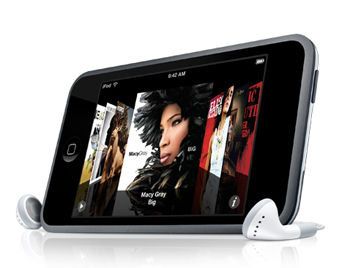
I've had an iPod touch for awhile, but never had the chance to play around with it. Over the last week or so, I've been having some fun with all of the different apps and games. I'll have to admit I love some of the games but hate the fact that they give you the opportunity to pay for additional features. Whatever, the game cost .99 cents and I think I dumped $20 bucks or so on upgrades, kinda wish I had that opportunity with PACMAN when I use to sit at the bar for hours dumping quarters into the machine.

Anyway, I downloaded the app for Ricoh Innovations for scanning documents on my iPod touch and this will also work with the iphone, not sure about the new droid phones.

So, under some not so good light at my desk I used the app to scan some pages. It's easy!!! You open the Ricoh app, take the picture and you'll then have the opportunity to deskew the document, clean the document or keep as is. When you're done you can them export to all these Google docs, email, Evernote, Dropbox, or export to your picture gallery. When exporting to everything but your picture gallery you send as a .pdf or .jpeg.

Within a minute or less I had the document in my Google docs and then sent to my email account. One of the nice features that I noticed is that once the document is sent it's not deleted, this enables you to send the document to another if needed. It kinda almost felt James Bondish, being able to take a picture of the document and have it captured and secured with one of my accounts.

The image quality is good. Keep in mind that you can tap the screen of the iPod or iPhone and you'll be able to focus and then see the AE lock on the screen.  I did not have the chance to export as a jpeg to see that quality. Keep in mind it's more for documents, sketches and stuff like that. Once I opened the doc, of course it was readable, but the quality kinda reminded me of a poor quality fax (but, I then realized that the document I captured was printed via inkjet printer and it was taken from an image from the web, thus 72dpi). I printed the document to my printer and it printed exactly what I scanned.

I'm thinking a better quality document will produce much better results and I really didn't have the time to run out to the car to get some good originals nor did I want to print from the inkjet. When I'm back in the office I'll give this a shot with some clean documents.

So, I'm thinking this is an awesome app, especially for those of us in the field. Instead of using scan2email or faxing the documents to the office. I can take a picture of them and email them or upload to my Google docs (this way I always have a copy of the documents).

It's the sizzle that sells the steak right? I'll going to incorporate this app into my presentations, and I was just thinking a neat demonstration would be to have email2print setup at the office and then just email the scanned page to the MFP's email address. That would be the sizzle!

Dam, I couldn't wait till I got to the office so I went to the car and pulled a clean original and processed through the Ricoh app. You know it did a very good job, not A1 perfect, but good enough for FREE and good enough to read and process documents!!!

-=Good Selling=-

Sunday, December 4, 2011

Document Capture Workstations "Is the Time Right"?

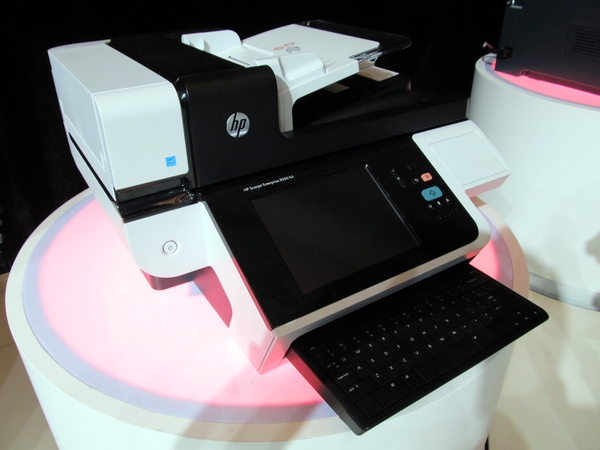
A few days ago I was flipping through the MFP Report and there was an interesting article on an HP device listed as a "Document Capture Workstation".  The MFP Report states that the HP Scanjet Enterprise 8500 fn1 was previewed at Innovation Impact in Shanghai a few months ago.

I'm all over this technology!  Many years ago I mentioned that Hi Speed Network Scanners Stations are needed in the office, but you'd have to spice them up with some additional features like:

  • Scan2email
  • Scan2folder
  • Scan2ftp
  • Scan2sharepoint
  • Ability to run third party software such as ecopy, digidoc flow, NSI, etc....
  • Network Fax
  • Cloud Fax
  • Scan2Print
  • Scan2fax

Sunday, November 6, 2011

Selling Copiers & MFP's "I'm Thinking this is Not for Me" Ask Art

We (Print4Pay Hotel Members) try to help whenever we can.  Ours is not an easy business and we can all agree to that.  Since the Digital revolution of copiers, the new Digital systems offer companies endless opportunities to enhance work flow, reduce paper, scan 2 ERP systems and much more. But, I wanted to get to the the matter in hand.  Yesterday this thread was posted on the Print4Pay Hotel forums.

I've been selling MFP's for 9 months. I've only gotten a commission once. I'm starting to get discouraged. Questioning if this is the right industry for me. Can't see me supporting my family on base alone. I guess I'm looking for encouragement, words of wisdom etc.

One P4P'er (thats our short name for members) posted this today:

Quit selling MFP's and start selling solutions.
"You can get anything you want in life if you just help enough other people get what they want."
Zig Ziglar


Tuesday, October 4, 2011

Selling Copiers "Are you Selling the RIGHT Solutions?"

We all know we can't make any money with a box to box situation.  So, where can the profit be made? Usually it's made in non competitive situations that will produce an immediate ROI for the customer.

One of the keys is to know everything about your customer.  You may be able to see the hardware when you do a walk through, however if you don't ask how do you do this or how do you do that, you don't get, get what?  INFORMATION!!!

We need to ask what do you print on that printer or this printer. With this you'll get a better understanding of the media they are using.  Plus, you can then add questions like:


Saturday, September 24, 2011

Windows 8 Developer Preview

Rick Backus is our Guest Blogger for this month.  Rick's been a verteran in the industry for years and consults for Office Equipment Dealers on how to improve their business technology industry experience and enable increased productivity, profitability, customer satisfaction and competitive advantage for our clients by helping them get the most out of technology with Cybercon Services.
 
So I took the plunge and created a VM using the developers preview downloaded from http://msdn.microsoft.com/en-us/windows/apps/br229516 .  Keep in mind this is a pre-beta release and I am sure a lot is going to change before a production version is available. Even the name Windows 8 is not a certainty.  None the less it is quite obvious that Microsoft is trying to address the huge influence tablets are having on the computing world by drawing from the Windows 7 mobile screen layout.  There is a lot to cover here so I will have several articles over the coming weeks to discuss various aspects of this release of Windows 8.  
 

Metro Screen

My first thought was to install as a VM on my Windows 7, x64 laptop so I would have it with me out of the office.  However since virtual PC will not support 64 bit guests I opted for a VM on one of my Hyper-V servers.
You immediately notice the new “Metro” style start screen that is specifically designed for touchpad capable devices.  You can use some keyboard short-cuts (Home, End, Page Up/Down) to navigate through the tiles and Esc to toggle between the Metro and Desktop views. 


Metro Start "toggle"

To toggle the start screen, explorer and running apps I used full-screen mode in the VM viewer and the Windows-Tab or Alt-Tab key combos to scroll through your open windows.


IE 10

I first went to Internet Explorer 10 which is very different from the current IE 9 release.  Not much to configure here unless you revert to the desktop view. 

Right click will bring up the tab choice bar across the top of the screen.  The page button at the bottom of the screen pops up a menu to search pages or change to the desktop view in Explorer with all the usual features we are used to from IE9.

Metro Screen
There are numerous tiles on the startup screen for widgets like News, Tweet@rama (Twitter client), Weather, Socialite (Facebook client).  All these widgets give you a continually updating, start-up screen summary of all your social networking and content connections.


You can add tiles to the Metro screen by creating shortcutsin C:\ProgramData\Microsoft\Windows\Start Menu\Programs.  They will then display in the startup screen and you can drag them where you want. Right clicking on tiles will display a task bar menu to adjust tile size, go to file location, run as administrator, etc.
So those are some of the basic features in this pre-beta preview of Windows 8.  More on this in the coming weeks. 

About Cybercon Services

Cybercon Services is a business technology consultancy integrating application, information and content management with business process and network infrastructure. Utilizing a broad array of tools and services developed over 25 years of IT, consulting and business technology industry experience we enable increased productivity, profitability, customer satisfaction and competitive advantage for our clients by helping them get the most out of technology.

Cybercon Services can assist in guiding your organization towards greater success. Whether your needs are implementing tablet mobility in your enterprise, automating or retooling your business processes, managed network services and support, technology management planning or leveraging best practices to improve your core operations, Cybercon Services is uniquely positioned to assist your organization.

To take the next step, Contact Cybercon Services to schedule a free review of your company’s current status and strategic goals to tailor a plan for continued growth and success.


-=Good Selling=-


Friday, September 23, 2011

5 Great Ways to Lose Your Best MFP Sales People

Over the years I've had many emails from long time reps that have thrown in the towel.

These are the top 5 reasons why seasoned reps have stated they are moving on from the MFP industry.

Just thought I'd enlighten everyone with these.

1. Make sure you give them last months commission report a few days before you need to pay them. This way if there is a mistake, the rep will have to wait until next month.

2. Selling managers are too interested in selling, and not teaching/training new reps on sales techiniques nor solutions.

3. They can't get new equipment delivered in a timely manner.

4. Sorry, our pricing model had a mistake, it's not what you thought and we have to charge you back!

5. Promise them roads paved with gold and the don't give them the tools to reach those goals.

-=Good Selling=-