Tuesday, May 20, 2008

Copier Sales People "Selling Color Wide Format"


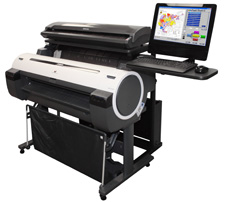
Tired of selling Digital Copiers, tired of the competition, pricing and bs that comes with it. Look no further! Paradigm Imagings EIS Supra was just awarded a BERTL's BEST Award!


Besides having almost no competition in the market place the EIS Supra is a Color Multifunctional Wide Format system that will Scan, Print & Copy in color! Margins are good and the competition is minimal at best. If you're currently selling monochrome wide format you must get into the end of the business, there are lots of opportunities for all us! Tell em P4P Hotel sent you.


Costa Mesa, CA - May 14, 2008 - Paradigm Imaging Group, a leading supplier of large-format scanning, printing and document archiving solutions, announced today that they have received the coveted BERTL’s BEST Award for the EIS Supra, awarded in the category of BEST Value for Price MFP Color Wide Format System.


BERTL analysts review current product lines and new product introductions to identify the select group of devices and software that stand apart from the others. BERTL’s BEST covers the entire digital imaging and document management arena. Earlier this year the EIS Supra was awarded the BERTL Four Star rating based on its versatility, ease-of use, and its use of best-of-breed components. BERTL recommends the EIS Supra for the facility management, CAD/GIS and reprographics markets.


“We are proud to receive this prestigious award from BERTL and will continue to offer innovative, versatile and technically sophisticated solutions while providing our customers, with the highest level of service,” says Randy Geesman, President of Paradigm Imaging Group.


About BERTL


For over 15 years BERTL Inc. has been the primary source for objective, independent product evaluation reports and comparative analyses on digital imaging devices and workflow solutions. Covering more than 5,000 products from all major manufacturers, BERTL publishes the world's most extensive and diverse library of evaluation reports on copiers, printers, MFPs, production and workgroup scanners, wide format devices, fax machines and color production equipment devices. For more information about BERTL visit http://www.bertl.com/.


About Paradigm Imaging Group


Paradigm Imaging Group is a large format solutions provider whose expertise extends from scanning and printing products to imaging systems integration, software development and product distribution. Paradigm counts among its clients, companies in reprographics, architecture, engineering, construction and manufacturing, as well as numerous public agencies at all levels of government. Since 1989, Paradigm has grown to become a leading provider of large format scanning and printing solutions

Wednesday, May 14, 2008

Samsung Deals another Blow to MFP Giants (Ricoh, Canon, KonicaMinolta)

You here it from me over and over, A4 devices are the way to go!

Samsung has launched their 6555N Multifunctional System, a 55 page per minute device that incorporates a 7" LCD display, 1200x1200 dpi, max paper capacity of 3,240 sheets. The system will color scan out of the box along with an FCOT of 5 seconds, a FPOT of 8 seconds and a max monthly volume rating of 250,000 pages per month. Optional sorter/stapler, fax module and three additional paper trays are available. Get this, the MSRP is $3,995!!


First glimpse tells me that this system is based on the 6354n (45ppm) device, Samsung has changed from older the mono 7" screen to a color 7" screen and beefed the speed from 45 pages per minute to 55 pages per minute. From the picture it seems like the document feeder may have been changed also, not sure, I'll have to wait until I see one of these bad boys.


No 11x17 capability, but who the heck needs 11x17 anymore! Personally, I think the MSRP is two low. It should be more like $6,995, thus allowing dealers and salespeople the opportunity to upgrade older A3 devices to SCX-6555N. I have a few 6345N's in the field generating an average of 8,000 pages per month and no reported problems.


What's next for Sammy a 75ppm device, maybe 85ppm, are all of the A3 devices made by the likes of Ricoh, Canon, Fuji Xerox, KonicaMinolta overpriced? It all depends on if you need 11x17 to print copy or scan.


Realizing, that the cost per page of the SCX-6555N is twice that of a 55ppm A3 device. The SCX-6555N still has a home in the SMB market place especially if the user is average 10,000 pages per month. At a cost per page of .016 the SCX-6555N will have a total cost of ownership of $13,995 with out any options. Take a similar A3 device that has an MSRP of $20,000 and a consumable cost (based on 600,000 pages) of $5,100, thsu we have a TCO of $25,100. That's a HUGE difference. Some will argue that the 55ppm A3 devices will last longer and have a larger paper supply, and I might agree, however I could buy three of the SCX-6555N's and still be under the $25,100.


What I'd really like to see is the likes of Ricoh, Canon, KonicaMinolta, Fuji Xerox to wake up and smell the coffee! We don't have to bring to market A4 devices with a very low MSRP, we can bring them in higher and we can sell the reliability, quality and a lower cost per page. Currently we are producing 55ppm A3 devices with cost per pages under a penny, why o why can't we do this with an A4 device!! Come on people Wake UP!!

Tuesday, May 6, 2008

The Software Storm, the MFP, and Document Management

I'd like to introduce Russ Hetzberg of PSIGEN Software Inc, as our Guest Blogger for May 2008.

The last few years have seen rapid growth in the type and quantity of software for MFPs. At the base of everything inside the MFP is the embedded real time operating system that runs on the processors. Above this you may find Java and/or .NET development platforms, interfaces to network file systems, network authentication technology, recognition technology, security technology, web servers, I/O management subsystems, and more.

All of this ‘platform enabling’ technology is enticing to independent software vendors, who have quickly added document management, print management, fax management, and more to the list of MFP software solution alternatives. These solutions deploy a variety of different architectures, from fully embedded within the MFP, to partly embedded and partly external, to fully external. The solution architecture can impact infrastructure issues as diverse as MFP performance, network security, and network bandwidth utilization.

With all of these new choices, MFP customers may feel that clear thinking about MFP software solution architecture is akin to determining the mix of software stack required for production Linux and/or Windows servers on the company network. The relevant question is how to help customers get an effective deployment in place, for a target application such as document management, in an increasingly complex software solutions landscape.

Good document management deployments for MFPs start with an accurate understanding of requirements. Adding a basic document capture and retrieval system to the printing/copying/faxing services of a few MFP devices can be easy enough. An unattended capture application can process scans received at a network folder, convert images to PDF with hidden text, and then leverage the full text OCR results to deliver retrieval using free desktop search tools. More complex document management installations may address requirements like multiple document types, capture workflow, document separation, document indexing, document quality/image pre-processing, and migration to content management systems.

The software storm for the MFP is a good thing. It has helped turn the MFP into a strategic platform for document management. And this is making the art of solution selling the key to success in this marketplace.


Russ Hertzberg has over 20 years of increasingly responsible experience with established technology providers (IBM, Novell, Scantron) and small cap/startup firms (NetSoft, PSIGEN Software, Inc). Russ has a Bachelor of Arts degree in International Relations from Brown University. He also completed the Executive Program in Management at the UCLA Anderson Graduate School.

Friday, May 2, 2008

Ode to the Copier Repairman


I can't take credit for this, this was reposted on the Print4PayHotels Ricoh Family Group Message Boards today. It is a good read. Enjoy!


An Ode to the Copier Repairman Of all the heroes great and small;comes he, the most unsung of all.


You've seen him before, you know him well;

he comes to do battle with the copier from Hell.

He steps through your door, a glaze in his eye,a tool kit in hand, and toner on his tie.

The problems, oh yes, he's seen them all, this week;the jams, the rattles, the chortles, the squeaks.

The customer tells him "It's broke, see, right there!"As slowly he pulls out what's left of his hair."Okay," says he, "I'll have it fixed in a snap!

"The office manager replies, "It's a piece of crap!

"The insults bounce off, he's heard them before;

The same stale old wisecracks, a million times more.

He opens a panel, flips a lever, turns a screw;

Meanwhile the damn thing takes a leak on his shoe.

The consummate professional he's trained to be;but respect?

Hell, he gets less than Rodney D.

The copies are streaked, too light, or too dark;

the last time it was serviced was on Noah's Ark.

He's got it running, now, cleared the jams, stopped the drips,removed from its insides seven pounds of paper clips.

His hands are shredded, and he's covered with grime;

some wiseguy walks by, "Didja fix it this time?"

He smiles as he cleans the covers and mirrors,tries his best to ignore people's insults and sneers;

takes some comfort in knowing five 0' clock's getting close.

Of filth, slime, and insults, he's had his daily dose.

So when your copier hiccups, and threatens to die,Please be kind to your Repairman, with toner on his tie.

Tuesday, April 29, 2008

Selling Copy Machines "Securing An Appointment"


Oh boy! This was once the easiest part of my job and nowadays it is the hardest!

Once upon a time we were able to cold call with no security systems, no locked doors, no gatekeepers and unlimited access to all, my how times have changed.


Old fashion cold calling still works if you have the stomach for it, however you have to work three times as hard to get access to buildings, keep in mind that if you do get in, your only roll is to get the name of the person who is in charge of the office equipment.

Usually, I will approach potential clients with three different contacts. I will use the telephone or a cold call to find out the right contact, from there I will send a personalized letter and then follow up with a phone call to the person in charge.

You've got to be able to peak their interest in the first 10 seconds of the call, lately I have been asking if they are currently using "document capture" software. Most will say no and I have peaked their interest, be prepared to be knowledgeable and to elaborate on technology. Secondly, I will ask if they have connected MFP's usually the answer is yes. I then ask for a 15 minute appointment to show the Document Capture software.

I'm selling hardware however, I 'm getting in the door with software, from there I can learn all about their hardware and workflow. Starting with a software solution will make you stand out from the crowd!

By the way we have an inexpensive Document Capture Software called Docuary, please call me or email me if you would like further information.


-=Good Selling=-


Sunday, April 27, 2008

Buying a Used Copy Machine on the Internet? "Buyer Beware"


Sneakers, Software, Computers, and Clothes all good things to buy via the Internet. Pre-Owned and used copiers....not a good thing to buy over the Internet.


In my 28 years in the business, copy machines are service intensive machines, whether they are analog or digital, they need a qualified service engineer in order to service them correctly and keep them running. Without getting very technical and I could, but its late on Sunday and I'll need some down time later. I'll list a few reason why you should not buy used, pre-owned or off lease copy machines over the Internet.


1. There is no "car fax" for copy machines, you have no idea who serviced the unit, how qualified the service engineers were, if the machine was in a flood, dropped, re boxed or if the factory updates were ever performed. This alone should be enough to scare you away.

2. How will it be shipped? Copy Machines are very susceptible to bent frames, broken covers, trays and displays when not shipped properly. Do you want to go through the hassle of an insurance claim if the copier arrives damaged?

3. Who will service this beauty that has very low volume and grandma only used it to make a few copies a week. Are there reliable service engineers in your area that are Authorized to make repairs? You could have everything go right and the copy machine is perfect, however your local service company does not know how to fix it, or they will take three days be on site or maybe the closed Authorized Dealer is 150 miles or more away!

4. Who will assist with all of advanced functionality of the unit? Are you prepared to spend hours on the Internet searching for manuals, software and drivers?

5. When the machine arrives are you prepared to pay for someone to install the unit or train your staff how to use the system?
6. Meters on copy machines, if they can be turned back on cars, they can also be turned back on copy machines. Are you willing to take that risk and get a machine that has a million pages on it, when you thought the meter was 100,000 pages?

Buying anything used or pre-owned is a risk on the Internet, especially copiers. If you want used or pre-owned call your local dealer and ask what they have to offer. Most dealers will be able to accommodate your needs with used or pre-owned copy machine that they have serviced from day one!


Polling Copier Sales People


Here's a few more polls that were conducted on the Print4Pay Hotels Message Boards. The Print4Pay Hotel has dedicated message boards for Canon, KonicaMinolta, Kyocera, Xerox and the Ricoh Family Group. Enjoy!


Poll: Has HP's CM8050/CM8060 Color MFP taken any of your business, or have you seen any of these in the field?


53% No

47% No, and I have not seen any in the field!

Some members who voted were actually dual line dealers for HP and Ricoh, interesting that the much vaulted HP CM8050/CM8060 has not been seen in the field by 47% of our members.


Poll: "Commission For Clicks" Has The Time Come for Sales People to be Paid on Click Revenue?

78% Yes
10% No

12% Not Sure

I know of a few trials being conducted for click revenue, I will report more on this once I hear back from them. Seems to me this should be the wave of the future!


Poll: "Color CPC Poll" How low do you think all inclusive Color Cost Per Copies will Go?

.065 (6%)

.06 (3%)

.055 (10%)

.05 (29%)

.045 (19%)

.040 (10%)

.035 (6%)

under .035 (16%)

51% our our members believe the price will fall below 5 cents for all inclusive color pages.


-=Good Selling=-


Wednesday, April 16, 2008

Copier Sales "ODBC, What is it"?


ODBC - What it is and why it is important in a document processing application

ODBC is an acronym for OPEN DATABASE CONNECTIVITY. It is a Windows tool that can be found in Control Panel>Administrative Tools>Data Sources (ODBC). It provides a standard interface to connect to virtually any database that is ODBC compliant.

Connecting to a database is very important when performing document processing. Without the ability to connect to data, MANUAL indexing is required (unless OCR, barcode or some other technology is used). Manual indexing is very inefficient and prone to errors. An error made during manual indexing may prevent the document to be found at a later time.

In a typical document management scenario there may be many different document types. Each document type may, or may not have, data that is “associated” with the documents. For the document types that do have associated data, the indexing process can be very efficient and accurate. Document processing software, that includes ODBC connectivity, will allow the indexer to enter data (typically a “key” such as Invoice Number) and the software will automatically perform a lookup into the database to VALIDATE the entry. In addition, related data such as Customer Name, Po Number, etc can be EXTRACTED from the database at the same time. This data can be part of the retrieval schema without any additional work or manual indexing.

Advanced software, that includes ODBC connectivity, will incorporate barcode or OCR technology to process documents completely automatically. The documents are scanned, separated automatically by barcode or OCR, the barcode or OCR data is used to perform the database lookup, the data is VALIDATED and the related data is EXTRACTED and the documents are published to the document Repository without any operator assistance.

ODBC can also be used on the “backend”, or retrieval side, of document management. It allows virtually any database to be used for purposes of retrieval of documents. Of course, the publishing and retrieval software must include the ODBC interface.


For more information on MFP software that can perform the functions discussed please send me an email art@p4photel.com

Wednesday, April 9, 2008

Tribute to Danka "Dan is Danka"

I can remember in the early eighties the Danka Buzz! If you owned a profitable dealership you had high hopes that Danka would come calling.

Everytime you turned around you heard about Danka buying another dealership. Back in the eighties we had Xerox direct and from what I remember everything else was dealerships. You could call it the "Golden Age of Copier Dealerships", all were thriving, all were making money and there was a great entreprenuerial spirit in the industry. Many owners got the pay day of thier lives from this Golden Era.


It's sad to see to see a great American company fall. However, it may present some great opportunities for those involved.


Danka's time line:


1977: Started in Tampa by Dan Doyle and Frank McPeak, Danka's name was forged from the first names of its co-founders.


January 1997: Under Doyle's leadership, Danka grew to more than $3-billion in sales by the time it acquired the office imaging business of Eastman Kodak for $588-million.


October 1998: Doyle resigns as chief executive after the Kodak deal causes financial chaos.


2004: Danka sells its Canadian subsidiary.


2005: Danka sells South and Central American business to Toshiba.


2006: Danka sells its European operations to Ricoh Co. of Japan for $210-million, slashing its business in half.


November 2007: Danka shares delisted from Nasdaq.


April 8, 2008: Konica Minolta agrees to purchase Danka for $240-million.


Tuesday, April 8, 2008

MFP Wars "KonicaMinolta Buys Danka USA"

Will KonicaMinolta now join the ranks of Xerox, Canon & Ricoh. Some think they are there already. If you haven't heard KonicaMinolta bought Danka USA today, just a few weeks after Ricoh announced that they had acquired Danka (Europe).

Danka founded in 1977 in Tampa, Florida as and entrepreneurial venture. By 1986, Danka had become the leading office imaging distributor in the US. A year ago the stock traded for $1.37 per share and yesterday the stock was down to .22 cents a share. The total purchase price seems to be $240 million, hardware and supply sales for the last four quarters is about 200 million.


As an outsider looking in, KonicaMinolta products have been getting stronger and stronger, saturation of dealers and direct branches seems to be balanced. KonicaMinolta never cut their ties with Global, while Canon & Ricoh walked away. Not sure if they lost business here, I would tend to think that they gained business during the Xerox transition process. I now believe KonicaMinolta can be a major vendor for quite some time.


WOW, where does this leave the likes of Toshiba, HP and Canon? Will Toshiba do the same as Canon and Ricoh did with Global? Will HP fold and Canon also fold up their tents? My thoughts, HP will stay put if they can, Toshiba is continuing to buy dealerships in an attempt to maintain market share and I think they'll get out. But, what about Canon? They took quite a hit from Global, now Danka, and Ikon which was pretty much Canon is now three major product lines, Canon, Ricoh and Kyocera.


Its now a question of WHO has the bucks and the brawn to buy IKON! It will happen, it's just a question of when. Who can do? HP can, Canon can, I'm not too sure any of the players could pull off a purchase of IKON. Just a guess, but it would probably take at least 3 billion to pull it off.

Saturday, April 5, 2008

Ricoh "Message from the President"

I picked this up about a week ago from a press release. Good read for all of you Ricoh guys and gals out there.

Ricoh’s President of worldwide operation, Shiro Kondo, gave out details on its financials:o predicting increase in worldwide sales of 11% between now and end of fiscal 2011o predicting total worldwide sales this fiscal of 2.5 trillion yen ($26 billion).


  • Key driver will be sales of production print devices to commercial printerso will spend a total of $725 million to finish acquisition of IBM’s printer division by 2010o IBM sold $1 billion worth of printers in 2006.

  • Has paid a total of $210 million for the European branches of DANKA. Operating profit will increase worldwide 7.8%.

  • Projections for this year are less than targets that Ricoh published earlier as part of its 3 year plano “Our business in the U.S. is the hardest-hit” stated Ricoh’s worldwide CFO, Zenji Miurao.

Other comments from CEO, Shiro Kondo:

  • “we will comprehensively revise our current research and development system”

  • “we can no longer increase our competitiveness simply by satisfying customers”

  • “what matters now is how we make our products and services represent values that inspire customers”

  • “transform process to creating rather than making”

  • Will set up a “marketing strategy office” on 4/1/08 in Japan to explore market needs from a long-term point of view.

  • “we can’t develop new products and services only by asking customers what they want….we will research the issues and needs that the customers themselves don’t even fully understand and propose new values and services”

  • Plans to undertake large-scale restructuring as early as July of this year.

  • Slower-than-expected sales of its GelSprint inkjet printer/MFP products “focusing on profitability in the 16th plan”.

  • Aiming to make up for the loss in profits that came about as a result of its downsizing.

  • Will reorganize its businesses and cut personnel if necessary.

With the start of the new business year for Ricoh as of April 1st, we'll just have to wait and see.

-=Good Selling=-


Friday, April 4, 2008

What is a "searchable" pdf?


ADVANCED FUNCTIONS- create searchable PDF documents with this application.

What is a “searchable” PDF?-
In simple terms, a searchable PDF is an image (picture) containing the “text” in a layer (usually behind the image and not visible). A scanned document (PDF as image format) is NOT searchable until an OCR (optical character recognition) process is performed on the document. Some scanning hardware can deliver a searchable PDF (the OCR process is performed during the delivery process). A searchable PDF can also be created by PDF distiller software. This process “converts” a digitized file, such as a MS Word document, to a PDF format. Because the original document was digitized (contains text), the OCR process is not required and a searchable PDF is rendered. An easy way to determine if a PDF is searchable is to open the document with Adobe Reader or Acrobat and perform a “find” function. If the found “text” is highlighted, the document is a searchable PDF.

Benefits of a “searchable” PDF-
Searchable PDF’s are very useful for retrieving documents from a document Repository (full content management) and useful to find the location of a word (s) within the document.
Adobe Systems provides a free downloadable tool known as an iFilter. The iFilter provides a link between the “text” layer of the searchable PDF and an “indexing” engine. This connection provides for retrieval of the document by any word(s) contained in the “text” layer or in the metadata (Title, Subject, Author, Keywords) of a PDF. Indexing engines include:
A) The catalog feature of Adobe Acrobat- very powerful engine which provides advanced searching functionality.
B) MS Indexing Services- an “index” maintained at the server level with “load” processing options built into MS server platforms. Note: this application has an unlimited user retrieval tool that leverages this free MS service.
C) MS Desktop Search- a free, downloadable MS powerful tool that maintains an “index” on the desktop of either desktop files, server files or both.
D) MS Sharepoint- searchable PDF’s can be retrieved with the built-in query tool.
E) Other DMS- most document management systems can retrieve searchable PDF’s.


The requirements are:
1) A full license of TOCR (the OCR engine)
2) The “captured” document should be a Group 3 or IV B/W tif.

There are two components that are used to create “searchable” Pdf’sOCR Processor must be set as Full Page; however, you may OCR All pages, the first page, or identify the pages to OCR.

“So Easy a Copier Rep Can Sell It"

The copier industry is facing tough times. It is no longer just about speeds and feeds, rather how can the equipment be used as part of a business process to increase productivity?

Usually that business process includes software add-ons. The software add-ons can be for a specific task; for example, managing access and usage, or for general purpose document processing and document management.

All of the manufacturers now have reliable devices that will print, scan, fax and copy in color or monochrome. Almost all systems now support scan2email, scan2folder, fax4ward to folder. The questions now becomes how do we separate ourselves from our competition? The time is right for P4P’s Docuary (document management for everyone) and P4P’s Docuary Web.

Every copy representative should have a “go to” software product that is easy to learn to demonstrate and bundled with the hardware lease for less than .65 cents a day! His/her proposal will stand out from the others because he/she is selling a “total” solution. Tell me, what the heck can you buy for .72 cents a day, a cup of coffee (No), a bagel (NO), Bottle of Water (NO), gallon of gas (absolutely NO). The time is right to break out of your shell and go where others have gone, do you want to be the only one left on the planet selling something that just copies, prints and scans? Do you want to face extinction!

Transform yourself to a Docusultant (someone who consults on paper based workflow). Give your SMB (Small to Mid Size Business) what they really need. Every SMB needs P4P’s Docuary or Docaury Web (document management for everyone), they just don’t know that they need it!

Docuary has the following features:

* Unlimited user access
* Proven in thousands of locations
* SQL database engine
* Web based access
* Folder/file navigation or database lookups (based upon user defined indexes)
* Full content management (key word lookup based upon content)
* Optional batch processing of documents via barcode, forms recognition, etc.
* Availability of source code
* File access auditing
* Version control

The software is easily installed on a notebook in minutes and so easy to learn that a demo could be given to a prospect in 15 minutes without any formal training. In other words, “So Easy a Copier Rep Can Sell It”.

For more information on such a product contact me art@p4photel.com+

Sunday, March 30, 2008

Samsung Readies 1-2 Punch Against Ricoh, Canon & Xerox


I picked up this information from a member of the P4P. Samsung is ready or will launch a new A3 Color MFP @ 40ppm for under $5,000!

I've done a few searches and have found nothing to date on this unit, so I can't comment on cost per page, features, and specs. The information states that this unit is designed to compete with HP's Color LaserJet 4730MFP.

All of this brings me to another point that I've been pounding for a few years now. Ricoh, Canon, KonicaMinolta, Sharp, etc.. need to step it up a notch in R & D. They need to bring to market A3 devices that will have the same cost as their A4 devices ASAP! Samsung, and HP will get better and better at the interfaces, these systems will become more popular because of price. These systems will take away business from Dealership and Direct Branches! If you want to blow them away you need to develop the A3 device with 11x17 scanning, and a cpp like A4 machines. A few months ago, it was rumored that Samsung was coming to market with a 50ppm mono device.

More info on Samsung’s first floor-standing color laser MFP, the CLX-8380DN offering: Base MSRP of $4999.00. Actually made by Samsung of Korea. Letter/legal size paper onlyo Competes against the Hewlett Packard Color LaserJet 4730MFP.

This product may be relabeled by Xerox and Muratec (as they currently relabel other Samsung made models). 40ppm top speed color or b/w. 600x600dpi or 1200x1200dpi (not 8 bits per pixel). Interpolated up to 4800dpi. 4 tandem OPC drum design. Polymerized toner. Comes standard with 520 sheet paper tray and 100 sheet stack bypass. Optional two more 520 sheet drawers ($349 apiece) or a 2100 sheet letter size paper deck ($799).

Optional 100 sheet document feeder. Auto duplex standard.
Optional stapling finisher for $649 (50 sheet stapled sets, no booklet making)
Built-in print controller.

 Actual maker unknown
 HP PCL and PostScript print drivers included
USB & 10/100BaseT ports
 256MB RAM standard (can upgrade to 512MB)
 80GB hard drive
 Scan to e-mail/FTP/SMB Optional fax board 11 second first b/w copy out time 13 second first color copy out time.

Black toner yield of 18,000 pages based on 5% coverage for $65.00 each. Color toners yield 12,000 pages each based on 5% for $149 each. Each drum has yield of 50,000 pages, with black for $165.00 and C, M or Y for $245.00o Waste toner cartridge yield of 100,000 pages. PM kit #1 has yield of 100,000 pages for $149.00o PM kit #2 has yield of 200,000 pages for $229.00

Selling Copiers, How Does Your Dealership Rate?


It's time for another Guest Blogger. I have know Mike Kaprinski for 6 years and I consider him as one of the elite sales guys in our industry. Mike has put together an awesome blog for you. (Art Post)


Are you working for a dealership prepared for the future of Office Technology?

This might sound like I am making a big deal out of nothing, but I am not. You are making good money and the deals are closing, but you are losing some of the bigger deals, people in immediate need and you cannot compete in bids or large deals. Your dealership could be a sinking ship and you better be one of the first out and not the last because your reputation will be tarnished.

I had asked myself these exact questions a year ago. My answer was mostly no for each one. Below are questions that you should answer yes for at least 80% of them. Questions with the # next to them are “a must.”

#Does your dealership have inventory?
-What good is a sale if you have no product!!!

Does your dealership have demo/loaner inventory?
-You need to show and make sure it is the correct solution.

#Does your dealership have Certified Network Engineers?
-What if something happens while doing network install?

Does your dealership have a software solution expert?
-You need someone with completely understands all possible software.

#Does your dealership have delivery staff?
-You need to be selling and not delivering!

#Does your dealership have a real retirement plan that they contribute?
-The dealership should invest in the well being of their employees.

Does your dealership have a gated commission plan for each deal?
-This way you or they will not lose money later on.

#Can your dealership pay you all you commissions on time?
(Ex: March commissions paid by April 30th)

Does your dealership have an internal bonus program?
-They need to invest in the strongest reps and keep them happy.
80/20 rule applies here!

Does your dealership have President Club Trips?
-They need to invest in the strongest reps and keep them happy.
Not to Dealer Sales Meetings!
80/20 rule applies here also!


#Does your dealership have a company handbook for rules and procedures?
-This one should be common sense.

#Does your dealership have enough service people for the MIF and size of territory?
- The machine will breakdown and service needs to be done in a timely manner.

#Does your dealership have service technicians that actually receive manufacturer training? (Not mostly on the job training or from a book)
-I always say I can send a monkey in less than 4 hours but he won’t fix it!

Is your boss out of touch with reality and only working part time while you bust your butt?
-If you are their cash cow and bosses are taking it easy you are probably dealing with all the issues they should be handling.

#Does your dealership have a written down marketing campaign?
-They should help you spread the word and it should look professional.

#Does your dealership have real sales database? (NOT OMD!)
-Any online sales database, ACT, Goldmine something to monitor activity.

#Does your dealership invest in itself?
-Nice office for customers/prospects to see, new reps, trainings and seminars.

Does your dealership use up to date technology like new phone systems, computers and cell phones?
-If you are trying to sell technology you better be buying it.

I hope this helps some of you out. I believe the next step in our industry is that independent dealers are going to be few and far between so try to find a good manufacturer owned dealership that will value its employees and the work they do.

I will be happy to talk to any of you if you have any questions. Please feel free to email me at mike@p4photel.com.

Good Selling,
-=Boston Mike=-


About Me: I have been in the Office technology for over 10 years. I have worked with all kinds of customers. I was with a small Ricoh dealership for almost 10 years where I had to learn most things on my own. For the last year I have been with CBS-A Xerox Company, which is part of Global Imaging Systems. I wish I had made my move 5 years ago and that is why I am sharing my experience.

Saturday, March 22, 2008

Copier Sales People "How to Sell Wide Format"


The buzzword in the AEC industry is scanning and archiving. All digital wide format systems will scan in some way shape or form. If you work for a dealership or manufacturer that is selling wide format systems, you want to attack these types of clients.


· Construction Companies
· General Contractors
· Architects (Design & Build)
· Engineers
· Builders
· Print 4 Pay
· Telecommunications
· Utilities
· Manufacturing

Most of these clients will have an inket plotter, a Diazo Blueprint Machine, a wide format copier (digital or analog). Also, most of these clients are usually out sourcing additional copies, prints or scans to a P4P shop in their area.

Strategies:

Focus on helping the customer with an existing problem. Whether it is copies, prints, scans or the volume of paper that is handled on a day-to-day basis in their office. You must be able to “drill down” with the client and even interview some of the staff to find out where problem or pain is. Most will be happy to tell you as long as you ask the questions. You want to look for inefficient wok flows, time delays for getting the project completed on time. You should also be asking if they out source documents for printing, copying or scanning.


Finding Potential Clients:


Nothing beats old-fashioned cold calling. Yep, knocking on doors! At one time I would walk up to a closed door and then turn around because I was afraid of the rejection. I got over this pretty quickly. If you are concentrating in the SMB (small to mid size business) for architects, engineers, surveyors, and contractors, you have a great chance of meeting the owner or the decision maker when you walk in the office. Compared to making a telephone call and having to leave or message because they have already assumed that you are trying to sell something.


Securing the Appointment:


As long as you are prospecting on a daily basis the appointments will come. “Build it and they will come”. When talking to a prospective client you must ask for the appointment (somethings never change). Ask them for 15 minutes of their time, with this you can discuss what system may be right for them or if they need your system at all. Sometimes, telling them that they may not be right for your system will peak their interest.


These are just a few of the paragraphs that came from my book titled "How to Sell Wide Format". Which includes marketing, the appointment, ROI selling, glossary, selling tips and much more!


If you would like the full copy, please send me and email art@P4Photel.com. There is a cost of $19.95 for the booklet.

Friday, March 21, 2008

MFP's & Total Document Volume

Manufacturers continually talk about TDV (Total Document Volume), capturing TDV is easier today considering that most MFP manufacturers now have a complete line of network printers and MFP's that encompasses low end and high end systems.

The problem facing most reps in the field is we do not receive revenue based on the ongoing revenue streams for these systems. Typically, we can sell supplies with the initial order and receive a very small commission. With CPP (cost per page) programs more popular than ever, we are quoting and selling CPP's and receiving nothing. Usually these CPP's will last the term of the lease and create a very profitable revenue stream for the dealer or manufacturing, considering that the customer is locked in for the duration of the lease.


Now, more than ever it seems that there are many small MFPs or printers that complements the larger system, and allows workers to be more productive with printing, fax, scanning and copying from their desk. The problem with most of these small MFP's and printers is that they are more expensive to print, short life cycle, and if a service call is needed most users must bring the systems to a repair facility or the customer will just go out and buy another inexpensive printer or MFP and through the old one out (what a terrible waste)!


Since we are not paid on the on going revenue stream, along with the fact that we receive very little commission's on the low end printers or MFP's, we tend to focus on the larger systems, place the units and then move on to the next customer that has a need for our services. There is no incentive to place our lower cost per page systems, and capture TDV! Many times I have gone back to see a customer a few months after the sale, only to see additional systems that we not purchased from our company.


MY opinion is that we can capture TDV in most offices! I have done this with a few accounts, however it was very time consuming process for so little. WE have the knowledge and the resources to capture TDV, but most of us are lacking the support from management to implement CPP programs on all of our devices.


So, what can be done to implement TDV, well the first step is to offer an ongoing commission for the revenue stream that each printer of MFP in the field. The second step is to implement a device that will capture all of the meter reads and report back to your billing department (Ricoh uses @ Remote). The third step is pay a fair commission on the revenue based on the clicks, click commission should vary with different devices that is fair to the rep and the dealer. The fourth step is a software program that will calculate clicks and commission on a monthly or quarterly basis.


When was the last time you actually tried to sell a maintenance agreement or sell additional supplies? How many of us actually shy away from selling maintenance agreements or CPP's, and tell the customer take the initial warranty and supplies and then call us? When was the last time you actually focused on TDV in a customers office?


Receiving an ongoing revenue stream will allow us to focus more on every device in the office, and allow us more time to truly consult on the CPP's of printing devices. Everyone will benefit! The customer will benefit by having one supplier amd service provider for all devices, along with the benefit of truly knowing what their CPP is for thier TDV. The dealer will benefit from more devices being placed and capturing service and supplies for all devices! The sales person will benefit from the on going revenue stream plus the incentive to capture all of the output.


It's all about the clicks!

Saturday, March 8, 2008

Ten Tips to Return Leased Copiers

Over the years, I would say that ninety percent of my clients leased their copiers with an option to buy the copier at the end of the term. Most of these leases had a buy out option for FMV (Fair Market Value). The general idea of an FMV lease is that the customer has no intention of ever owning the equipment and they will return it at the end of the lease.

Most leasing companies have been and still are very aggressive with FMV rates (interest), however most will have clauses in the leases that you must notify them in writing before the end of the term. All of the leasing companies have a "Window" clause, meaning you only have "x" amount of time when you can notify them, some are not more than 90 days prior to the end of the term and others are not more than 180 days and not less than 90 days. Make sure you read the lease!!!

Here's a few helpful tips for you:
  1. Read the lease and be familiar with the return clause, Make sure you notify with in the parameters of the lease contract.

  2. Set a reminder in MS Outlook or another contact management program to remind you to submit your LOI (Letter of Intent), state whether you will return or you wish to purchase.

  3. Send all correspondence via certified mail of Fedex, where you will get a signature that they received your letter.

  4. Make sure that the system is in good condition, good quality copiers and that the machine passes a piece of paper (some leases now have clauses that they will charge you for parts and labor if the system was not returned in good working order).

  5. Most leasing companies have preferred shipping companies that will pick up, pack, return and insure the product, make sure you call the leasing company for a list of preferred shippers.

  6. When calling the leasing company for a pay off figure, never ask for a buy-out, ask what the remaining stream of payments are. When asking for a buyout you are telling them that you want to buy the system.

  7. Make sure all shipments are insured.

  8. Take a video of the copier making copies, also the model number and serial number, hence you proof that it left your facility in good working order.

  9. Whenever calling them always get the name of the person you are speaking with, log date and time of call and if you have a verbal agreement make them send you a fax, email or letter stating their position.

  10. Be wary when upgrading and the new copier company states they will return it for you, while most companies will do this as a service and most are very good at it, there are some who will drop the ball and not return the system on time. If they don't return on time it's your headache not theirs. Have a separate contract with the new vendor that covers everything above.

  11. Never have the system moved from your location until you have notified the leasing company or they have sent you a RAL (Return Authorization Letter).

I've written this for the end user, however dealers and sales people can benefit from some of this especially videoing the product before it is shipped and having a separate contract for return.


The Hardier I work the Luckier I Get

I've had this article around for awhile and it was picked up by a few major magazines in the industry, thought I would re-post it for all.

Is a saying I hear over and over from my boss (Jack Carrol), after I tell him about an amazing sale.

Good ole fashioned hard work, meaning working at least eight hours every day, working on proposals before or after prime time cold calling time (whether on the phone or in person), coupled with the expression... THAT THE CUSTOMER IS ALWAYS RIGHT, has made my sales career in copiers highly successful.


I sell down the street, no major accounts, and no key account list, just a territory that borders the Atlantic Ocean up to the Raritan River and down to the trout laden Manasquan River in New Jersey (USA). I sell Ricoh products (the finest products in the world), the MFP's, fax, duplicators, wide format, software and whatever else I can learn that will help a customer reduce costs. Many times I have been able to place a new piece of equipment that will help client increase productivity while not increasing their existing payments. All you have to do is ask, most potential clients will allow you to do a cost analysis for them.


Here’s how I do it!


When speaking about replacing multiple pieces of equipment, let’s say a fax, an HP laser printer, and an ink jet printer. At some point in time the customer bought these units for cash or check. Find out or estimate how much they paid for these items, and then amortize the amount paid for those items over the life cycle. When speaking to the customer in the initial consulting appointment, have the customer agree to your method of amortizing those systems. My talk track has been this, when doing a cost analysis I look at all of your printing equipment, the fax, the copier, color ink jet printing and laser printing. I see that you have an Epson color printer, an HP laser and an Oki fax, are these units all paid for? How often do you require service on these pieces? How often do you replace these systems? Once I have these numbers, I explain to the customer that the monies paid for these systems should be accounted for in their imaging or printing budget. I also state that this equipment will not last forever and will have to be replaced. I then state that I will do a straight line amortization of these units. When uncovering a companies costs these “hidden costs” will help justify that new Aficio 2238 will of the accessories. These “hidden costs” for these systems based on 3 years for the laser and fax and two years for the inkjet can account for almost $80 per month (based on $1,000 for the fax, $1,000 for the laser and $300 for the ink jet). Then add in 2 service calls for the fax and the laser over the term and you have almost $90 a month. That $90 can represent a $5,000 savings to the customer and or may be the difference when trying to cost justify a $20,000 system. Does all of this make sense, you bet it does.


24 Years In The Industry

In my 24 years in this industry I've learned that you have to be able to learn and learn quickly, you must be able to think on your feet and most crucial.... listen to what the customer wants. Too often we (salespeople) are enamored with how much money we can make on a single sale and there are some who will refuse to sell if they don't make the money they think they are entitled too.

There are some who think if they can't make $1,500 in their pocket on a sale, they will not follow up and move on. Thus hoping to find greener pastures or a customer that is not well educated on what they are spending or buying.


Another True Story


I once sold a copier to a company at a loss. I had to pay my company $150 to make the deal. Crazy you may say, however this company has now purchased over 15 systems in the last two years and has never balked at price. I give them what they are entitled too, a fair price under MSRP and great service. I manage the lease, and the cpc's, and guess what? The corporate headquarters is located 2,000 miles away.


Leasing

When a lease comes back declined for the fourth time, I do not give up. I keep on pushing and digging for new info, and will offer alternative ideas to the customer and the leasing company. In my twenty fours years I have lost two deals to non-approvals, and one of the two was approved by Advanta Leasing from another dealer. After hearing that, I vowed to not let it happen again.

Sales are what you make of it

Sales to me is about how you dress, how you groom, how you listen, how your work (prospect) and how YOU WANT TO BE TREATED AS A CUSTOMER and finally getting the order! Treat the potential clients and existing clients like you would want to be treated. If you don't have an answer, then say so, and tell the customer you will get an answer for them, and then commit to getting back to them in a timely manner.

Listen to what they want; even if it means you only make a few dollars, those customers will turn out to be loyal for years and years to come. Do not try to over sell them, as a matter of fact if they need to be downgraded, and then just do it. Odds are you'll be recommended to their friends and business partners. Work as hard for a dollar as you would for $1,000 dollars. Who knows, that little 1515MF sale could land you a $40,000 order from a friend in a month or two. You are judged by your first appearance! Know when to dress up and when to dress down. When cold calling print shops, engineers, architects or hot days, I will dress down. Slacks, pressed shirt, polished shoes and a few pieces of breath mints can go a long way, especially after a cup of GIANT coffee.

When meeting with CEO's, CFO's or higher administration, its time for the suit and tie. You need to make the call on when you need to dress up or dress down. Practice your grammar; you are always judged your vocabulary and your actions! Be creative, create solutions, and ask questions, in some cases present a whole new idea to the customer.

A few years ago, when Ricoh had just entered the printer market and we had a second generation of digital copiers. I had a customer who was in need of a digital copier. They wanted a system that would print and copy @ 85 ppm! We (Ricoh) did not have a digital 85ppm at the time. I could sense the customer being uneasy with my 60 ppm system. I took a chance and asked the customer how many documents they copied off the glass. My customer was not sure and called in his secretary; she said that they copied about 30 documents a day. These documents represented a large part of their volume and they needed to replace an analog copier that was 85 ppm. I then asked where the originals came from. The secretary stated that we print the document and then make the appropriate copies; they then need to be sorted, and stapled.After hearing this, I decided to shift gears and offered the customer a solution that included a 22 ppm copier (for doc off the glass) and two Aficio 4500 laser printers with staplers and LCC's. I pointed out the benefit of three systems compared to one. The combined print speed of the two printers for a total of 90 ppm and the lower toner cost. Well, what was the end result? The customer loved the idea, and did not follow up on the other sales proposals for the higher end digital copier. By the time the customer decided to make a purchase they went with our more cost effective solution.


BE CREATIVE and TAKE A CHANCE, make yourself stand out among the crowd.So while others have had down sales cycles, down quarters and losing sales, mine have increased. My profit, my sales dollars and number of units.It's all about......THE HARDER I WORK, THE LUCKIER I GET! And I believe luck is for rabbits!


Good Selling!
Wednesday, March 5, 2008

Selling Copiers "Selling in a Slow Economy"


Twenty Six years in the business, I started my copier selling career in 1982. I have seen the tough times, the good times and these times come and gone more than a few times. Here' s a few things that I try to do so I can take advantage of an economic slowdown, not saying we're in one however the decision making process that used to take a few weeks now seems to be almost 4-6 weeks. Please comment is you're experiencing this, I would like to hear from different areas. Here we go.


1. Now more than ever, businesses will want to SAVE cash! Get into your base, and set appointments based on lower their costs. Your presentation should focus on cost per page for each device in the office and then present an ROI spreadsheet that outlines what they are spending NOW and what they would save with moving the volume to a new MFP solution! Go after standalone faxes, small MFP's and side by side faxes, make sure explain the savings of Fax4ward2email!


2. Government ,Municipalities, Schools, Board of Educations will continue to buy, seems like they have an unlimited source of tax dollars (lol), plus you can get a lot of placements.


3. Food Industry, every body has to eat and usually they are not affected like other markets.


4. Medical, seems always to be recession proof and the dollars are always out their to upgrade equipment.


5. Attorneys, especially trial and bankruptcy, the criminals never stop and the foreclosures and bankruptcies will increase created a higher demand for documents.


If anyone has anymore to add, please post a comment!


Good Selling!