Showing posts with label Multifunctional Copier System. Show all posts

Thursday, June 28, 2012

Can Multifunctional Copiers or Printers be Infected with Malware?

Multifunctional Copiers or Printers be Infected with a Malware?

My first thought was….. this is AWESOME! 
Finally all of those tree huggers than complain about the world’s most re-usable resource (paper) may be affected by this new malware infection.  My second thought was, how can I get a hold of this and get this malware to all those rotten people out there that have hung up on me, not called me back (ever), or went with a cheap price!  Can we all remember this one, “the thought of a cheap price is long forgotten after poor service”. 
This also reminds me of the early days of faxing; this is when all plain paper/thermal fax machines were using roll paper.  Guys in the office would send an endless fax to a business that either ticked them off.  The trick was to take and original document, place it in the feeder of the fax machine and then roll the original and the tape the end of the sheet of paper to the front.  The result is that you would have a rolled original document that would be an endless loop.  You would then dial the fax number, press the start key and the document would be set to endless scan.  The result on the receiving machine is that it would continue to print until the roll of paper ran out!  I can remember that some of the paper rolls lengths were 500 feet.  Can you im agine walking in the office in the AM and seeing 500 feet of fax paper all over the floor, or sitting at your desk and just seeing the fax keep printing for hours!
Luckily there was no caller ID then, and one of our guys in the office got caught because he forgot to clear out the sender TTI, this actually told the customer where the document was being transmitted from.  It was not the professional thing to do, however some customers did deserve payback!
With this current malware named Trojan.Milicenso, the infected PC will print out pages of garbled data to the connected printer.  The article I read also indicated that this virus was most prevalent in the US, Europe and India.
The garbled pages of data reminds me of when I first started with installing print drivers, seems when I installed the wrong the print driver and then selected a file to print, we would then get pages and pages of garbled data and the only way to stop it was to turn the printer or multifunctional copier off!
So, can multifunctional copiers become infected with a virus? After doing a Google search and scanning through the first ten pages I came up with nothing. I’m thinking it may have something to do with Operating Systems that multifunctional copiers use that would make them less susceptible to viruses.
If anyone has any additional information on this I’d love to hear about it.

-=Good Selling=-

Sunday, December 4, 2011

Document Capture Workstations "Is the Time Right"?

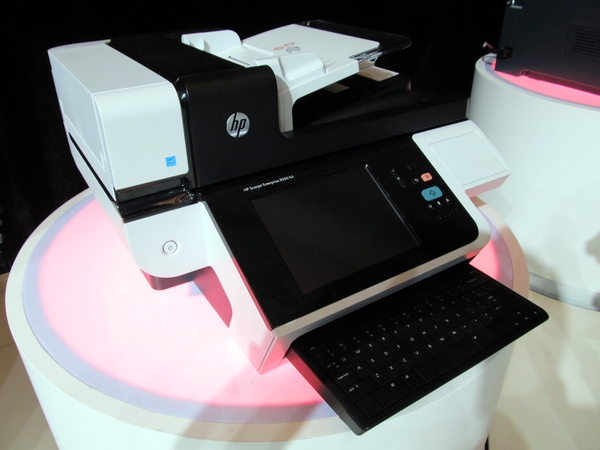
A few days ago I was flipping through the MFP Report and there was an interesting article on an HP device listed as a "Document Capture Workstation".  The MFP Report states that the HP Scanjet Enterprise 8500 fn1 was previewed at Innovation Impact in Shanghai a few months ago.

I'm all over this technology!  Many years ago I mentioned that Hi Speed Network Scanners Stations are needed in the office, but you'd have to spice them up with some additional features like:

  • Scan2email
  • Scan2folder
  • Scan2ftp
  • Scan2sharepoint
  • Ability to run third party software such as ecopy, digidoc flow, NSI, etc....
  • Network Fax
  • Cloud Fax
  • Scan2Print
  • Scan2fax

Monday, October 10, 2011

My 2nd Reason Why Managed Print Services is a Loser

My first reason for Why Managed Print Services is a loser was waste and maybe that was to broad of a reason.  Waste can come in many different forms, such as waste in energy, waste is resources, waste in consumables, waste in landfill, waste of space, and waste of time!

As the second reason, I'd like to focus on waste of energy.  Think about it, 50 lasers printers firing up everyday, heating and cooling all day long. It's gotta take it's toll on energy consumption.  For those of you who are not aware of the laser engine technology, I'll make is real simple for you. Toner is needed to make a print, in most laser printers toner is housed in the print cartridge. Toner is fine plastic resin particles. In order for the toner to adhere to the paper it must be heated and fixed.  All laser printers have a heat roller or heat belt that melts to toner.  In order to have the printer print quickly most of these devices maintain a temperature threshold.

So, lets be bold and say we have 50 laser printers firing up and staying on all day wouldn't it be smarter to have 5 work group Multifunctional Copier Devices that could support every ones printing.  

Gesh, what would it cost on energy to run let's say a certain "Q" color laser printer?

Sunday, May 15, 2011

MFP's & Cost Per Page Agreements

It's that time of year for me and my apologies!  I've been very busy trying to get my summer Collegiate baseball team ready for opening day.  We open Memorial Day Weekend and then play 30 games in 60 days.

I had an email the other day from a rep that was new to the industry.  I was asked "Can you tell me what information I can read to understand cost per copy to figure contracts for my customers for toner and service. "

The first thought that came to me is that this rep is really new and possibly there is nothing in place from management to help this rep sell. He may be the only rep, and he may be working for a small mom and pop that may be selling other things such as furniture, postage machines, shredders and office supplies.

Cost Per Page and Cost Per Copy, both mean the same.  Usually if a rep states a cost per page or a cost per copy it means that all consumables (toner, developer, drums), parts, labor and maintenance is included for that price.  Cost Per Page for multifunctional copiers (that's what we're gonna call it from here on in) for black pages can be anywhere from .004 (usually reserved for print production) all the way to .03.  Pretty much depends on the speed and volume of the unit. An average cost per page should be somewhere around .0125 for a black page. 

Since color multifunctional copiers are gaining more acceptance most dealers and direct that offer Cost Per Page Contracts have a separate charge for black like .0125 and then a separate cost for color (average color is in the are .075), again Print Production units will have the lowest Cost Per Page and the low volume Multifunctional Copiers will have the highest Cost Per Page. 

Most Dealers and Direct Branches will make you commit to an annual volume for the pages, and then bill monthly or quarterly.  The billing could be in arrears or in advance.  Overage charges apply when you've made more than your contracting volume for any month, quarter or year.

Lately, there's seems to be a growing trend to incorporate the copier lease and the Cost Per Page on the lease agreement.  What that means is that you have two charges from the leasing company one for the basic lease of the copier and then the Cost Per Page Agreement.  I'm kinda wishy washy about this, in one hand this type of agreement protects my customers from upgrades and  on the other hand my customer is contracting for all of the pages to be copied or printed upfront (there's no way of getting out of it), and then are automatic increases for the Cost Per Page built in every year.

One other side note for the newbie is that most manufactures have a wholesale Cost Per Page "fact" sheet, this information details the yields of the consumables, yield of certain parts and the estimated "meantime before failure" with that they then associate an average labor charge.  In essence the manufacturer is going you a delta at your cost and you can process from there.

In the end Cost Per Page or Cost Per Copy are two of the same.  There are hundreds of variations for cost per page agreements, make sure you read your agreement and understand your agreement.  From there you can consult with your customer for the best plan of action.

-=Good Selling=-

Tuesday, August 3, 2010

Weekend MFP Print4Pay Hotel Industry Threads 8/1/10


Hello All!

What's in it for Me?

P4P Value Page get access to all forums, rfp's, rfq's, proposals, quotes, and leads! pssst! We've now linked and uploaded leads, RFP's and RFQ's for more than 1,000 systems!

Looking for a Multifunctional Copier System?  Want to do business with the "Best of the Breed Solution Dealers and Reps", pay a visit here Print4Pay Cafe.

 We're still looking for coverage in core areas of the country, remember when you sign up for a Premium Membership you get FREE "core" leads!


Recent Blogs of Note
How managed print services (MPS) can add efficiency and streamline operations
Cloudy Horizons for Business Applications
A Managed Print Services Success Story
haha "You Wanted the Multifunctional Copier When?"
MFP Wars "Samsung Poised for MFP Blitzkrieg

Interesting P4P Forum Threads
The Savin or Lanier brand will go away on or around 3/31/11.
Ricoh A4 devices to hit market at the end of this year.
Rumor has it...(Over 3,000 page views)
Mark Pollack Joins Konica Minolta!

Most Viewed P4P Forum Threads
Whats Your Monthly Quota?
Ricoh Canada Inc. and IKON Office Solutions Inc. Officially Amalgamate as Ricoh
Yuba City schools will collate copy costs
Canon 3480i Question
MP4500 Serverless fax dilema!

New Leads, RFP's & RFQ's Uploaded!
Color Digital Copier Bid "Expires 8/20/10
Copy equipment for reprographic center.
48 month lease for (1) volume band 1B5 copier in Arkansas
48 Printer RFP in the South Expires 8/9/10
RFP for 11 copiers in Canada Expires 8/20/10
BID NOTICE THE LEHIGH COUNTY

Follow the links for FREE access to the Print4Pay Hotel Forums!

-=Good Selling=-

Enhanced by Zemanta

Thursday, January 28, 2010

Marketing Copiers and MFPs "101"


In an effort to keep adding value and solutions for our Print4Pay Hotel members. The Print4Pay Hotel is exciting to announce a NEW P4PU Webinar "Marketing arm of your Copier Company that your sales reps always wanted!"

I've had this site in a beta test for awhile now and I'm happy with how it's evolved and the amount of calls and sales I've received. I'm not gonna let the cat out of the bag right now, however give this a read through and log on to the Print4Pay to get detailed time and date for this POWERFUL Webinar!

Having been in the printer and copier sales business for years, many of the processes used by the industry do not leverage the technology available to make sales reps and copier companies as profitable as possible. Manufacturers push MPS because they want to lock in the clicks, but you have to do all of the heavy lifting. Once tracking devices, who determines whether there is a good fit. This is especially true on the printer side of the fence where there is little total gross profit per transaction making it an area of our customers which winds up costing them a lot more than necessary if we can't get them to "get rid of all those old printers."


In our webinar, I will go over several components of my sales process which I am branching out to copier dealers which has made my numbers stay level and slightly rise while the industry has taken a hit with the economic downturn. Here are some of the things I will show you.


I will show you how I use Print Asset tracking software to AUTOMATICALLY notify me when there are opportunities in the printer fleets which I am responsible for. It will also create the comparisons for me so that I can talk to customers with side by side comparisons which I don't have to produce. (Well, I have to enter in all the data, but you won't).

I will show you how I use this software to Automatically generate printer and copier supplies quotes.

I will show you how I use the web and search engine optimization to create new leads for copiers.

I will show you how I create side by side quote comparisons in less than 3 minutes which include: product photos, pdfs, basic speed, cost of toner, lease pricing, and TCO.

I will show you how you can have a simplified version of this on your site which will allow a customer to do some of this legwork and make you look like more of an expert.

I will show you how to get competitive information on over 800 printers and copiers in ONE LOCATION!

I will show you how this can work for you regardless of the brand you sell. I sell printers and copiers, I do not work for Xerox, for Lexmark, or Ricoh...

We only work with one reseller/dealer per major metro area. Chances are that if you have any (or all) of the problems I did listed above, you could benefit. Your cost will be less than $500 per month (and even lower depending on needed feature sets...) What are we? We are the Marketing arm of your company your sales reps always wanted! Why? Because I am a sales rep who built this system and continues to improve it!

Please sign up for our webinar if this looks intriguing and we'll spend an hour going over all of these features in a live setting so you can SEE how this works!

You'll need to be a member of the Print4Pay Hotel, so please click the link and register today for this awesome sales advantage webinar!

-=Good Selling=-

Wednesday, December 9, 2009

Can Ricoh, Xerox, Canon & KonicaMinolta be the next GM & Chrysler?


For those who know me, they know that when I'm traveling from appointment to appointment I never listed to the radio, or cd's.

This was not by choice, my buddy Darby (185lb dog), knocked out the SIRRUS antenna one day while getting out of the car and along with the fact that I lost the code for my regular radio, well my rides are pretty dam quiet w, except for the rambling thoughts cruising through my head all day!

Thus this came to me the other day when speaking with a fellow p4p'er in Florida. We got on the topic of A4 devices, my question was "Why have the Big Dogs like Ricoh, Xerox (Xerox/Fuji), Canon and Konica Minolta not come to market with their own A4 devices? Well, the answer I got was surprising and made sense. My fellow p4p'er stated that the Japanese are reluctant to re-tool the factories due the cost involved. There is no money made on the hardware anymore, they are relying on the consumables for profits.

Hey, I'm the guy in the field, on the streets and in the trenches, my customers love the A4 devices that we have from Sammy (Samsung), and if you haven't heard Sammy is doing very well with their A4 devices.

About a year ago Sharp launched their Frontier Series which is an A4 multifunctional device made by Sharp. Just today BLI awarded them "BLI Pick of the Year Awards" for three different models. At a recent Sharp dealer meeting it was noted that 24% of placements in 2008 were A4 devices.

So, while the chickens are roosting in the hen house at night, companies like Sammy, Sharp and Muratec (relabled Sammies) are quietly taking market share from the likes of Ricoh, Xerox (they also relabel a few Sammies), Canon and KonicaMinolta. Gesh, I would have thought by this time that the Big Dogs would have at least stepped up to the plate.

I reached out and made another call to a prominent p4p'er and got these quotes:

* Samsung certainly is doing quite well with its A4s.

* I feel like the reason Sharp is so hot for A4 is because they realize they cannot beat the big dogs at their own game (A3s) so they are looking to build share through A4 while maintaining or slowly growing A3 share. Man do they say how great A4s are every chance they have though. Not sure where this was sourced from, but at Sharp's dealer meeting they said that A4s were 24% of all MFP units in 2008 and 35% of all 31ppm+ MFP unit growth between 2005 and 2008.

* Most of Xerox metered A4s are either sourced from Samsung or most recently Konica Minolta so that's a sign that they don't want to retool and are looking externally for their A4 lines. That said, FujiXerox does make A4 engines for Lexmark and Infoprint, so they have the ability.

* Considering Canon supplies HP with all those A4 engines I would think they would expand in A4 if they wanted. They are probably limiting A4 presence for different reasons.

Ah, Canon the biggest dog of them all and why haven't they entered the market? I'm thinking they have some type of agreement with HP. WOW, we forgot about HP, here's another instance where HP is now replacing their own laser printers and others with their own A4 Multifunctional devices. Yet, all of this is one of the least talked about topics and the mass migration of A3 to A4 is happening before our eyes.

I read an article today from Channel Web, where a representative from Gartner stated "recommended customers use fewer A3-sized printers, which print at 11 x 17 inches, and adopt more A4-sized devices, which print letter-sized documents, to cut costs."

Sammy is poised to steal even more business, if you think they're satisfied with four or five A4 multifunctional devices, well you're wrong. They want to be the manufacturer of choice for dealers in the near future.

So, back to the topic, if the Big Dogs don't a make a move soon with their own A4 platforms where will they be in two years. I'm thinking they could go the way of GM and Chrysler, they've rested on their laurels and their A3's engines far too long, and instead of investing money in new factories and re-tooling, they all opted to buy market share by purchasing the likes of Savin, Oce, Global, Danka, Gestener, Ikon, Monroe, and Imagagistics. Did I miss any?

BTW, special thanx to the p4p'ers that helped me out with the additional information. If you like to be a member of the largest and fasted growing group of copier professionals in the world, then take a trip here. Print4Pay Hotel

-=Good Selling=-

Thursday, December 3, 2009

WANTED Federal Printers "Dead or Alive"


Going through my alerts last night I ran across and article from the Washington Post, the Federal Bureau of Engraving and Printing has posted WANTED Posters for desktop printers.

Get this the Bureau of Engraving is offering to Federal employees $75 gift cards for their desktop printers.

From the Washington Post Article:

"For a limited time, to incentivize you to voluntarily give up your active personal printer, BEP will share the savings with you," the flyer said. "You will receive a gift card in the amount of $75 if you turn in an active personal printer."
Get this, our government paid for these printers and now they're giving employees gift cards to relinquish them! I've got a better idea, take them away, no gift cards given, use the network printer for you prints and get up off your butt!


There is an estimated 534 printers, at $75 a pop that represents a total cost of $40,050. Atta boy Feds, way to spend our money when you could easily just take them away and tell everyone to print to the network printer or multifunctional device.

I for one applaud the fact that finally the Bureau has recognized that small convenient lasers printers have an extremely high cost per page, and the work or 10 oer 12 small printers can be done by one network printer or one multifunctional device. However, giving out $75 gift cards to relinquish something the Bureau provided the employees with is downright wrong!

Here's a few facts that most people don't realize about networked multifunctional devices:

Lower cost per page, typically multifunctional devices can have a page cost of .007 or less compared to .03 cents per page for small desktop printers

Less consumable items, most desktop laser printer utilize and AIO (All in One Cartridge), and these are thrown away after a few thousand prints, multifunctional devices use bottles or cartridges of toner which can last as much as 30,000 pages and then the container is sent back to the factory to be refilled.

Longer life span (who the heck is going to repair a $300 laser printer when the cost to have someone on-site to replace a part will cost $200 or more, fact is the printer is thrown in the trash and another is purchased. How wasteful is that?

Virtual mailboxes, users of multifunctional products now have the luxury or printer to a mailbox (space on the hard drive) and then can walk to the printer, enter their pin code and have all of the documents print while they're at the printer!

These are just a few of the features that are available on most multifunctional devices and networked printers.

My God, what's next, we'll offer employees additional gift cards to print on both sides of the paper, or give them gift cards for not printing at all and creating electronic files?

The Bureau needs to get a set of balls and tell it like it is, we're taking your printer, get up off your butt. If you don't like it, show them the door!

-=Good Selling=-

Thursday, November 12, 2009

EIS Quatra Color Wide Format MFP Saves the Day!

Another repost for ya, btw the way we're killin it with sales, now we have to keep it rolling!!
I just finished my first install on the EIS Quatra "M" series from Paradigm Imaging. This is an awesome unit! The ease of set-up and install is exceptional along with the configuration of scan, print and copy drivers!


First, we had the unit dropped shipped to the customers location, this was a great savings since the shipment did not have to come to our office first and then ship to the customer. Second, we had the unit up and running inside of one hour! There were no issues with software, hardware or print drivers (whew)! Third, the software was easy to use and was very user friendly, we took about and hour to train the customer on all of the features they needed to use. Very cool software!


For those of you not aware of the EIS Quatra "M" series, Paradigm Imaging has combined a Graphtec 36" color scanner (24 bit) with Graphtec 24" color printer and their awesome Rocket controller and Image Flow software. Customers can scan scan wide format in color or monochrome, print in color or monochrome and copy in color or monochrome, all for under $9,000! We were also able to batch print, scan and copy.


Clients looking for a wide format color scanner (24bit) can expect to see prices upwards of $14,000 for a 36" wide system. The Quatra fills the void for the price conscious buyer that still needs high end productivity and solution work flow software. If you are player in the wide format arena, I highly suggest that you get on board with these systems!


Sunday, October 11, 2009

Copier Sales "New RFP's Uploaded"


After many hours of research, we've uploaded six new RFP's (requests for propoals) for multifunctional devices or products, or whatever we are calling them these days.

One of the RFP's is for 66 units. All are due to expire in 30 days or less. You need to be a member of the Print4Pay Hotel, click the link and you'll be a member of the largest group of Copier Professionals in the World!

What is and RFP?

A request for proposal (referred to as RFP) is an invitation for suppliers, often through a bidding process, to submit a proposal on a specific commodity or service. A bidding process is one of the best methods for leveraging a company's negotiating ability and purchasing power with suppliers. The RFP process brings structure to the procurement decision and allows the risks and benefits to be identified clearly upfront.[1] The RFP purchase process is lengthier than others, so it is used only where its many advantages outweigh any disadvantages and delays caused. The added benefit of input from a broad spectrum of functional experts ensures that the solution chosen will suit the company's requirements.

The RFP may dictate to varying degrees the exact structure and format of the supplier's response. The creativity and innovation that suppliers choose to build into their proposals may be used to judge supplier proposals against each other, at the risk of failing to capture consistent information between bidders and thus hampering the decision making process. Effective RFPs typically reflect the strategy and short/long-term business objectives, providing detailed insight upon which suppliers will be able to offer a matching perspective.

Similar requests include a request for quotation and a request for information.

-=Good Selling=-

Thursday, September 17, 2009

Copier Quotes Uploaded on Print4Pay Hotel

Over the past few days I've been able to upload some new copier quotes that were emailed to me (Special thanx to those Print4Pay Hotel Members). These quotes are located in the Industry Proposals and Quotes Forum.

Xerox ColorQube 9203
Toshiba e-studio 305
Ricoh W3600 Quote
KIP 3100
XEROX 6279 WIDE FORMAT PRINT SYSTEM
Xerox 6204_KIP 3000 Bid Pricing
Wide Format Bid _KIP_OCE_XEROX
Ikon Pricing for Ricoh Bid
OCE CM4010 Color MFP
Canon C4080i Quote
Xerox 7655 Copier Printer Quote


I have also uploaded documents that I've created over the years:

P4P's "Top Ten Rules for New Reps"
Objection Sales Document
ROI Spread Sheet for Wide Format
Interesting Paper Factoids
Faith Based Sales Intro Letter

You'll need to become a member (it's FREE) for access to the Print4Pay Hotel, click on the above links and you'll be guided through the process. The Print4Pay Hotel has over 2,200 members from around the world!

-=Good Selling=-

Saturday, August 15, 2009

Monday, April 6, 2009

Copier Life Expectancy


There is a great post on this topic on the Ricoh Family Group P4P Hotel Message Boards. The question asked "Does anyone have any data on copier life expectancy?"

Here's what our members answered with:


I would say as long as they have parts available, whether new parts or from old trade ins. One of the conversations that I have with people is that unlike before, our systems now have two lives to consider.

Because our systems are now an integral part of the overall technology of a business or organization, they need to not only realize that there are both a mechanical and a functional lifespan to their system.


As I said earlier, as long as there are parts available, we can keep a copier going, however, because they are asking these systems to be a huge part of their technology they must consider when that unit ceases to be a productive part of the business. When does it functionally become a part of the problem rather than a part of the solution. Just as a business doesn't want to use 5,6 or 7 or older computers because of their becoming obsolete, do they really want a vital piece of their technology to become a drag on productivity. Just my two cents worth.
Indiana


Yes, I agree, most companies outgrow their copier. Obviously, the most important change was in connectivity. Digital technology and modular technology added to reliability and total uptime for productivity. Whereas with analog machines, they are older, cheaper and they can be rebuilt until the cows come home.
DC


Ricoh use to claim that they would guarantee parts availability for 7 years after a product was discontinued. Not sure if that still holds true but that was the standard.
USA


It is actually the law that any manufacturer must maintain parts for 7 years after the last date that the product is sold new.
Texas


What kind of law? How would that be enforced on overseas manufacturers?
DC


It appears that is a legend. I couldn't find any federal law covering that, but here are some state laws covering it...

Parts Availability Laws

Can your item be repaired? If parts are required, are they available to a servicer? In some states, the answer may be "no."

California:
7 years after date of manufacture for goods with a wholesale value of $100 or more, 3years for items valued at $50 to $99.99. This law covers functional parts only.
Connecticut:
4 years after the date of final sale.
Indiana:
7 years after the date of final sale.
Rhode Island:
4 years after final sale.
New Hampshire:
For goods valued at over $100, parts and service info for the period of time covered by the warranty.
BTW, these are enforced on overseas manufacturers because they cover any product "sold within the state".
TN


Is this site great or what? Thanks! I guess if you are an overseas manufacturer wanting to do business in every state, you would probably adopt a policy that would cover the laws of every one. No telling how much the rest of the country is paying for laws passed in the state of California. I bought a stud finder the other day. It came with instructions to wash my hands after every use because the State of California has determined that lead in the plastic may be hazardous to my health.
TX

Have a comment, would like to read more? Log on to the P4P Hotel and then register for your OEM partner.

That's just a few of the threads on the topic, in my 28 years in the field, I would have to say that we are still servicing some machines that are over 10 years old! It all depends on how long the manufacturer will keep parts on hand for. The average life span of a copier will vary greatly and is dependent upon usage, technical expertise and environment.

-=Good Selling=-

Thursday, February 26, 2009

Copiers, Laser Printers & Your Health!


I've heard about this report before and had heard all of the critics, however it seems that this is not going away. Some have referred to it's th same as inhaling "burnt toast". Well, I don't inhale burnt toast everyday, however I'm sure there are many technicians that inhale this stuff everyday.

My main concern is that if this stands to be true, what do we do with the millions upon millions of copy machines. Let's face it, the copy machines of today are nothing more than heavy duty laser printers!

Has anyone noticed and increase in copier or laser printers technicians with cardiovascular disease? Is this even tracked? Is there really a problem here?

The post below is from Osko News

"Almost every third laser printer emits a large number of ultrathin harmful particles, which have a negative effect on the cardiovascular system. This is illustrated by Australian scientists.

According to the author of the study from University of Queensland Lydia Morosku, danger comes primarily during the printing process, when the coloring of the heat comes from paper.

“This end-product of chemical reaction is comparable with the clouds of smoke or automobile exhaust gases, which are potentially hazardous to human health - stressed Morosku - Thus, by inhaling a “bouquet”, the owner of a laser printer inadvertently cause irritation of the respiratory system, which subsequently develops in cardiovascular disease “.

Professor also recommended clerical related to office equipment, keep the laser printers as far as possible from their jobs and ensure that vehicles are well ventilated. It should be remembered more than the printer is operating, the higher the concentration of harmful particles, said AMI-TASS."

-=Good Selling=- I hope!! Here's a cool Xerox file for you

Saturday, August 23, 2008

Multi-function Sales Quotes for Copiers


Have you ever tried to find a competitive quote or proposal on the Internet? I've tried too and I've had no luck at all!


However, if you visit the P4PHotel, and register to become a member you can download actual proposals, quotes and view street pricing that has been recorded for various manufacturers and models. Who knows you just may find a competitors quote whom you lost a deal too or better yet get a true handle on what they are quoting and how they are doing it.


Our members are there to help in each other, and we have dedicated message boards for Ricoh Family Group, KonicaMinolta, Kyocera and Canon. Go and see what your peers are talking about in reference to solutions and hardware. Post messages and you'll be surprised on how many members are willing to help and share information.

-=Good Selling=-

Thursday, August 21, 2008

Copier vs Printers "MFP Wars"

Picked this information up on the web the other day, would like to hear pros and cons in reference to where we are going as a whole in the indsutry.

90% of all companies do not know what they are currently spending on internal desktop and network printing. Print charges are typically underestimated by 30%-50% by ignoring charges other than the obvious hardware, maintenance, and consumable charges.


Buyers Laboratory Inc., Gartner


Quoting insight from major research companies, we've outlined the document trends that can benefit an IT or facilities manager responsible for an organization's documents.


Document Trend #1Paper use continues to rise.


Office paper use is increasing 6-8% each year1.
Paper use is expected to grow for the next 20 years1.
Paper is thought to be 30% faster and easier to read than a computer screen.


Document Trend #2Print volume is climbing.


Print volume is growing 10-15% each year. The internet, email, and intranets are big drivers.
Printing surpassed copy volume in 19953.
End-users are printing multiple originals, rather than making copies.
Color printers are bringing new documents to the network.
The number of documents created and distributed electronically — then printed at the time of need — continues to grow.


Document Trend #3


Copy and fax are becoming secondary technologies.
Copy volumes are stagnant or in decline. Long-held habits are changing.
Fax volumes are being challenged by email. Email is free and arrives "at-the-desktop".
"The heyday of the photocopier is past — the tide of history is with the printer." — Better Buys for Business


Document Trend #4


Document devices are converging.
Print, copy, fax, and scan are now common features of a single device.
Printer-centric MFP's hold advantages in five key areas4:
Network ability
Ease of use
Reliability
Print Quality
Total Cost of Ownership Document


Trend #5


Color is becoming mainstream.
Four years ago, color was $2.00/page, and very slow.
Today, color is as low as $.12/page, and up to 28ppm.
Color printers are currently the fastest growing segment of the printer business.


Document Trend #6


Output-Based solutions are the future.
In today's office, the as-needed approach to printer support is being replaced by Output-Based solutions ensuring reliable, hassle-free documents.
Research indicated that by 2005 75% of all printing would be done on a cost-per-page basis and 75% of all enterprises would outsource key technologies.
Enterprises should evaluate newer technologies — multifunction printers and new procurement options, including cost-per-page service contracts5.


1Xplor

2Dataquest

3HP

4IDC

5Gartner

Tuesday, August 12, 2008

Ricoh MPC Series "Turbo Charge Your Ricoh MFP"


How can you get the most out of your new Ricoh MP Series Multifunctional Device without breaking the bank and getting the best bang for your buck?

By adding the these three Ricoh solutions you can enjoy increased productivity, reduce paper, reduce costs and reduce down time. Along with knowing that you are doing your part to conserve resources.

The solutions that I've outlined will add less than $100 a month to the typical 5 year copier lease, and depending where your companies workflow and volumes stack up, the savings could be well over the investment.


Our first solution is to add Document Mall 3 year/1GB Solution with the MFP browser. Document Mall is a robust off-site Document Management Software SaaS (Software as a Service) that can enable your Ricoh Multifunctional Device to push documents to an off-site Document Repository. From the LCD screen of the MFP, any user can see the file folder structure and then select where the paper documents need to go. Document Mall will then organize documents by type, using indexing and full search. Document Mall can also be used as a collaboration tool, where you can work on documents together, edit documents and create markups. What I like most about Document Mall is the ease of use, along with the ability to access documents where ever there is an Internet connection. You don't have to have a degree in order to enjoy the benefits of Document Management and you don't have to have an IT infrastructure to keep the system updated and running. This package can be leased for under $60 per month.


Moving on to Embedded Print Director, all Ricoh MFP's now have the ability to embed software on a Java card, thus enabling features that can be used through the MPF's LCD display. Embedded Print Director will monitor every copy and print on Ricoh MFP's. The long and short of is that every print and copy can be tracked for charge backs and accountability. At the end of the year the system can provide a full report on what was printed, copied, identify bottlenecks, inefficiencies on the network and can help IT maintain a balanced budget for Total Cost of Ownership. A single MFP package can be leased for under $20 per month.

Monday, August 11, 2008

Ricoh MPC Series "Best of the Best"


You think I could have gotten a little more creative with the title?


Just about eighteen months ago Ricoh launched the MPC series, this series Incorporated the same engine for 5 different models and 5 different speeds. Let me tell you this was genius, from a sales persons point of view, if I knew one I knew em all. From a technical side and I do have technical back ground, these units just keep running and running and the quality is awesome from print one to 1,000,000.


What did Ricoh do right, well for one they introduced PxP toner, where the toner is chemically grown and particles are more uniform in size. Fuser oil was eliminated thus creating less user involvement, preventative maintenance was increased to 80,000 pages, support for heavy paper was added and to top it off color speeds were equal to black and white speeds!


From a sales point of view this system kicks butt because of several options that Ricoh added, such as a booklet maker to all of the systems, before this booklet makers were only available on the higher speed units. We know have heavy paper with 140lb paper through the 100 sheet by-pass and 120lb index through all of the paper drawers (this was unheard of in a Ricoh product).


Features that I like best is fax4ward to email, this really acts as a mini fax server, all inbound faxes can be routed to a folder or a single email address (what a way to save paper). The ability to store documents on the hard drive, view them in color and then print the documents from the MPC series, did I mentioned that you can also load them on the hard drive via the print driver! How about the ability to print onto 12x18 paper, thus giving customer in the AEC market place the ability to print half size CAD documents.


Above all, the reliability of this unit has been awesome in the field, not one complaint from one customer over the last 18 months and I probably have about 60 of these in the field. Whether the customer is making 1,000 or 10,000 pages a month the system does its work flawlessly.


In the near future Ricoh will be expanding this line up with an 18 & 22ppm system, thus covering a wider range of speeds and volumes. So, if you're in the Print4Pay Market, AEC (Architects Engineers Construction) or anyone who needs and awesome color unit. Go buy it, or lease it, the MPC2000, MPC2500, MPC3000, MPC3500, and MPC4500 is an awesome value that just keeps on running.


-=Good Selling-=

Sunday, August 3, 2008

Sharp Imaging "Giving Customer What They Need"


Finally...., and Kudos to Sharp Imaging!! Sharp announced on May 7th, 2008 and they will be the first Copier Manufacturer to release a full line of A4 multifunctional devices. If you don't know A4 print devices are not capable of printing or copying onto 11x17 (tabloid size paper).


I've been touting this type of machine for about two years know and feel that this launch of A4 MFP's could vault Sharp into #1 in MFP placements in the US. I checked Sharps web site and did not find any of these new devices yet.


Below are paragraphs from the press release.


New Business Workgroup A4 MFP and Printer Line:With the unveiling of a new line of A4 MFPs and printers - its largest line of multifunctional peripherals (MFPs) and printers ever - Sharp is providing A3 performance in a sleek A4 footprint, leveraging its heritage in enterprise solutions to offer features and functionality not available in any other line in this class.


The new A4 lineup, which will include 18 color and monochrome MFP and printer models in a wide range of Segment 3 and 4 speeds, leverages this proven formula. For example, the new MFPs use the same next generation multi-tasking MFP controller technology as other Sharp product offerings. In addition, all MFP models in the series will support the new 3rd generation of the Sharp OSA development platform, turning them into a gateway for document-based business communications by integrating the devices with network-based applications.


The new line boasts advanced remote access and device management capabilities. A new printer administration utility (PAU version 5.0) incorporates a Remote Front Panel feature that allows an IT administrator to remotely take control of the device’s front panel, giving them the ability to see exactly what the end user is seeing. The IT administrator can remotely change settings, show the user how to perform a function, or diagnose and often rectify problems without deploying a technician to the device. To gain enhanced levels of support, the IT administrator can also grant the service provider permission to perform this function directly from their dealership. This unique MFP capability dramatically reduces unit downtime and service expenses.


All models feature Sharp’s award-winning network security suites that can be enhanced through data security kits encrypting document data using AES (Advanced Encryption Standard) encryption and secure data erase, which overwrites the hard drive up to seven times.
Sharp has enhanced its new line with a bold new look that complements today’s office environment. Featuring a stylish, textural exterior with chrome accents, the new Sharp MFP line offers appealing aesthetics in a compact design. The new MFP models also feature brilliant Sharp displays: an 8.5 inch (diagonal) WVGA Color Touch panel with thumbnail previewing for easy in IT-oriented workflow intensive environments; each speed is also available with a 4.3 inch (diagonal) Advanced Super View (ASV) color LCD display providing easy navigation for non-workflow, price-sensitive applications. This new look will be adopted for future Sharp MFP and printer lines.


These should prove to be awesome systems with great price points for cost per page and hardware. If any has information on these systems, please send me an email art@p4photel.com


Wednesday, July 30, 2008

Selling Copy Machines "Going Green"


As a rebutal to my last blog and also to hop on the "Green" Band Wagon, I developed this for my cleints to read!


Want to Go Green!


· Eliminate your Fax Machine with a Fax Server: A fax server will eliminate the need to print faxes, which will reduce paper costs, reduce maintenance costs, and reduce toner costs along with hardware. Fax servers will also keep an digital copy of all inbound and out bound faxes (you’ll never lose another fax)

· Multifunctional Systems: These systems can print, scan, fax and copy in color for pennies and eliminate the need to have four different devices in the office. Multi-functional systems have a very low cost per page when compare to standalone fax machines, copy machines, laser or ink printers. Consider this the average laser printer and fax machine has a cost of .03 per page. Multifunctional Systems have a cost of .0125 per page. That’s a savings of over 50%! Where else can you cut your costs by over 50% these days? If you’re printing color documents on a laser printer, your savings could twice as much!

· E-copy: Easy to use software that will allow you to convert documents to pdf’s, along with the ability to markup documents (circles, arrows, lines, notes, signatures). You can even fill in text on a pdf document, along with having OCR capabilities. This software eliminates the need to print documents, add notes and re-delivery the paper document. Everything can be accomplished with out printing paper!

· Print Management Software: We all have them the inexpensive printers that we bought for a few hundred dollars. Did you know that printing in color on these devices can cost as much as 60 cents a page for ink jet and 20 cents a page for laser? Print Management software coupled with a Multifunctional System takes the guess work out of printing (which device will save me money); the software will monitor and redirect the print job the lowest cost system on your network. This inexpensive software can save thousands of dollars!
Comments are Welcome!!