Thursday, January 12, 2012

Do You Trust the Cloud

Actually the thread that was posted on the Print4Pay Hotel forums was "Can you Trust the Cloud"  which was derived from a Xerox white paper that was posted many months ago.   Below I'd like to post some snippets from the threads that we had posted.  This thread was one of the more popular threads on the forums and continues to be read and additional threads posted.

From SSG:  A good white paper from Xerox XGS.
PDF Docxgs_whitepaper_cloud_computing.pdf

From SSG:  I am learning about scanning to the cloud from any MFP via email by opening a free account at www.box.net and....

From SSG:  A real interesting concept from Lexmark https://smartsolutions.lexmark.com/ssds/
You can basically upload dozens of free.....

From TXEAGLE:  If only they would offer this on their B2B laser MFP's.

From AP:  Most of my customers do not trust the cloud, those who do already have something working.

From Constanze:  You can even scan directly and securely to the cloud from your Ricoh MFP(to Microsoft Online, Office 365 BPOS, SharePoint). Just take a look at www.udocx.com or at our....

From CASHGAP:  This pretty much sums it up...http://dilbert.com/strips/comic/2009-11-19/

Look forward, reason back. How many of us have big generators in the parking lot because we like to be in control of our own electrical uptime? Very.......

From JASONR: I totally agree, "not trusting" the cloud is an irrational fear.

From SSG:  I just watched a video from the investment website called Motley Fool. They are stating that Cloud Computing is the next big thing to invest in. http://www.fool.com/shop/newsl...rce=irbsitlnk0000141 and point out the big three .....

From ANON:  Buy an LG phone and get 50 GB of free Cloud storage on www.box.net .

http://storagenewsletter.com/n...l/lg-box-partnership

From SSG:  Is 2012 the begining of the end for File Servers as more companies move to Cloud Storage? http://storagenewsletter.com/n...-egnyte-file-servers "Forrester found that 41 percent of information workers surveyed were using.......

There's may additional replies to this thread.  According to the Xerox white paper the we're pretty much going to have to trust the cloud.  The white paper even spoke about intellegent documents that would update themselves with new content. 

Personally, I'd like to see more MFP's? Copiers have browser units in them that would allow us to use the MFP more open applications, meaning you would not have to use the "Ricoh, Xerox, Canon or KonicaMinolta" scan2cloud offerings.  You could use the solution that works best for your document workflow and one the fits your financial concerns. 

-=Good Selling=-


Wednesday, January 11, 2012

Copiers & MFP's "The Hidden Cost of Staples"

Have you recently bought a new multifunctional copier with a finisher/stapler?  If so, can you remember if the staples were included in the cost per page or not included in the cost per page. 

Very rarely have I ever seen staples included, and I never though much about the cost of staples and to tell you the truth neither did any of my customers.  I tell em staples are NOT included and they say OK!  No BIG deal right?  Heck what does a box of staples cost, I know it's cheap and you know it's cheap but how cheap are staples when you buy em at STAPLES.  A generic box of 25,000 staples will set you back a whopping $4.99.  Let's dig a little deeper, what is the actual cost per staple, well based on the yield and the cost, the price of each staple would be .0001996, let me see that's.......ah...ah well its not that much.  When we think staples we're thinking I could toss em in the garbage and it's no big loss.

Tonight was a lot like any other night and I needed to get some new information on the print4pay hotel forums for the members.  I make sure there is new information posted daily that is related to the industry. So, I decided to investigate the REAL cost of staples for copy machines.  To say the least I was amazed at the cost per staple when I did the math.

Let's take one of the BIG 4 Copier Manufacturers (Xerox, Ricoh, KonicaMinolta & Canon), and look at the cost of the more popular staple cartridges.  In this case this one particular staple cartridge will fit most of the models from 40 pages per minute to 90 pages per minute.  The cost for 5 cartridges which have a yield of 25,000 staples is $210.  So with 25,000 staples the cost per staple is a whopping .008426 per staple. Which is almost 500% higher than the cost of the staple that you buy at the Office Super Store.  That's a pretty step increase for a staple, but I'll say that most of the manufacturers present a fancy delivery system for the staple.  When using staples to make booklets the cost can be as high as almost two cents to staple the booklet.

I understand we're talking about pennies and fractions of pennies. But what about the high volume users who are stapling 10,000 booklets, did anyone tell them that cost of the staples alone would cost almost $173 per month. How about the church or school that staples 5,000 tests or bulletins or reports, was there a mention the staples would cost an additional $42 per month?   Heck, that's almost $500 a year in staples.

In addition the finisher/staplers don't come cheap. You can expect to pay anywhere from $1,000 to $6,000 per unit.  True story I was in a Municipality looking at some old equipment, in particular one copier had a finisher/stapler unit.  The cost of the finisher/stapler unit when they made the purchase was some $2,300.  Over the course of 5 years they only used the stapler 476 times (true most systems will give you a report of how often the stapler was used). In this case the it cost the Municipality  $4.83 cents to produce 476 stapled reports, and lets not forget the cost of the staple at .008. I recommended getting a new system without the stapler and keeping one nearby the system.

Something as mundane as staples, who woulda thought that the cost was so high, I guess it's the price we pay for ease of use and technology. Geessh, I'm scraping the bottom of the barrel when I have to write about staples!

-=Good Selling=-


Sunday, January 8, 2012

Weekend MFP & Copier Industry Updates

Just a few notes for everyone this week.

I wanted to put this out there for all members, if you're looking for a way to make any additional revenue for next year, please contact me.  I'm looking for a few good people to see if they would be interested in selling banner ads for the P4P Hotel.  It's a good way to pick up some extra cash and you may have some contacts that I don't have.  We can give a nice commission rate also and just think it would be a renewable income!

Take the time to set your goals for the new year, make a few that are short term and a couple of long term.  What I did last year was to super impose a picture of the number one rep in our office in a bullseye. Had it hanging up all year! I'll have all the numbers in a few days, point of the matter is that we all need to have something to drive us. For me after 32 years even I need to do this, and I'm making a point of setting my goals again for this year!

P4P Hotel's Production Print Certification Testing!  That's right now posted on P4P U Certifications & Testing are the first five tests in a total of ten tests. There will be a new test posted each month for the next five months!

Please take advantage of the sales documents, quotes, proposals, rfp's, rfq's, uploads, p4p library, downloads and all of the additional forum features that are enabled with a Premium Membership!
Please support our Advertisers by clicking their links and giving them a call! LCA Leasing Corp, Stethos USA, Jetmobile,  Polek & Polek, UDOCX, Print Audit, & Cybercon Dealer Services, sfSCAN

Recent Blogs of NoteWhy is single clicking an 11×17 on a “copier” legal?
Selling Copiers & MFP's "Add Value to You Web Site"
Selling Copiers & MFP's "3 Short Follow Up Stories"
Top Ten Copier & MFP Industry Predictions for 2012
Selling Copiers & MFPs "1 Awesome Way to Increase Profit through Knowledge"

Uploaded Pricing Proposals & QuotesX700XV Xerox
X700i Digital Color Press"Pricing on the Street"
Canon 3245i"Pricing on the Street"
KonicaMinolta bizhub423"Pricing on the Street"
Xerox WorkCentre 5150PTQ.pdf

Interesting & Most Viewed P4P Forum ThreadsCompetitive Info Xerox Workcentre 7500 Series
End of 2011 Sales Quota Poll, End of Month, End of Quarter
Both HP and Lexmark increase prices Jan 01 2012
kyocera taskalfa 3050ci - What can you tell me about it?
Big Shake Up at XEROX!!!
Awesome FREE Widget for laser printer TCO
Ricoh MP2550B Shortage from Thai Floods
Got A Situation! What would ou do? (10 responses)

Press ReleasesCanon to build new MFP/Copier factory in Thailand
ACS, A Xerox Company, Helps Iowa Modernize the Way Physicians Share Patient Information
Mergers and Acquisitions: 7 MSPs Acquired Since New Year 2012
Minuteman Press Printing of Lansing, Ill., Grows Business With Help of Ricoh Pro C651

NEW! Uploaded MFP Docs in P4P Document Library
Ricoh Full Line Sell Brochures
New Ricoh SP 5210SR A4 MFP Brochure "New 15 additional threads!"
New Ricoh MP 2352_2852_3352_Brochure
research-managed-print-service-for-government-agencies

P4P Poll QuestionsNew Color Cost Per Page Poll for 60 ppm plus
New Color Cost Per Page Poll for 30-44 ppm COLOR
New Color Cost Per Page Poll for 45 - 59 ppm COLOR

New Leads, RFP's & RFQ's Uploaded!Health Strm / Lease Color Copier
Printers/Projectors/Shredders/Plotters/Copiers
Countywide Multifunction Device Copiers/DUE DATE CHANGED TO 1/26/12/ADDENDUM
Lease of 389 copiers for.......
716 Copiers needed for.........

The Staff at the Print4Pay Hotel

Selling Copiers & MFP's "Add Value to You Web SIte"

More often your potential customers and current customers are using the web to do research long before you get a phone call.   They'll do much of the leg work on what they need or what they would like by searching google, reading blogs or going to web sites such as yours.  What's the problem with most web sites in the office equipment industry? There's no interaction for the for the potential new customer or the existing customer. Let's face it, your customer or potential customer will call you when they have questions that can't be answered by your web site, however if another site answers that question you may be losing opportunities.

Web sites need to have current information and something that they can interact with on a daily basis. There are some very nice office equipment web sites out there, and they incorporate a current blog, current press releases via feedzilla and there are those that have interactive polls along with widgets that can help a customer decide on what product would be best for them. Office equipment dealers that have web sites with these attributes will stand the best chance of having the customer call them and they are either ready to order or have some additional questions for the rep to answer.

I found a neat widget from the folks at Pahoda Imaging that will enhance your web site.  Best all of the widget is free.   You can get three different widgets that you can put on your blog and web site, these widgets will allow your customers to compare features and TCO for different manufacturers and models. 

1. Compare HP, Lexmark, and Xerox Printers
2.Compare HP, Lexmark, and Ricoh Printers
3.Compare HP, Lexmark, and Kyocera Printers

Keep in mind that these text link say printers however they also have MFP's in the links also.  What I like best is the ability have something that is quick, reliable and something that will help my customers understand that we are leaders in our market place and have the resources to educate them on the total cost of operation. I'm sure these widgets can be customized also, so you if you support Ricoh, Lexmark and Kyocera you'll be able to have a widget for that also (this may not be free).

-=Good Selling=-


Wednesday, January 4, 2012

Selling Copiers & MFP's "3 Short Follow Up Stories"

1) Just a short story for everyone today. Back in December of last year I was asked to quote on a copier for a local company. Not a big unit or sale, but a 25ppm monochrome device.

The company new and credit was extremely hard to get approved, after six weeks of trying off and on, we finally got it done. I called the customer and they didn't have the time to wait and had negotiated with another company (sort of like a sub lease).

I had stayed in touch with them and called every four months as a follow up.  Just the right thing to do, even if you lose the sale right?

Almost two years had passed and I got a call from the same company that they had kicked out the old vendor and needed another system.  Just goes to show you that you need to persevere and still make the calls because anything can happen.

Numbers two and three are posted in the Print4Pay Hotel forums, take a trip here P4P Hotel, get registered (it's free) to read the rest and collaborate with your peers.

The 3 D's represent Desire, Dedication and Determination. Desire to succeed, Dedication to your profession by being a professional sales person and not someone who slings mud at either the competition or the other sales people, Determination to be the best at your craft and to always have the zeal to learn as much as possible!!

-=Good Selling=-

Monday, January 2, 2012

Ricoh Innovates with Scan2iPhone & Scan2iPod App

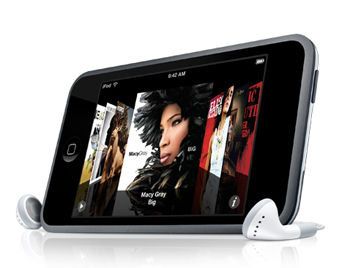
I've had an iPod touch for awhile, but never had the chance to play around with it. Over the last week or so, I've been having some fun with all of the different apps and games. I'll have to admit I love some of the games but hate the fact that they give you the opportunity to pay for additional features. Whatever, the game cost .99 cents and I think I dumped $20 bucks or so on upgrades, kinda wish I had that opportunity with PACMAN when I use to sit at the bar for hours dumping quarters into the machine.

Anyway, I downloaded the app for Ricoh Innovations for scanning documents on my iPod touch and this will also work with the iphone, not sure about the new droid phones.

So, under some not so good light at my desk I used the app to scan some pages. It's easy!!! You open the Ricoh app, take the picture and you'll then have the opportunity to deskew the document, clean the document or keep as is. When you're done you can them export to all these Google docs, email, Evernote, Dropbox, or export to your picture gallery. When exporting to everything but your picture gallery you send as a .pdf or .jpeg.

Within a minute or less I had the document in my Google docs and then sent to my email account. One of the nice features that I noticed is that once the document is sent it's not deleted, this enables you to send the document to another if needed. It kinda almost felt James Bondish, being able to take a picture of the document and have it captured and secured with one of my accounts.

The image quality is good. Keep in mind that you can tap the screen of the iPod or iPhone and you'll be able to focus and then see the AE lock on the screen.  I did not have the chance to export as a jpeg to see that quality. Keep in mind it's more for documents, sketches and stuff like that. Once I opened the doc, of course it was readable, but the quality kinda reminded me of a poor quality fax (but, I then realized that the document I captured was printed via inkjet printer and it was taken from an image from the web, thus 72dpi). I printed the document to my printer and it printed exactly what I scanned.

I'm thinking a better quality document will produce much better results and I really didn't have the time to run out to the car to get some good originals nor did I want to print from the inkjet. When I'm back in the office I'll give this a shot with some clean documents.

So, I'm thinking this is an awesome app, especially for those of us in the field. Instead of using scan2email or faxing the documents to the office. I can take a picture of them and email them or upload to my Google docs (this way I always have a copy of the documents).

It's the sizzle that sells the steak right? I'll going to incorporate this app into my presentations, and I was just thinking a neat demonstration would be to have email2print setup at the office and then just email the scanned page to the MFP's email address. That would be the sizzle!

Dam, I couldn't wait till I got to the office so I went to the car and pulled a clean original and processed through the Ricoh app. You know it did a very good job, not A1 perfect, but good enough for FREE and good enough to read and process documents!!!

-=Good Selling=-

Selling Copiers & MFPs "1 Awesome Way to Increase Profit through Knowledge"

What happens when you have no one to turn to about a specific solution on a piece of hardware? You know what I'm talking about, there always seems to a question or two that you know the exact spec or the workflow involved.

I'll give you a scenario, you were at the customers office and had a great meeting, however some additional questions came out of left field about an "xyz" solution.  You could tell the client was hot on this and if your system had the capability you would have a better chance to demo the solution, propose the solution and close the sale. To add fuel the fire the client wants the answer asap since they are making the decision within the next 24-48 hours.  Typically you'll call your manager, or someone within your organization first, and it's not uncommon that they won't be available (seems to happen all to often) or do not have the answer.  You'll then try the manufacturers dealer or direct channel rep, most times it can be a hot and miss here also especially with the recent reductions in staffing. Plus what happens when you need the answer the next day coming off a late afternoon appointment?

My golden rule is the more knowledge you have the better you chance to close additional sales and increase profit from your knowledge with hardware and solutions.

Let's face it, there are not that many guru's (docusultants) in the copier and MFP business.  These are the guys and gals that eat, sleep and breath the industry.  You could also refer to them as the "geeks" of imaging.

Back in 2003 I created a loose knit group of copier people within MSN communities,  probably eight or nine of us to start, and we grew and grew.  Today sees the Print4Pay Hotel forums as the only forum of it's kind that allows copier & mfp people to share information, discuss hardware, software solutions, comp plans, new products, price quotes, leads, new trends, new solutions along with daily threads on new products in a secure closed forum. There's a  "core" of copier and MFP guru's that help each other, with no strings attached.  There's also a handful of solution manufacturers that monitor the site and provide support through the forums.  The best part about the forums is that they are FREE. The Print4Pay Hotel has over 3,000 followers in the industry.

So, the one awesome tip is to click this link Register for the Print4Pay Hotel forums and get timely information on products and solutions that will help you add value, add profit and close sales.  Here's another link for our testimonial page. Enjoy and have an awesome New Year!

-=gOOD sELLING=-


Thursday, December 29, 2011

Top Ten Copier & MFP Industry Predictions for 2012

Whoa! What a year for the industry with the earthquake/tsunami in Japan, the floods in Thailand, the continued devaluation of the dollar vs the yen, Xerox dumps wide format, Global Imaging Systems has taken over all of the SMB business from Xerox, and major copier manufacturers finally produce their own A4 MFP systems.

Speaking of Xerox, word on the street is that Xerox may be bought (this coming from a Print4Pay Hotel Member on the forums), a recent blog stated that the dancing partners maybe HP, Dell and IBM.  You just never know in this business.  I just though about this scenario today, Dell buys Xerox and keeps ACS and then spins off the imaging division!  You never know.

Last year saw these predictions Top Ten MFP Copier Industry Predictions for 2011.  I'm not claiming to be a soothsayer, not when you get 6 out of 10 wrong, however we were right with Kodak on the verge of Bankruptcy (stock is at .65 cents), Samsung did introduce the A3 MFP in the US, it was announced in 2011 that the IKON brand will disappear in March of 2012, and Copier Manufacturers did make the move and purchased MPS related companies.

What can happen in 2012?

1.  I'll go out on a limb, Xerox will be bought by....well someone

2.  Kodak files for Bankruptcy or is bought "A picture is forever, Kodak is not"

3. Ricoh USA finally comes clean and announces that Ricoh Americas Corp has moved to Malvern, PA

4. Sharp bows out of the commercial MFP business similar to what Panasonic did three years ago, however they will still continue to market A4 devices through distributors and the web, no more dealer and direct channel.

5. Chinese Manufacturer Siene Technology introduces first MFP and looks to establish USA dealer network.

6. Toshiba Business Systems withdraws from the copier/print hardware business, instead they focus on giving the hardware away for free to capture the clicks.

7. One of the Big four Xerox, Ricoh, Canon or KonicaMinolta will buy Auxilio, who ever does takes a major leap of faith in MPS.

8. Managed Print Services......the hype continues

9. Xerox announces additional layoffs in the US

10. USA MFP Copier manufacturer sees the introduction of the first segment 5 A4 MFP.

Some of these are meant to be light hearted and have no chance of coming true, so please take some of this as entertainment and figure out what could happen and what's not going to happen.  Above all I hope you enjoyed this!

-=Good Selling=-

Daily Managed Print Service Industry Notes from Around the World!

Fifteen Trends at Managed Services Conferences: This blog offered insights from the Kaseya Connect User Conference, HTG Dallas and the Managed Print Services Conference. 7. Cloud Computing is Big Business for Small Business: This guest blog, ...go here for more

And our managed print services are helping them keep those costs under control. The other thing we're hearing about is process improvement. With Perceptive, and now Pallas Athena, we help them understand better what their processes are. ...go here for more

I’ve spoken with industry analysts, listened to co-workers and read plenty of IT prophecies form an opinion about what the New Year will bring. In my opinion, the two hottest managed services sectors entering 2012 are managed document services (MDS) and go here for more

Dec 27, 2011 Scottsdale, AZ. – MWA Intelligence, Inc. (MWAi), a leader in enterprise-class M2M (machine to machine) and M2P (machine to people) solutions and services, has been named as one of the Top Managed Print Services Organizations of 2012 by Greg Walter’s The Death of The Copier blog...read more here

-=Good Selling=-

Tuesday, December 27, 2011

10 Tips for "More Light With Less Current"

The information below was derived from a pamphlet that I found while cleaning out the attic. The pamphlet was printed in 1941 and was titled "800 Ways to Save and Serve", which was designed to help Americans with the World War II effort.

Times have changed this is for your enjoyment and nothing else.

You can reduce those electric bills by-

1. Eliminating colored bulbs. The greatly lessen the actual light you get.

2. Replacing dark shades and shade linings with light ones.

3.  Using one high wattage bulb in place of several smaller ones. A 100 watt bulb gives 50% more light than four 25 watt bulbs, yet uses the same amount of current.

4. Dust the bulbs and the linings of the lamp shades. Wipe off parchment shades, inside and out, with a damp cloth (Turn off electric before dusting).
5. Wash light bulbs occasionally, but be careful not to get the metal section wet. Dry thoroughly before replacing. Be sure electric is OFF while replacing.
6. If after washing the bulbs still look very dark, get new ones.
7. When you leave a room for more than 5 minutes, switch the light off.

8. If your rooms are due for a repainting, consider the lower electric bills you will enjoy by painting walls white or some pastel shade, thereby requiring less artificial lighting.

9. "Bargain" light bulbs are usually and extravagance. They dim quickly, but consume as much electric as good ones. Play safe by using the standard brands.
10. If you spend much time working in the basement, spare your eyes by whitewashing the walls so they reflect more light. If the joists overhead are exposed, you can increase the amount of illumination from the ceiling fixture without changing to a larger bulb. Simply nail several white painted boards or cardboards to the joists around the base of the fixture.

-=Good Selling=-

Monday, December 26, 2011

Selling Copiers & MFP's "9 Tips to Start the Year Right"

Who says you can't teach an old dog new tricks? 

Even me with 32 years in the "down the street" sales can still learn a few things.  Over the last few years I've made the effort to schedule vacation time a few days before Christmas and then the week after Christmas.  I don't go anywhere, will do a few things around the house that need attending, take some longer naps (I need em), get some of the odds and ends done that I've put off like re-registering the car. 

More importantly, I'll take this time to recharge.  Things that I like to do during my time off that will help me with next years sales.

1. Re-read a few chapters of my favorite sales books. (you've got to stay on top of your game, there's nothing new in sales, so it's always good to review and make sure you're doing all of the right things)
2. Make a list of my goals for next year.  (I'll make one or two major and then 5 or 6 minor ones).
3. Update my data base in our CRM software. Out with the crap and in with the new. (In my case, just like the old index cards, some accounts will get lost in the shuffle.  I'll take this time to make sure every account gets a call)
4. Make a list of 20 "Net New" Companies that I'd like to get as accounts. (Kinda my wish list for accounts that I'd like to get into for the new year)
5. Educate myself about what my competitors have to offer for hardware & software. (Sometimes we get so caught up with prospecting, researching, quoting and closing that we find ourselves not knowing about new products and software from the competition, I'll take a trip to their web site to review)
6. Make some follow up calls to make sure I have some January business. (There's always some loose ends that need to be taken care of)
7. Review pipeline for first quarter. (What can I say, you always need to know what you need to do to make things happen and have the business that will pay you the big bucks)
8. Relax (My most favorite, this will also include power naps, mindless entertainment, and a few good flicks)
9. Family Time (Other than relaxing I'll make sure I help the wife or the kids with something special, if it were not for them I might not have the desire, determination or dedication to be the best at what I do)

The industry has  been good to me and I'm pretty sure it's because I've always worked hard.  With out hard work and passion I probably would have wilted many years ago.  But, after 32 years there's always something new and something new to learn.

-=Good Selling=-


Thursday, December 22, 2011

Ricoh's New SP5200SR Copier MFP Review

Whoa!  It's been four days since I posted a blog, just goes to show you what the end of the month, the end of the quarter and the end of the year can do to you when you're still selling!

I'd like to put my thoughts down about the new Ricoh S5200SR series, pretty much what I like, what I don't like and some of the unknowns that I see about the new product.

Over the last 3 or 4 years I've been a big fan of A4 Copier/MFP devices. For years I couldn't fathom why major manufacturers like Xerox, Ricoh, Canon and KonicaMinolta (The Big 4) were not developing their own A4 strategy. I'm thinking the proliferation of MPS (Managed Print Service) in recent years changed the mind set of the Big 4 to enter the A4 MFP marketplace with their own home grown devices.

Ricoh SP5200 series

One of the most confusing aspects of this series is the model number, there is a laser printer version and an MFP version.  The model numbers for the laser printers are SP5200DN and SP5210DN. The SP5200DN prints at up to 47 pages per minute and the SP5210DN prints at up to 52 pages per minute.  D represents Duplex, white the N represent Network .

Here's where it gets confusing, in the MFP series we have an SP5200S, SP5210SF, and the SP5210SR.

The SP5200S prints and copies at up to 47 pages per minute and out of the box offers print/copy/color scan/store. While the SP5210SF offers out of the box configurations with print/copy/color scan/store/fax and an inner one bin tray (for fax receptions), and has a print speed of up to 52 pages per minute. 

The flagship of the series is the SP5210SR offers the same out of box configuration as the SP5210SF except that the fax is an option and the 1 bin tray is replaced with an internal 50 sheet stapler (50 pages for letter and 30 pages for legal). What ever happened to keeping it simple. When talking about the systems it's crucial to make sure  that you know the difference between the DN, S, SF & SR versions of the device.

For time being I'm gonna put the laser printers on the back burner and from here on I'll be writing about the MFP version in general.

Sunday, December 18, 2011

Ricoh USA Website in Countdown Mode to......

For the last ten days if you paid a visit to the Ricoh USA web site the main banner was replaced with a banner of a "cloaked" product and a picture of a color GUI (Graphical User Interface) that is placed on their copiers.  As of Friday or it might have been Thursday the countdown was down to 1 day left.  I'm thinking it was Thursday when the one day was left. I didn't have the time to visit the site on Friday, nor Saturday, but had the chance today to pay a visit and see what the hype was.

I'm thinking I knew what the hype was, the delayed launch of the SP5200 A4 series multifunctional products.  The SP5200 multifunctional series is much needed to compete with the Canon 1700 series.  We were suppose to see it here in the US in November.

However, I bit at the banner ad and was expecting to see something on Friday, Saturday or Sunday.  Well, the countdown banner is gone, the old banners are back up and there is no press release. Heck, maybe they'll post it on the overnight or first thing in the AM.  It's not surprising since.....

Saturday, December 17, 2011

12 Gas Saving Tips "800 Ways to Save & Serve"

Your Gas, Electric and Phone Bills

The information below was derived from a pamphlet that I found while cleaning out the attic. The pamphlet was printed in 1941 and was titled "800 Ways to Save and Serve", which was designed to help Americans with the World War II effort. Times have changed this is for your enjoyment and nothing else.
Ideas on keeping them "down to earth"

Conserve Cooking Fuel

1) Fuel is a victory essential. Conserve your bit by lowering the hear once the watter is boiling. It will remain at this tempature. Buy an oven thermometer so that the roasting and baking can be done at the most economical, recommended temparture.

2) Don't heat a whole tea kettle of water when all you need is two cups.

3) Remove sediment in your tea kettle.

4) Cook most vegetables in the smallest possible quantity of water - this saves vitamins and minerals too!

Wednesday, December 14, 2011

Digital A3 Envelope Press from Ricoh? I Think....

I've been around this business long enough to know a good thing when I see it.  My roots are in the Print4Pay market of the office equipment business.  My first introduction to the Print4Pay business was when I began selling the Minolta 450Z analog copier to print shops, advertising agencies, newspaper and basically any company that needed to reduce or enlarge a document by 1/10th of 1%. Gosh darn those where the good ole days right?

In the past few years dedicated "digital" envelope presses have emerged from the likes of Xante, Oki and a few other third party suppliers.  If you're not familiar with these devices I'll make it short and sweet, it's a tweaked OKI  Color LED (Laser Emitting Diode) print engine with A3 (up to 11x17 print) print capability.  These LED (technically not laser, but is laser quality or better, depends on who you ask) are then married with an envelope feeder attachment   and then an exit conveyor attachment.  The feeder feeds envelopes into the by-pass area of the paper feed system.  There you have it, a digital press that can produce 4 color envelopes with for consumables of about 2 cents each.

Price...., the systems are pricey, with  most models that will range from $16k-$22k per system.  You have to see a whole lotta envelopes to make up that kinda cash.  If the price was right for these systems, I'd bet dollars to doughnuts that every print shop and CRD would have one.  The fact is the price is not right and not every print shop has one or can afford to have one. 

Monday, December 12, 2011

120 Ways to Save on Food "8 Tips on Vegetables & Fruit"

The information below was derived from a pamphlet that I found while cleaning out the attic. The pamphlet was printed in 1941 and was titled "800 Ways to Save and Serve", which was designed to help Americans with the World War II effort. Times have changed this is for your enjoyment and nothing else.

VITAMINS ARE EXPENSIVE

Save those Vitamins! They're most precious part of your food and the more of them that you get inside you, the fitter you'll be for those stressful times. Here are eight common-sense rules for conserving vitamins, as recommended by the Metropolitan Life Insurance Company:

1. In cooking vegetables, raise the temperature to the boiling point as rapidly as possible. Heat may then be lowered.

2. Foods shout not be put through a sieve while still hot.

3. When cooking, use as little water as possible.

4. The water used in cooking is valuable for soups sauces, and gravies.

5. Chopped fruits and vegetables should be prepared just before serving.

6. Start cooking frozen foods while they are still frozen.

7. Frozen foods which are to be served raw should be used immediately after thawing.

8. Stirring air into foods while they are cooking cause vitamin destruction.

P.S.

read more 8 bonus tips

Copier & MFP Color Cost Per Page Poll

Over the years the Print4Pay Hotel has conducted many "secure" polls that are only available to registered members on our forums.

Just yesterday we started our Second Annual Color Cost per page poll.  Within the forums we allow our members to click the Color Cost Per Page that they are charging end users. The poll is anonymous so no one knows who clicked what cost per page and what monthly volume.  After two days we've already posted 156 page views.

It's essential that we as sales people, Dealer Owners, and the Direct Channel can get a view of what is being charged for the Color Cost Per Page.  Here you can see the average cost per page, the low cost per page and the high cost per page, plus you can match them with monthly and quarterly volumes.

In recent days 67% of our members stated that the Color Cost Per Page on a 50 page per minute color MFP doing 5,000 pages per month is below .........yup gonna have to be a member to get that information.  Membership is FREE, you just gotta put up with a weekly email of updates on the latest industry threads from our members.  Keep in mind that our forums are secure, no end users, no bs registrations. So if you can take a trip here, become a member of the worlds largest group of copier, print and mfp professionals in the work.

Here's a sample of one of our Second Annual "Color Cost Per Page Polls"

Question:
Please check your average color cost per page for 10,000 plus pages per month.

Choices:
.08
.075-.079
.070-.074
.065-.069
.060-.064
.055-.059
.050-.054
.045-.049
.040-.044
.035-.039
under .034

Question:
Please check your average color cost per page for 7,000-10,000 pages per month.

Choices:
.08
.075-.079
.070-.074
.065-.069
.060-.064
.055-.059
.050-.054
.045-.049
.040-.044
.035-.039
under .034

Question:
Please check your average color cost per page for 4,000 - 7,000 plus pages per month.

Choices:
.08
.075-.079
.070-.074
.065-.069
.060-.064
.055-.059
.050-.054
.045-.049
.040-.044
.035-.039
under .034

-=Good Selling=-

Tuesday, December 6, 2011

Daily Managed Print Service Industry Notes from Around the World!

Mission Viejo's AUXILIO Inc., a managed print services (MPS) provider for the healthcare industry, is holding an informal webinar on Friday, Dec. 8 at 8 am hosted by Modern Healthcare. ...read more here

NEWSBYTE, Dec. 6, 2011 - Lexmark International, Inc. (NYSE: LXK) has enhanced its offerings for the public sector by combining the power of Lexmark multifunction product (MFP) technology with ImageNow from Perceptive Software. To save valuable time when submitting documentation for services, the Lexmark MFP and ....read more here

Despite CEO Meg Whitman saying that 2012 would be a year of balance sheet rebuilding, HP(HPQ) announced another acquisition Monday, purchasing German software company, Hiflex Software GmbH. HP spent more than $11 billion in 2011 making ....read more here

The lawsuit was filed in US District Court for the Northern District of California on behalf of all HP LaserJet owners by David Goldblatt of New York, who recently purchased two of the printers. The lawsuit accuses HP of violating California's consumer ....read more here

Brother strengthens senior sales team with print industry veterans
Printer manufacturer Brother has expanded its sales team with the appointments of two senior managers.  Cathy Ellis (pictured) joins from Dell, where she was the UK head of its printer business for three years. She will take up the newly created position of head of sales, online partners, developing Brother’s online partner network, and ....read more here

-=Good Selling=-

Sunday, December 4, 2011

Document Capture Workstations "Is the Time Right"?

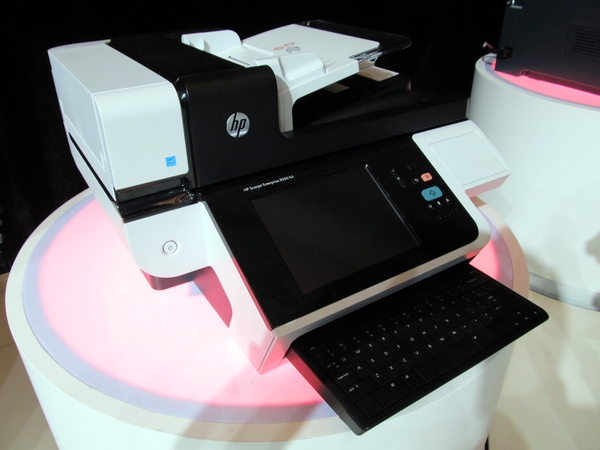
A few days ago I was flipping through the MFP Report and there was an interesting article on an HP device listed as a "Document Capture Workstation".  The MFP Report states that the HP Scanjet Enterprise 8500 fn1 was previewed at Innovation Impact in Shanghai a few months ago.

I'm all over this technology!  Many years ago I mentioned that Hi Speed Network Scanners Stations are needed in the office, but you'd have to spice them up with some additional features like:

  • Scan2email
  • Scan2folder
  • Scan2ftp
  • Scan2sharepoint
  • Ability to run third party software such as ecopy, digidoc flow, NSI, etc....
  • Network Fax
  • Cloud Fax
  • Scan2Print
  • Scan2fax

Thursday, December 1, 2011

What is Jetmobile?

Recently Jetmobile signed on as an annual supporter of the Print4Pay Hotel. I'll admit I knew little about Jetmobile and what they did until I spoke with Stoney Tuckness Director of Business Development. So without further ado, I've posted the first Print4Pay Hotel Interview with Stoney @ Jetmobile. Please go here for online demo.

Stoney what is Jetmobile?

Jetmobile is an ISO 9001 certified company with 17 years of experience developing enterprise-class software solutions for the printing industry. Jean Francois d’Estalenx established Jetmobile in 1994 in Paris but has since grown into a global company with strong representation in all 3 major regions; Americas, EMEA, APJ.  Jetmobile headquarters are located in Nampa, ID, Paris, France & Singapore.  Jetmobile is nearing 70 employees, 45 of which make up our research and development department and quality control. This reach and scope allows Jetmobile to tailor our already flexible software based on regional needs as well as offer technical and sales support 24/6 in local languages.

What type of Jetmobile products are there?

Jetmobile offers 3 major products; SecureJet, MicrDIMM, and BarDIMM. These products are sold as either OEM products from major printing manufactures or through indirect channels.

 What are the benefits of each product?

Jetmobile’s BarDIMM turns your HP LaserJet printer into a barcoding expert. BarDIMM supports over 90 barcoding formats, numerous manufacturing symbols in multiple languages, is fully scalable, and supports color.

Jetmobile’s MicrDIMM allows for ad hoc dynamic check printing including signature lines, logos, and addresses, removes the need for pre printed check stock, and minimizes security risks of pre printed checks or third party check printing services.  Our flagship product is SecureJet. SecureJet is a security, mobility and traceability solution for print devices. SecureJet is a next generation, enterprise-class, fully scalable, security, mobility, and traceability, solution. SecureJet allows customers to minimize printing cost, increase security, and prove utilizations and efficiencies as well as providing knowledge for actionable print environment optimization.